Architectural Patterns for Frontend Side Effects

TLDR:
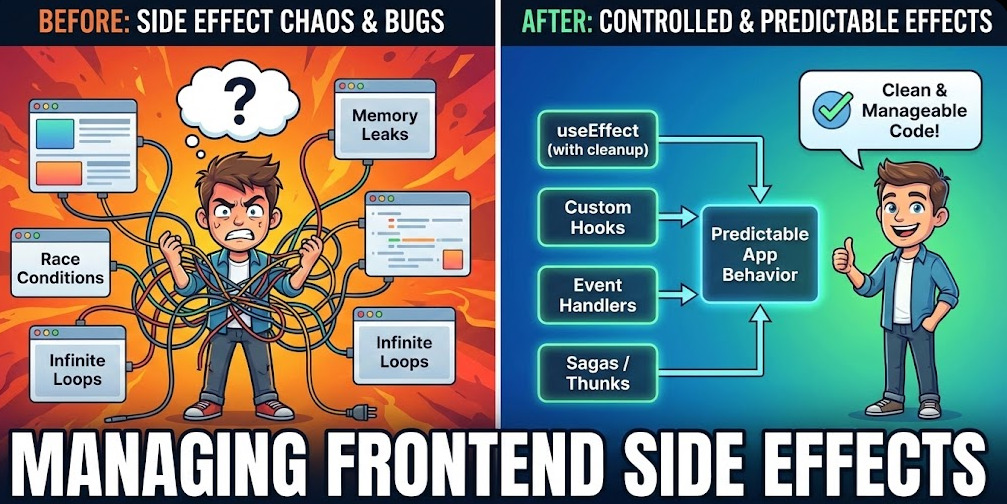
Frontend side effects—API calls, subscriptions, timers, analytics—can turn a clean UI into spaghetti without clear boundaries. This guide covers practical patterns: organizing effects with useEffect and lifecycle hooks, separating them via service layers and use cases, and scaling with Feature-Sliced Design so effects stay isolated, testable, and maintainable.
Frontend side effects are the fastest way for a clean UI layer to turn into “spaghetti code”: API calls, subscriptions, timers, analytics, and navigation logic creep into components until refactors become risky. Feature-Sliced Design (FSD) on feature-sliced.design provides a modern methodology to keep useEffect, data fetching, and state management predictable by isolating effects behind clear boundaries and public APIs. This article breaks down the most practical architectural patterns for managing effects at scale—without sacrificing developer velocity.
Table of contents
- What counts as a frontend side effect and why it matters
- Managing side effects in components with useEffect and lifecycle hooks
- Separating side effects from UI: architectural patterns that scale
- Dedicated libraries and effect systems: thunks, sagas, observables, and query layers
- Feature-Sliced Design: a robust way to organize effects in large frontend projects
- Testing side effects: from pure units to integration and contract tests
- Migration playbook: refactor effect-heavy codebases without stalling delivery
- Conclusion
What counts as a frontend side effect and why it matters
A key principle in software engineering is that pure code is easier to reason about than code that touches the outside world. In a frontend application, “outside world” isn’t only the network. A frontend side effect is any operation that:
- Produces observable interaction beyond returning a value
- Depends on time, external state, or global mutable state
- Cannot be safely re-executed without careful control (non-idempotent behavior)
In other words, side effects are where determinism ends. That’s why they are also where many production issues start: race conditions, memory leaks, duplicated requests, and inconsistent UI states.
A practical taxonomy of frontend side effects
| Effect type | Common examples | Architectural risks |
|---|---|---|
| Network & I/O | REST/GraphQL API calls, file uploads, WebSocket messages | Duplicate requests, stale responses, inconsistent cache, retry storms |
| Time & lifecycle | setTimeout, setInterval, debouncing/throttling, animations | Leaks, inconsistent cleanup, “zombie” updates after unmount |
| External integrations | analytics events, feature flags, error tracking, payments | Vendor lock-in in UI, hard-to-test code, scattered config |
This taxonomy helps because the same patterns show up repeatedly:
- Initiation: something triggers the effect (mount, user intent, state change)
- Coordination: multiple effects must be ordered or canceled (latest-wins, take-leading, debounce, retry)
- Consumption: the result updates state, cache, or UI (loading, error, success paths)
If you don’t model these explicitly, they get buried in components and become tightly coupled to rendering.
Why uncontrolled effects harm scale
Large-scale frontend development is less about picking the “best” state library and more about enforcing cohesion and low coupling:
- Coupling increases when components directly know about HTTP clients, endpoints, analytics schemas, auth headers, and retry policies.
- Cohesion decreases when a UI module mixes rendering with orchestration, caching, and error normalization.
- Onboarding slows because effect logic is spread across dozens of files with inconsistent conventions.
- Refactoring becomes scary because effect timing and dependencies are implicit.
A good architecture creates effect boundaries: places where impure work is allowed, named, and tested.
Managing side effects in components with useEffect and lifecycle hooks
For many teams, “frontend side effects” quickly becomes “useEffect everywhere.” The React hook is powerful, but it’s not an architectural pattern by itself—it’s a low-level primitive. Similar issues exist in other frameworks: Vue’s watch/onMounted, Angular’s subscriptions in components/services, Svelte’s reactive statements and lifecycle hooks.
The goal isn’t to avoid useEffect. The goal is to use it for what it’s best at: wiring UI to already-structured effect logic.
The most common useEffect failure modes
-
Effect-as-controller
The component orchestrates data fetching, retries, navigation, and analytics in one effect. This inflates responsibility and makes reuse difficult. -
Dependency chaos
Developers fight the dependency array: missing dependencies cause stale closures; too many dependencies cause request loops. -
Cleanup inconsistencies
Subscriptions and timers are created without consistent disposal, causing memory leaks and state updates after unmount. -
Races and stale data
Two requests are in-flight; the slower response overwrites the latest state. This is especially common in search boxes, filters, and typeahead flows.
Component-level patterns that scale (to a point)
Pattern 1: One effect, one reason
Keep each effect narrowly scoped and name the intent in code structure.
- One effect for subscribing/unsubscribing
- One effect for a fetch triggered by a specific key (like
userId) - One effect for analytics that reacts to a stable event
Pattern 2: Prefer event handlers over effects for user intent
If a user clicks “Save,” that’s not a lifecycle concern. Triggering side effects from event handlers is clearer and reduces dependency complexity.
Pattern 3: Use cancellation for async effects
If your effect starts async work, cancellation is part of the contract.
Typical tools include:
AbortControllerfor fetch cancellation- “latest-wins” logic for search
- library-provided cancellation (sagas, observables, query libs)
Pattern 4: Extract custom hooks only when they have a stable public API
A custom hook is not automatically “clean architecture.” If it directly calls endpoints and controls caching, you’ve merely relocated complexity. Extraction pays off when:
- the hook has a stable interface (
useUser(id)), - dependencies are injected or abstracted (API client, repository),
- side effects are testable independently of UI.
A minimal, scalable component wiring approach
A good mental model is: components should consume “capabilities,” not implement them.
- UI decides when (mount, click, input change)
- Feature logic decides how (policy, retries, caching, error mapping)
- Entities decide what data means (domain-friendly models)
That sets you up for architectural separation without forcing a full rewrite.
Separating side effects from UI: architectural patterns that scale
Once you accept that “view code should be mostly pure,” the next question is: where do side effects go?
Different methodologies answer this differently. Leading architects suggest that separation becomes reliable only when you make dependencies explicit and enforce directionality.
Classic patterns and where effects typically live
| Pattern | Typical place for side effects | Fit for modern frontend |
|---|---|---|
| MVC / MVP / MVVM | Controllers/Presenters/ViewModels orchestrate effects | Solid conceptual separation; can degrade if ViewModel becomes a “god object” |
| Atomic Design | No strong guidance; effects often remain near UI atoms/molecules | Great for UI consistency; weak for domain workflows and effect orchestration |
| Domain-Driven Design + Clean/Hexagonal | Use cases interact with ports/adapters; UI is an adapter | Strong for complex domains; requires discipline and clear boundaries |
Each approach can work. The difference is whether your structure naturally supports:
- Dependency inversion (UI depends on abstractions, not implementations)
- Public APIs (modules expose stable entry points)
- Isolation (effects can be mocked for tests)
- Composability (workflows can be reused across screens)
The “Service Layer” pattern (simple and widely adopted)
A pragmatic step beyond component effects is a service layer:
UserService.fetchUser(id)PaymentsService.createCheckout(payload)AnalyticsService.track(event)
Pros:
- Easy to introduce incrementally
- Reduces duplication of API calls
- Creates a single place for auth headers, error normalization, and retries
Cons:
- Often becomes a dumping ground
- Can drift into an anemic “utility layer” with weak domain modeling
- Encourages UI to orchestrate workflows (“call service A then B”)
The upgrade is to move from “services” to use cases (feature-oriented operations).
Use-case / Interactor pattern (workflow-focused)
Instead of “fetch X,” a use case models user intent:
ChangePassword.execute(form)ApplyCoupon.execute(code)Checkout.execute(cartId)
This is a subtle but powerful shift:
- Side effects become cohesive around a business goal
- UI becomes an invoker, not an orchestrator
- Testing becomes straightforward: mock ports, assert calls and state transitions
A helpful way to think about it:
- Entities model domain data and invariants
- Use cases coordinate effects and policies
- Adapters connect to HTTP, storage, analytics, router
- UI renders and triggers use cases
Ports and Adapters (Hexagonal) for frontend
Hexagonal architecture is often associated with backend services, but it maps well to frontend effects:
- Port: an interface like
UserRepositoryorAnalyticsPort - Adapter: implementation using fetch/axios, localStorage, or a vendor SDK
Benefits for effect-heavy frontends:
- You can test without the browser environment
- You can swap REST for GraphQL, or vendor A for vendor B
- You keep UI independent from integration details
This approach pairs naturally with methodologies that emphasize modular boundaries and public API surfaces—exactly where Feature-Sliced Design shines.
Dedicated libraries and effect systems: thunks, sagas, observables, and query layers
At a certain scale, patterns aren’t enough—you need tooling to model concurrency, caching, retries, and invalidation. This is where dedicated libraries become valuable. The trick is choosing tools that reduce coupling rather than introducing a second architecture accidentally.
Common categories of side-effect tooling
1) Thunks and imperative async actions
Examples: Redux Thunk, async actions in Zustand, plain async functions in a store.
Pros:
- Minimal conceptual overhead
- Good for straightforward API calls and form submissions
- Easy incremental adoption
Trade-offs:
- Complex workflows become nested and hard to cancel
- Concurrency rules are ad hoc (latest-wins, take-leading, debounce)
- Testing can become mock-heavy if side effects aren’t isolated
2) Sagas and orchestration layers
Examples: Redux Saga, effect middleware patterns.
Pros:
- Strong coordination: cancellation, race, takeLatest, throttling
- Clear separation between “dispatch intent” and “perform effects”
- Good for long-running flows (websocket channels, background sync)
Trade-offs:
- More abstraction and learning cost
- Can create a parallel “app inside the app” if boundaries aren’t enforced
- Requires disciplined naming and slice ownership
3) Observables and reactive streams
Examples: RxJS with Redux Observable, framework-level streams.
Pros:
- Excellent for event streams: autocomplete, websockets, sensors
- Composable operators for debounce, retry, buffering
- Naturally models concurrency
Trade-offs:
- High conceptual overhead for teams unfamiliar with reactive programming
- Debugging can be challenging without good tooling and conventions
4) Query layers for data fetching and caching
Examples: RTK Query, TanStack Query (React Query), SWR, Apollo Client.
Pros:
- Standardizes server state: caching, refetching, invalidation
- Removes boilerplate for loading/error states
- Encourages consistent API boundaries and normalized error handling
Trade-offs:
- Works best when you distinguish server state vs client state
- Complex workflows still need orchestration (checkout, multi-step wizards)
- Cache invalidation needs clear ownership rules
Decision matrix: which tool fits which effect profile?
| Approach | Best for | Watch-outs |
|---|---|---|
| Query layer (RTK Query / React Query / SWR) | data fetching, caching, pagination, background refetch | unclear cache ownership, mixed concerns with domain workflows |
| Saga / orchestration middleware | long workflows, cancellation, websockets, background sync | “shadow architecture” if boundaries are not aligned with modules |
| Thunks / simple async actions | small to medium apps, straightforward API calls | scaling coordination, ad hoc retries, business logic in UI |
A practical rule:
- Use a query layer for read-heavy server state and caching.
- Use orchestration (sagas/observables/state machines) for workflows and concurrency.
- Use simple async actions for isolated operations with clear ownership.
Side effects still need architecture
Libraries provide primitives, not structure. If your app has no clear boundaries, a query layer might still lead to:
- endpoint usage scattered across components
- inconsistent invalidation patterns
- coupling between UI and transport details
Architecture determines where these tools live, how they’re exposed, and how teams collaborate safely.
Feature-Sliced Design: a robust way to organize effects in large frontend projects
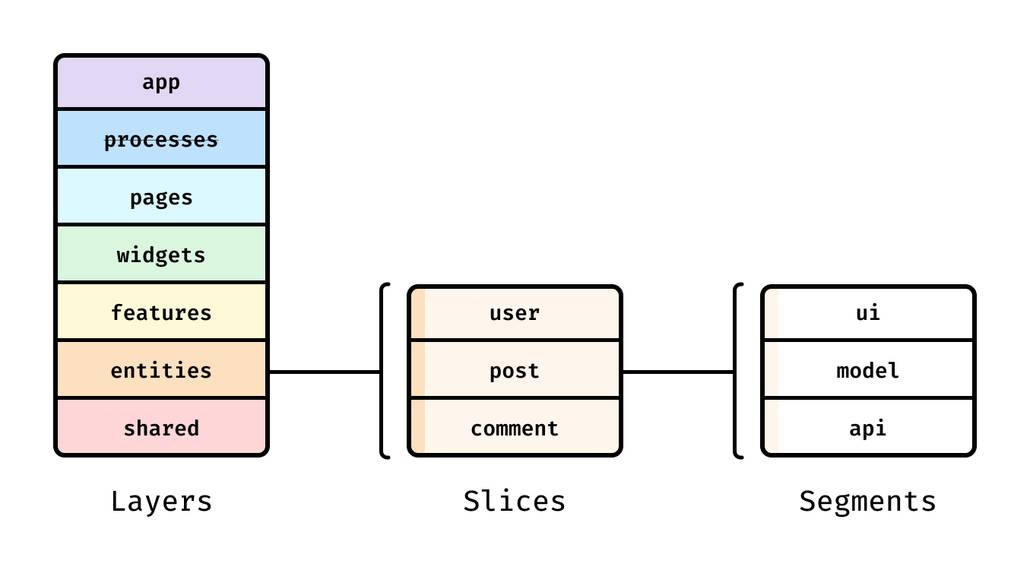
Feature-Sliced Design (FSD) is a methodology for structuring frontend codebases around business capabilities and explicit boundaries. It is especially effective for frontend side effects because it encourages:
- high cohesion inside slices (effects belong to a feature/entity)
- low coupling between slices (access through public APIs)
- clear ownership (who owns a query, a subscription, a workflow)
- predictable dependency direction (from higher layers to lower layers)
As demonstrated by projects using FSD, teams often report smoother onboarding and safer refactors because responsibilities are discoverable by structure, not tribal knowledge.
The core idea: effects belong to a slice, not to a component
Instead of “this page fetches data,” FSD pushes you toward:
- Entities own domain-centric data access and models
- Features own user actions and workflows
- Widgets/Pages compose and render, with minimal orchestration
- Shared provides reusable infrastructure (HTTP client, date utils, UI kit)
A simple dependency flow you can enforce:
Pages/Widgets → Features → Entities → Shared
App → (config/providers) → everything else via public APIs
This makes side-effect placement a design decision, not an accident.
Where different kinds of effects live in FSD
Shared layer: cross-cutting infrastructure
Great for:
- base HTTP client configuration (headers, auth, retries, interceptors)
- request/response normalization
- storage adapters (localStorage wrapper with versioning)
- analytics adapter abstractions
- low-level utilities (debounce, scheduler)
Key benefit: you prevent “HTTP details in UI” and align integrations behind stable adapters.
Entities layer: domain data and rules
Great for:
- domain models and types
- repositories and API modules for domain resources (
User,Order,Invoice) - server state queries and mutations with clear ownership
- mapping backend DTOs into domain-friendly structures
This is where many teams place RTK Query endpoints or query keys for React Query—because it keeps “what is a User fetch?” in one place.
Features layer: user intent and workflows
Great for:
- multi-step interactions (checkout, apply coupon, change password)
- orchestration: “call A then B,” conditional flows, compensation actions
- concurrency rules: takeLatest for search, debounce for input
- coordinated cache invalidation tied to a user action
This is where sagas/observables/state machines often belong—because workflows are feature-owned.
Widgets/Pages: composition and UI wiring
Great for:
- composing features/entities into screens
- minimal glue code: passing IDs, wiring callbacks
- UI-only concerns: layout, routing params, rendering states
Avoid: placing retries, endpoint details, or vendor SDK calls here. Keep pages predictable and refactor-friendly.
A tangible slice structure for effects
A common, scalable convention is to separate concerns inside a slice:
ui— components, view state, bindingsmodel— state, events, reducers, selectors, business rulesapi— requests, endpoints, adapterslib— internal utilities (slice-private)index— public API (what other slices are allowed to import)
In FSD terms, public API is not optional ceremony. It’s a tool for controlling coupling.
Instead of importing deep paths like:
features/checkout/model/saga
you expose a stable entry point:
features/checkout
That enables refactors inside the feature without breaking consumers.
Example: moving API calls out of useEffect into a feature boundary
A common anti-pattern:
- Page reads route params
- Component runs
useEffect - Effect calls
fetch('/api/...')directly - Component maps response into UI state
- Another component duplicates similar logic
An FSD-aligned approach:
-
Entity owns data access
entities/user/apidefines how user data is fetched and normalized.- Transport details (REST vs GraphQL) stay here.
-
Feature owns the user intent
features/profile-edit/modelcoordinates the “update profile” workflow.- It handles optimistic updates, invalidation, and error mapping.
-
Page composes
- page imports
ProfileEditFormfrom the feature’s public API - page provides
userIdfrom routing and renders the UI
- page imports
The component may still use useEffect, but now it’s wiring:
- “When
userIdchanges, call a stable feature capability.” - “Render based on feature state / query state.”
This creates a clean separation: UI triggers intent; feature/entity performs effects.
A small “diagram” of effect isolation in FSD
Think of effect boundaries like a pipeline:
UI event (click / mount)
→ Feature action (use case / command)
→ Entity data access (repository / query)
→ Shared adapter (HTTP client / storage / analytics)
→ External world (API / browser / vendor SDK)
→ Back through the same layers with normalized results
Benefits:
- Modularity: changes in transport don’t ripple into UI
- Consistency: retries, error handling, and cancellation are centralized
- Testability: you can mock adapters at the boundary and test workflows deterministically
- Team autonomy: different squads can own different features with minimal merge conflict
FSD compared to other structuring methodologies
| Methodology | What it optimizes for | Side-effect story in practice |
|---|---|---|
| MVC/MVP/MVVM | separation of view and presentation logic | good separation, but lacks standardized module ownership for effects in large teams |
| Atomic Design | scalable UI component taxonomy | strong UI reuse, but effect ownership often remains undefined and leaks into UI layer |
| Feature-Sliced Design | domain and feature boundaries with public APIs | clear placement and ownership for effects; promotes isolation, cohesion, and incremental refactoring |
FSD doesn’t force a single stack. You can combine it with Redux, RTK Query, React Query, sagas, observables, or other state solutions. The methodology focuses on structure—which is what makes side-effect strategies consistent across teams.
Testing side effects: from pure units to integration and contract tests
Side effects become easy to test when you treat them as boundary-driven modules. The goal is to test behavior while minimizing flakiness and reliance on real networks or timers.
The testing strategy: isolate effects, then choose the right test level
A balanced approach:
-
Unit tests for pure logic
- reducers/selectors
- domain calculations
- mapping from DTO → domain model
These are fast and deterministic.
-
Unit tests for workflows with mocked ports
- feature use cases (e.g., “apply coupon”)
- concurrency policies (latest-wins, retries)
Mock the repository/adapter and assert: calls, state transitions, error mapping.
-
Integration tests for network behavior using request mocking
Tools like service worker-based mocking help you test data fetching and caching without real backend instability. This is ideal for verifying:- pagination, retries, 401 refresh flows
- cache invalidation behavior
- error boundary presentation
-
End-to-end tests for critical journeys
Keep E2E focused on a small set of top-value flows: login, checkout, onboarding, payments. Architecture reduces the number of E2E tests needed because most behavior is verified at lower levels.
Techniques that make effect tests robust
Control time deliberately
When testing timers, debouncing, retries, and polling, make time explicit:
- use fake timers when possible
- avoid “sleep” style tests
- assert that cleanup happens (interval cleared, subscription disposed)
Model cancellation as part of the contract
For data fetching and subscriptions:
- verify that abort/cancel is called on unmount or key change
- verify “latest response wins” behavior in search/filter experiences
Normalize errors early
A huge testing win is an error model that’s consistent:
- map transport errors (HTTP, timeouts) into domain-friendly errors
- test UI against domain errors, not raw network shapes
- keep error normalization in
shared/apior entity adapters
Prefer dependency injection at the boundary
Even light-weight injection (passing an adapter into a use case) gives you:
- deterministic unit tests
- the ability to swap implementations (mock vs real)
- fewer brittle component-level mocks
In effect-heavy systems, architecture is what prevents tests from turning into an elaborate mocking framework.
Migration playbook: refactor effect-heavy codebases without stalling delivery
Many teams can’t “stop the world” to rewrite architecture. The good news is that side effects can be improved incrementally because they naturally cluster around integrations and workflows.
Step-by-step migration that keeps shipping
-
Inventory effects and identify hotspots
Look for:- repeated API calls across components
- inconsistent error/loading handling
- timers/subscriptions without cleanup
- scattered analytics calls
-
Create a
sharedadapter layer first
Centralize the fundamentals:- HTTP client configuration and error normalization
- auth token handling
- logging/analytics adapter wrapper
Even if UI still triggers calls, you reduce duplication immediately.
-
Move data fetching into entity modules
Pick a single domain area (e.g.,User,Order) and consolidate endpoints and mapping.
This improves cohesion and prepares for a query layer. -
Extract one workflow into a feature
Choose a business-critical action: “apply coupon,” “upload avatar,” “checkout.”
Put orchestration into featuremodel, keep UI in featureui. -
Introduce public APIs and enforce import rules
Replace deep imports withindexexports.
Add lint rules or CI checks to prevent cross-slice leakage. -
Keep pages thin and compositional
Pages become stable once they mostly assemble features and widgets.
This makes routing refactors safer and improves onboarding.
Metrics that show progress (and motivate teams)
Even without “perfect” measurement, a few signals are valuable:
- Fewer components containing direct fetch/axios calls
- Reduced duplication of endpoint strings and request shapes
- More consistent loading/error UI across screens
- Increased unit-test coverage of workflows (feature model)
- Faster onboarding: new developers can find “where effects live” quickly
This is a long-term investment. The payoff is sustained development speed, safer refactors, and a structure that supports multiple teams.
Conclusion
Frontend side effects are inevitable, but they don’t have to be chaotic. The most reliable approach is to make effects explicit, isolate them behind boundaries, and keep UI components focused on rendering and user interaction. Component hooks like useEffect are useful for wiring, but scalable systems benefit from dedicated patterns—service layers, use cases, ports/adapters—and sometimes specialized tools like RTK Query or orchestration middleware. Feature-Sliced Design reinforces these ideas with clear slice ownership, public APIs, and a dependency structure that improves cohesion and reduces coupling over time. Adopting a structured architecture like FSD is a practical, long-term investment in code quality and team productivity.
Ready to build scalable and maintainable frontend projects? Dive into the official Feature-Sliced Design Documentation to get started.
Have questions or want to share your experience? Visit the Feature-Sliced Design homepage to join the community.