Jotai: The Power of Minimalist State Design

TLDR:
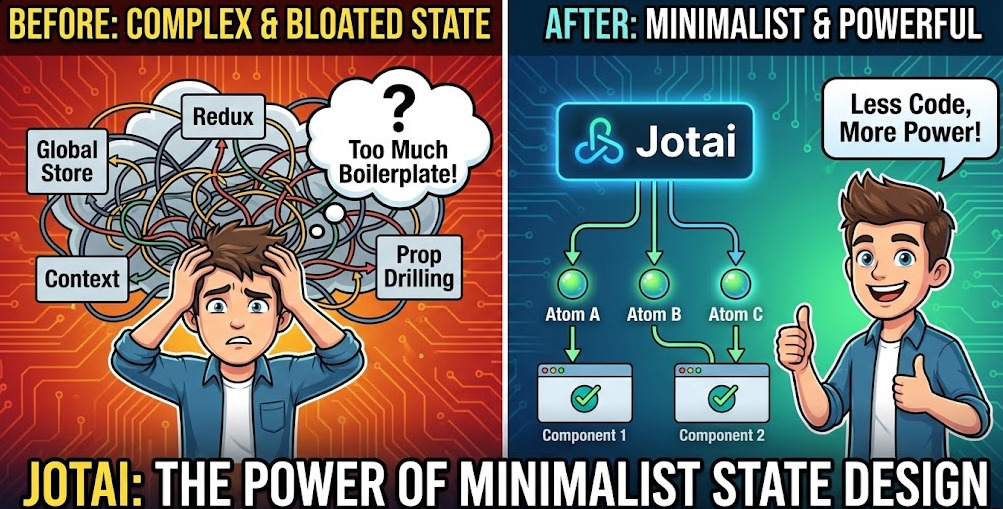
Jotai brings state management back to fundamentals: tiny atoms you can compose into a reliable dependency graph, without committing to a heavyweight global store. This article walks through atoms, derived and action patterns, async and SSR considerations, and shows how Feature-Sliced Design helps keep atomic state modular, testable, and scalable in large frontend codebases.
Jotai makes state management feel like useState again by letting you compose tiny atoms instead of feeding a monolithic store. When teams scale, though, atomic state can still devolve into hidden coupling—unless your codebase has clear boundaries, like Feature-Sliced Design (FSD) on feature-sliced.design. This guide shows how to build atomic state graphs, handle async, and keep a minimalist state library maintainable as a practical Recoil alternative.
Getting started with atoms: a 10-minute mental model and tutorial
The fastest way to “get” Jotai is to treat an atom as a definition of state, not the state itself. The docs describe runtime state as a mapping from atom configs to values (conceptually, a WeakMap), and useAtom as the hook that materializes and subscribes to those values.
Step 1 — Install and create your first primitive atom
Install:
npm install jotai
Create a primitive atom:
// src/shared/model/atoms/counter.ts
import { atom } from "jotai"
export const countAtom = atom(0)
Use it in React (it returns [value, setValue] like useState).
// src/pages/counter/ui/CounterPage.tsx
import { useAtom } from "jotai"
import { countAtom } from "@/shared/model/atoms/counter"

export function CounterPage() {
  const [count, setCount] = useAtom(countAtom)
  return (
    <div>
      <p>Count: {count}</p>
      <button onClick={() => setCount(count + 1)}>+1</button>
    </div>
  )
}
A subtle but important detail: setValue passes a single argument to the atom’s write function; for primitive atoms with the default write, that argument becomes the new value.
Step 2 — Derived atoms: computed state without a “selector layer”
Derived atoms are atoms with a read function. The core API supports read-only, read-write, and write-only atoms.
// src/shared/model/atoms/derived.ts
import { atom } from "jotai"
import { countAtom } from "./counter"
export const doubledAtom = atom((get) => get(countAtom) * 2)
In UI:
const [doubled] = useAtom(doubledAtom)
The architectural win is that derived state becomes a node in a dependency graph, not “computed in components”. Jotai’s comparison guide describes this bottom-up atomic model (inspired by Recoil) and notes that it can avoid the need for memoization because renders are optimized by atom dependency.
Step 3 — Write-only atoms: actions without reducers
Write-only atoms are perfect for “commands” (increment, submit, invalidate, logout). Jotai’s composing guide calls these action atoms and highlights that they keep things atomic and friendly to lazy loading.
// src/shared/model/atoms/counter-actions.ts
import { atom } from "jotai"
import { countAtom } from "./counter"
export const incAtom = atom(null, (_get, set) => {
  set(countAtom, (prev) => prev + 1)
})
Usage:
import { useSetAtom } from "jotai"
import { incAtom } from "@/shared/model/atoms/counter-actions"
function IncButton() {
  const inc = useSetAtom(incAtom)
  return <button onClick={() => inc()}>+1</button>
}
This style separates reads from writes, improving cohesion: buttons don’t become data consumers, and data displays don’t acquire mutation powers by accident.
Step 4 — Avoid the “atom created in render” trap
A key principle in software engineering is stable identity. Jotai’s docs warn that referential equality matters: creating atoms inside render can cause infinite loops; define atoms outside or memoize them.
const stableAtom = atom(0)
function Good() {
  const [value] = useAtom(stableAtom)
  return <span>{value}</span>
}
function AlsoGood() {
  const derived = useMemo(() => atom((get) => get(stableAtom) * 2), [])
  const [value] = useAtom(derived)
  return <span>{value}</span>
}
If you want one operational guideline: atom configs are immutable definitions—don’t generate new definitions every render.
Why atomic state management matters in large codebases
Teams don’t accumulate technical debt because “state exists”. They accumulate it because state becomes entangled. Atomic state management is a helpful default because it makes entanglement visible as imports and dependency edges.
Coupling and cohesion: what the atomic model changes
A single store is convenient, but it centralizes dependency. Over time you get:
- High coupling: unrelated features share the same schema and update paths.
- Low cohesion: domain rules are scattered across reducers, effects, and UI.
- Hidden ownership: nobody knows what “owns” a field in a global object.
- Fear-driven refactors: changes ripple, so teams stop cleaning up.
Atomic state flips the default. You start with small state units that are easy to own, then deliberately compose them into bigger behavior.
React Context rerenders vs atom-level subscriptions
Jotai’s homepage highlights that atom dependency tracking can reduce extra rerenders seen with coarse React context updates, and that it can reduce reliance on memoization.
For architects, the value is predictability:
- when a component rerenders, it’s usually because a specific atom changed,
- state dependencies are explicit (
import { xAtom } from ...), - performance work becomes a matter of reshaping atoms, not sprinkling
memo.
Minimalism that scales: small core, optional power
Jotai’s documentation emphasizes a minimal core API and a small core footprint (“Minimal core API (2kb)”).
Minimalism is also an organizational tool. It reduces “API surface drift” across teams and encourages composition over framework-specific conventions. It also aligns nicely with the minimalist ethos of libraries like Zustand—even when you don’t adopt Zustand itself.
Understanding Jotai’s store model and API surface
To design with Jotai (not just use it), you need a clear picture of what lives where.
Atom configs don’t hold values; stores do
The atom function creates an atom config. The docs explicitly note that atom configs don’t hold values; atom values live in a store.
That single fact explains several “advanced” behaviors:
- multiple stores can hold different values for the same atom configs,
- values can be garbage-collected when no longer referenced,
- Providers can isolate state per subtree,
- tests can run with isolated stores.
Provider is optional… until you care about lifetime
Provider supplies a store to a subtree. Without it, Jotai uses a default store (“provider-less mode”). The Provider docs list three concrete reasons to use Providers: separate state per subtree, accept initial values, and clear atoms by remounting.
In SSR, provider-less mode becomes risky. Jotai’s Next.js guide warns that the implicit global store can be shared across requests, leading to bugs and security risks; the safe pattern is a Provider scoped to the lifetime of a request.
A store interface you can reason about
Jotai’s store interface exposes get, set, and sub (subscribe), and can be created with createStore and passed into Provider.
This is valuable for system design:
- integrate with non-React code paths,
- test state transitions deterministically,
- build adapter layers without coupling business logic to UI details.
Utility building blocks: families, selection, reset
Jotai keeps the core small, and ships additional utilities in jotai/utils. Three utilities are especially relevant in large apps:
atomFamilycreates parameterized atoms with caching semantics; it’s “a cache of atoms,” and cleanup is your responsibility.selectAtomstabilizes derived projections using an equality function.- Resettable patterns like
atomWithDefaulthelp when “default comes from other atoms” but you still need a reset mechanism.
Advanced recipes you can ship to production
The difference between a demo and a scalable system is how you handle invariants, async, lifecycle, and integration boundaries.
Recipe 1 — Express domain invariants with derived graphs
Imagine an e-commerce cart with invariants:
- quantity can’t go below 1,
- coupon applies only above a threshold,
- totals must be consistent across UI.
With derived atoms, you encode invariants centrally:
// entities/cart/model/cart.atoms.ts
export const lineItemsAtom = atom<CartLineItem[]>([])
export const couponAtom = atom<Coupon | null>(null)
export const subtotalAtom = atom((get) =>
  get(lineItemsAtom).reduce((sum, li) => sum + li.price * li.qty, 0)
)
export const discountAtom = atom((get) => {
  const coupon = get(couponAtom)
  const subtotal = get(subtotalAtom)
  if (!coupon) return 0
  if (subtotal < coupon.minSubtotal) return 0
  return Math.min(coupon.maxDiscount, subtotal * coupon.percent)
})
export const totalAtom = atom((get) => get(subtotalAtom) - get(discountAtom))
UI reads totalAtom and stays simple. You get stronger cohesion because rules live in one place, not scattered in effects.
Recipe 2 — Async atoms: Suspense boundaries or explicit loadable
Jotai supports async reads and writes in atoms. There are two good production modes.
Mode A: Suspense-first
The async guide says to use async atoms you wrap with <Suspense>, and if you have a <Provider>, you should place at least one <Suspense> inside it to avoid an endless render loop.
Mode B: loadable-first
If you want explicit control, Jotai provides loadable, which returns one of three states: loading, hasData, hasError.
TypeScript tip: if an atom can hold a promise, type it accordingly. The async guide notes that atom(0) infers number and won’t accept Promise<number> later; use something like atom<number | Promise<number>>(0) when needed.
Async derivation tip: in Jotai v2, async atoms are “just normal atoms with promise values”, and derived atoms that depend on async atoms often need await get(asyncAtom) (or .then) in their read functions.
Recipe 3 — Persistence with atomWithStorage (and a boundary mindset)
atomWithStorage persists atom state to localStorage/sessionStorage (or AsyncStorage on React Native).
// shared/model/preferences.ts
import { atomWithStorage } from "jotai/utils"
export const themeAtom = atomWithStorage<"light" | "dark">("theme", "dark")
Two boundary rules keep this maintainable:
- don’t export storage keys widely; export capabilities (e.g.,
setThemeAtom), - keep persistence close to the feature/entity that owns the preference.
Recipe 4 — SSR + Next.js: Provider-per-request and hydration with useHydrateAtoms
For SSR, the Next.js guide warns that provider-less mode uses an implicit global store that can be shared across requests; use a Provider to scope the store per request.
To hydrate server-fetched values into atoms, Jotai provides useHydrateAtoms. The SSR docs describe it as primarily for SSR apps like Next.js; the hook is used client-side (often behind a 'use client' boundary).
Hydration is a one-time initialization; discussions note it tracks which atoms have been hydrated to avoid re-hydrating. Design routing/state so that “new page data” corresponds to new atoms or explicit resets.
Recipe 5 — Integrations: when you need state outside React
Jotai’s extension ecosystem makes integrations explicit instead of ad-hoc.
- Zustand sync: Jotai provides a Zustand extension to sync atoms with a Zustand store.
- React Query atoms: the Query extension supports SSR patterns like hydration/initialData.
An architecture tip: keep integration atoms behind a slice boundary (Shared lib, App providers, or a dedicated Feature), so the rest of the codebase stays pure and testable.
Jotai vs Recoil vs Zustand: choosing trade-offs deliberately
Choosing between Jotai, Recoil, and Zustand is mostly choosing a mental model and a boundary strategy.
Jotai’s docs position it as a bottom-up atomic model inspired by Recoil. The maintainer’s early comparison describes Zustand as a more Redux-like external store, and Jotai as close to Recoil.
| Library | Mental model | Best fit |
|---|---|---|
| Jotai | Bottom-up graph of atoms inside the React tree | Feature-heavy apps where you want local state to scale into shared state without a central schema |
| Recoil | Atomic graph with a selector ecosystem | Apps that benefit from a more opinionated atomic stack and selector patterns |
| Zustand | External store (often one object) + selectors | Apps needing state outside React, or teams wanting a minimal “single store” mental model |
A pragmatic decision process for tech leads:
- If your main pain is spaghetti global state, Jotai’s atom graph helps—but only if you enforce boundaries.
- If your main pain is cross-environment state (non-React consumers), Zustand’s external store model can be a strong fit.
- If your main pain is complex derived graphs, both Jotai and Recoil can work; prefer the ecosystem and ergonomics your team can standardize on.
Feature-Sliced Design + Jotai: minimalist state, maximal scalability
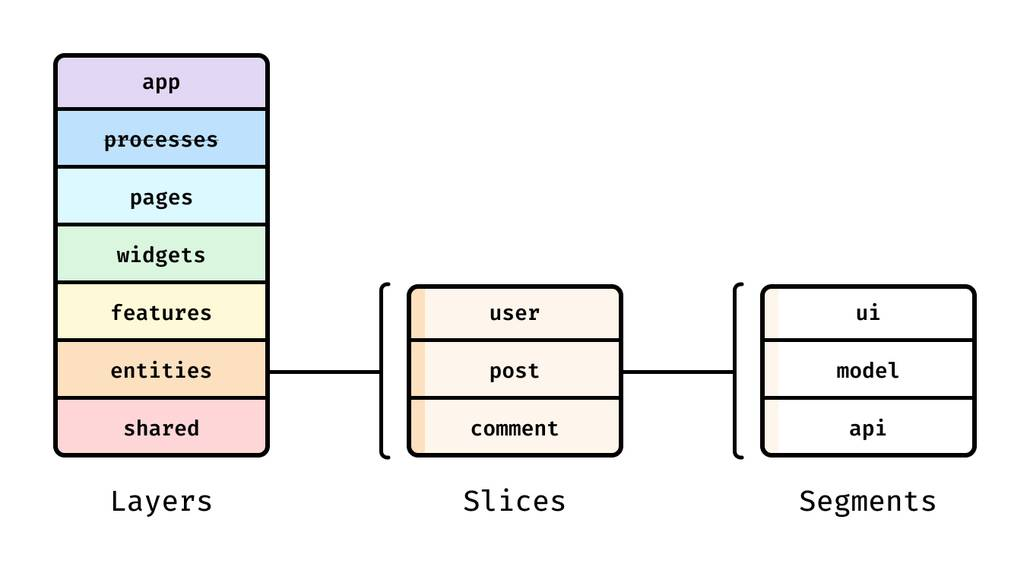
Feature-Sliced Design is a methodology built on layers, slices, segments, and public APIs. Layers separate code by responsibility and dependency direction, and the official docs enumerate the seven layers (App, Processes—deprecated, Pages, Widgets, Features, Entities, Shared).
Public APIs are contracts and gates, typically implemented as index files with explicit exports; they protect consumers from internal refactors and reduce accidental coupling.
How common UI architecture approaches compare
UI architecture often breaks when features cross-import freely and “shared” becomes a dumping ground. FSD is designed to make boundaries explicit and enforceable.
| Approach | What it optimizes | Where it tends to break |
|---|---|---|
| MVC / MVP | Separation by technical roles | “Model” becomes a catch-all; domain and UI still cross-import |
| Atomic Design | Consistent UI composition | Great for design systems, weaker for business ownership and state boundaries |
| DDD (frontend) | Domain language and bounded contexts | Powerful, but often lacks a concrete folder/interface convention for UI composition |
| Feature-Sliced Design | Business-driven modularity with dependency rules | Requires discipline: public APIs and dependency rules must be enforced |
Where atoms belong in FSD layers
A repeatable rule: state lives as low as possible, behavior lives where it’s triggered, and everything is consumed through public APIs.
| FSD layer | Typical state | Public API guideline |
|---|---|---|
| Entities | Domain state and invariants (user, cart, order) | Export atoms and action atoms that represent domain capabilities, not storage details |
| Features | Use-case state (login flow, apply coupon) | Export feature actions + UI entrypoints; keep internal atoms private |
| Widgets / Pages | Composition glue and page-scoped UI state | Prefer composing from Features/Entities; export only UI entrypoints |
This reduces coupling because Features don’t need to reach into other Features. It also aligns with the FSD warning that cross-imports (imports between slices in the same layer) are a code smell and should be deliberate.
A diagram to draw on a whiteboard
Explain it as two overlays:
- FSD layers as vertical bands:
shared → entities → features → widgets/pages → app. - Jotai atoms as a dependency graph: edges flow “up” from domain atoms to use-case atoms to page composition.
Annotate the rule: edges can cross layers only through public APIs. This keeps coupling visible and makes refactoring predictable: change internals, keep exports stable.
A concrete structure: Cart domain with Jotai atoms and public API gates
A structure that keeps Jotai powerful but contained:
src/ app/ providers/ index.ts pages/ checkout/ ui/CheckoutPage.tsx index.ts widgets/ cart-summary/ ui/CartSummary.tsx index.ts features/ apply-coupon/ model/applyCoupon.ts ui/ApplyCouponForm.tsx index.ts entities/ cart/ model/cart.atoms.ts model/cart.actions.ts index.ts shared/ lib/http/ lib/storage/
Public API gate:
// entities/cart/index.ts
export { subtotalAtom, totalAtom } from "./model/cart.atoms"
export { addLineItemAtom, removeLineItemAtom } from "./model/cart.actions"
Feature consumes only the gate:
import { addLineItemAtom } from "@/entities/cart"
This matches the FSD public API principle: expose only what’s necessary, avoid wildcard exports, and protect consumers from structural refactors.
Testing and refactoring: treat state as an implementation detail
Jotai’s testing guide encourages testing via user interactions and treating Jotai as an implementation detail. Combine that with FSD boundaries and you get a strong engineering loop:
- Test Features/Pages as behaviors (forms, flows, side effects).
- Keep domain invariants in Entities where derived atoms are easy to validate.
- Refactor safely because imports go through public APIs, not deep paths.
Conclusion
Jotai succeeds because it keeps the core small: atoms are configs, and your application state becomes a dependency graph that mirrors product domains. Start with primitive atoms for ownership, compose derived atoms for invariants, and use write-only action atoms to keep updates explicit and discoverable. For async, choose Suspense boundaries when you own layout, and reach for loadable when you need fine-grained control without Suspense. On SSR, scope a Provider per request and hydrate deliberately.
The long-term win comes from structure. Feature-Sliced Design gives your atoms an address—domain state in Entities, use-cases in Features, composition in Widgets/Pages—and locks those boundaries in with public APIs. That investment reduces coupling, speeds onboarding, and makes refactoring predictable as the codebase and team grow.
Compared to top-down store patterns, this combination keeps dependencies explicit and public interfaces smaller. As demonstrated by projects using FSD, clear layer and slice boundaries help teams evolve UI and state without fragile refactors, even as more developers ship changes in parallel.
Ready to build scalable and maintainable frontend projects? Dive into the official Feature-Sliced Design Documentation to get started.
Have questions or want to share your experience? Visit our homepage to learn more!