The Modern Frontend Testing Pyramid & Strategy

TLDR:
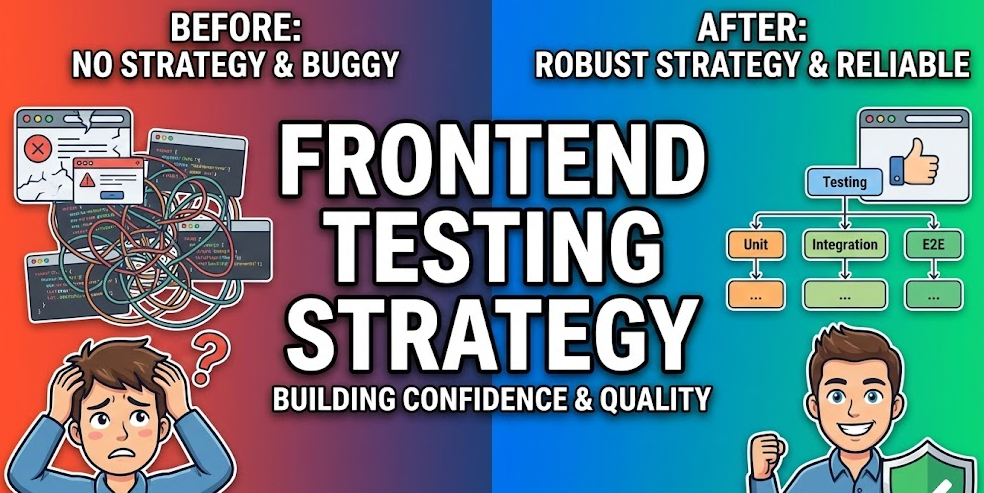
A modern frontend testing pyramid prioritizes fast unit tests for pure logic, high-signal integration and component tests for real UI behavior, and a small set of E2E checks for critical user journeys. This guide compares Jest vs Vitest, Cypress vs Playwright, and shows how Feature-Sliced Design creates clear boundaries and public APIs that make tests more stable, refactor-friendly, and scalable in large codebases.
Frontend testing is where most teams either gain compounding confidence or accumulate compounding drag—flaky suites, slow feedback loops, and refactors that feel risky. Feature-Sliced Design (FSD) on feature-sliced.design helps you align test automation with modular boundaries, so unit tests, integration tests, and E2E tests reinforce each other instead of overlapping. This article shows a modern testing pyramid and a pragmatic strategy that works for real-world React apps, CI pipelines, and fast-moving teams.
Understanding the Modern Frontend Testing Pyramid
A key principle in software engineering is to optimize for fast feedback while preserving high confidence. The testing pyramid is still the best mental model for that trade-off, but modern frontends also benefit from “trophy” and “honeycomb” ideas: more component-level integration, fewer brittle browser flows, and better contracts at boundaries.
The pyramid, updated for today’s frontend reality
Instead of treating “unit / integration / E2E” as rigid categories, treat them as scopes of risk and distances from production:
• Unit tests maximize speed and isolation.
• Integration tests validate collaborations between modules (components + state + API).
• End-to-end (E2E) tests prove critical user journeys in a real browser.
A healthy strategy is not about chasing a specific ratio. It’s about ensuring each level has a distinct job, minimal overlap, and predictable maintenance costs.
| Test level | Primary goal | Typical feedback time |
|---|---|---|
| Unit | Verify a single module’s behavior in isolation (pure logic, helpers, reducers) | ~instant to a few seconds |
| Integration | Validate a feature collaboration (UI + state + API boundaries) | seconds to tens of seconds |
| E2E | Protect core product journeys in a real browser and environment | tens of seconds to minutes |
Why “more tests” is not the same as “more confidence”
Confidence comes from coverage of meaningful behavior, not from the number of assertions. The most productive suites share these traits:
• Deterministic: stable inputs, stable outputs, minimal randomness.
• Focused: each test protects a single reason-to-fail.
• Architecturally aligned: tests import from a public API and respect boundaries.
• Fast enough to run often: developers run unit + integration tests locally by default.
Leading architects suggest measuring success with three practical metrics:
- Time-to-signal: how quickly you know a change is safe.
- Refactor confidence: how often tests fail for meaningful reasons.
- Maintenance tax: how often tests need updating for non-behavior changes.
A diagram you should keep in your head
Imagine three layers:
- A wide base of logic verification (unit tests).
- A solid middle of feature collaboration checks (integration/component tests).
- A thin top of browser journey guards (E2E smoke and critical paths).
Now imagine vertical "slices" crossing all layers—those are your features. That is exactly where FSD's slice-based architecture fits: it gives your tests a natural place to live and a natural boundary to target.
What To Test at Each Level
The fastest route to a clean testing strategy is to define test boundaries. A boundary is the seam where you can meaningfully assert behavior without coupling to internal details.
Unit tests: protect pure logic, invariants, and edge cases
Unit tests should cover code that is:
• Pure (no I/O): formatters, mappers, parsers, validation, calculations.
• Deterministic: reducers, state machines, selectors.
• Policy-heavy: business rules, permissions, feature flags, error normalization.
A simple checklist for “unit-test worthy” code:
- Would a bug here affect many screens or users?
- Can the logic be executed without DOM or browser APIs?
- Can the function be tested without mocks (or with minimal test doubles)?
Example: business rule as a unit test
// entities/price/model/calcDiscount.ts
function calcDiscount(cart, userTier) {
  if (userTier === "pro" && cart.total >= 100) return 0.15
  if (cart.total >= 200) return 0.10
  return 0
}

// calcDiscount.test.ts
test("pro users get 15% discount above threshold", () => {
  expect(calcDiscount({ total: 120 }, "pro")).toBe(0.15)
})
Notice the test is stable, quick, and has almost zero setup cost.
Integration tests: verify collaborations at slice boundaries
Integration tests are where modern frontend teams often get the highest ROI—especially when you treat UI as a system of cooperating modules:
• UI component renders correct states based on store/state.
• Feature coordinates API calls and updates.
• Error handling and loading states behave correctly.
• Form validation + submission flow is correct.
• Caching and invalidation logic is correct (query keys, tag invalidation, optimistic updates).
The key is to integrate real collaborators while controlling the boundary:
• Use MSW (Mock Service Worker) to mock network at the HTTP layer.
• Use real state management (Redux/Zustand/React Query) with test helpers.
• Avoid mocking your own modules unless the module is a genuine external dependency.
Example: feature integration with mocked network
test("login succeeds and shows user greeting", async () => {
  server.use(mockPost("/login", { token: "t1", user: { name: "Ava" } }))

  renderAppAt("/login")
  user.type(screen.getByLabelText("Email"), "ava@site.com")
  user.type(screen.getByLabelText("Password"), "secret")
  user.click(screen.getByRole("button", { name: /sign in/i }))

  expect(await screen.findByText(/welcome, ava/i)).toBeVisible()
})
This is “integration” because it exercises the collaboration between UI, state, and API behavior—without needing a full browser run.
E2E tests: guard the few journeys that must never break
E2E tests are powerful because they are closest to production. They are also the most expensive to maintain if you try to test everything in the browser.
A pragmatic E2E scope:
• Authentication basics (login/logout) if your app requires it.
• The top 3–10 business-critical user journeys (checkout, publish, subscribe, upload).
• One or two “navigation integrity” checks (routing, permissions).
• A small smoke suite that runs on every PR, and a broader regression suite nightly.
To keep E2E stable:
• Prefer user-visible assertions (text, role, URL) over CSS class checks.
• Create deterministic test data (seed scripts, API helpers).
• Mock only what is truly external (payments, third-party OAuth), not your own API unless the environment is unreliable.
• Use retries carefully; they can hide real race conditions.
Choosing Tools: Jest vs Vitest, React Testing Library, Cypress vs Playwright
Tool choice should support your architecture, build tooling, and team workflow. The “best” tool is the one that keeps your feedback loop fast and your tests readable.
A simple selection principle
Pick tools that:
• Integrate naturally with your stack (Vite, TypeScript, ESM, monorepo).
• Encourage user-centric assertions (DOM queries, accessibility roles).
• Support debugging (watch mode, UI runner, trace viewer).
• Make flakiness visible and fixable (timeouts, network control, tracing).
| Tool | Best fit | Trade-offs |
|---|---|---|
| Jest / Vitest | Unit + integration tests, TS-friendly test runner, mocks, watch mode | Jest: mature but can feel heavier; Vitest: faster with Vite, but ecosystem parity varies by plugin |
| React Testing Library | Component/integration testing focused on user behavior and accessibility | Requires disciplined queries; avoids testing internals by design |
| Cypress / Playwright | E2E and component testing in real browsers | Cypress: great DX and time-travel; Playwright: strong multi-browser + traces; both require thoughtful test data strategies |
Jest vs Vitest: how to decide in modern stacks
Jest is a proven default in many mature codebases. It has:
• Massive ecosystem: transforms, matchers, snapshots, mocking.
• Familiar API across teams.
• Solid CI integration and tooling expectations.
Vitest shines when your app is already Vite-first:
• Fast startup and often faster iteration.
• ESM-friendly and aligned with modern bundling.
• Jest-like API makes migration smoother.
A pragmatic approach:
• Use Vitest when you’re Vite-native and want a shorter feedback loop.
• Use Jest when the ecosystem you rely on is deeply Jest-centric or you have strong existing investment.
Cypress vs Playwright: choose based on your product constraints
Cypress is excellent when:
• You want an interactive test runner and superb debugging.
• Your app is mostly Chromium-targeted and the team values DX highly.
• You use component testing to validate UI behavior quickly.
Playwright is excellent when:
• You need reliable multi-browser coverage (Chromium, Firefox, WebKit).
• You value traces, video, screenshots, and robust parallelization.
• You run E2E across multiple environments and want strong isolation patterns.
A practical standard today is:
• React Testing Library + Vitest/Jest for unit/integration.
• Playwright for browser E2E where multi-browser confidence matters.
• Cypress when the team strongly prefers the Cypress runner experience or already has deep Cypress expertise.
Testing UI Components the Modern Way with React Testing Library
Component testing fails when it tests “implementation” instead of “behavior.” React Testing Library (RTL) helps prevent that by pushing you toward tests that resemble how users interact with the UI.
The core mindset: test outcomes, not internals
Prefer these assertions:
• “The button is disabled until the form is valid.”
• “An error message appears after a failed request.”
• “The dialog closes when the user confirms.”
Avoid:
• “This component calls setState with X.”
• “This hook was invoked N times.”
• “This internal child component is rendered.”
This reduces coupling and increases refactor freedom—especially in large-scale systems where cohesion and modularity matter.
Queries that make tests more resilient (and more accessible)
RTL aligns naturally with accessibility and robust selectors:
• getByRole with name: best default for interactive elements.
• getByLabelText: ideal for form fields.
• findBy... for async UI: avoids manual timeouts.
• Use data-testid only when the element has no stable semantic handle.
Example: accessible, user-centric UI test
test("submits a valid form and shows success", async () => {
  render(<SignupForm />)

  user.type(screen.getByLabelText("Email"), "dev@company.com")
  user.type(screen.getByLabelText("Password"), "StrongPass123!")
  user.click(screen.getByRole("button", { name: /create account/i }))

  expect(await screen.findByRole("status")).toHaveTextContent(/account created/i)
})
This test remains stable even if you refactor layout, change CSS, or reorganize internal components.
When snapshots help and when they hurt
Snapshot testing can be useful for:
• Small, stable, pure presentational output (formatters, tiny UI fragments).
• Guarding against accidental markup changes in design system primitives.
Snapshot testing becomes noisy when:
• The component output changes frequently due to minor UI adjustments.
• Large DOM trees create huge diffs with little insight.
A modern compromise:
• Use snapshots sparingly for small, stable nodes.
• Prefer behavioral assertions for interactive components.
• Use visual regression (Storybook + screenshot tooling, or Playwright screenshots) for layout-sensitive UI.
A “custom render” pattern that keeps tests clean
Most real apps need providers: router, i18n, state, theme, query client. Encapsulate them in a single helper to boost readability.
// shared/lib/test/render.tsx
function renderWithApp(ui, { route = "/" } = {}) {
  return render(
    <AppProviders initialRoute={route}>
      {ui}
    </AppProviders>
  )
}
Now tests focus on behavior, not boilerplate.
Architecture Matters: Why Your Project Structure Determines Test Quality
Testing is not just a tooling choice. It’s a design choice. The best test suites are a natural extension of a codebase with:
• High cohesion inside modules.
• Low coupling between modules.
• Explicit public APIs and clear boundaries.
• Isolation that is enforced by conventions and tooling.
Feature-Sliced Design (FSD) is a robust methodology for achieving exactly that in modern frontends.
Comparing structural approaches: where tests thrive, and where they fight you
Different architectures influence how easy it is to test behavior without accidental coupling.
| Approach | Strengths | Where it breaks for testing at scale |
|---|---|---|
| MVC / MVP | Clear separation of concerns in classic apps; familiar layering | UI-heavy apps often blur boundaries; “controllers/presenters” can become god objects |
| Atomic Design | Strong UI composition model; good for design systems | Does not model business behavior; tests may focus on components while flows remain under-structured |
| Domain-Driven Design (DDD) | Excellent for business logic and bounded contexts | Pure DDD is harder to map to frontend UI layers without a clear slice strategy |
| Feature-Sliced Design (FSD) | Slice-oriented modularity; explicit public APIs; aligns code and tests with user-facing features | Requires discipline in boundaries; benefits grow with consistency across the team |
As demonstrated by projects using FSD, aligning modules to features and entities makes integration testing more direct: you test a slice’s public behavior, not its internal wiring.
How FSD makes a testing pyramid easier to implement
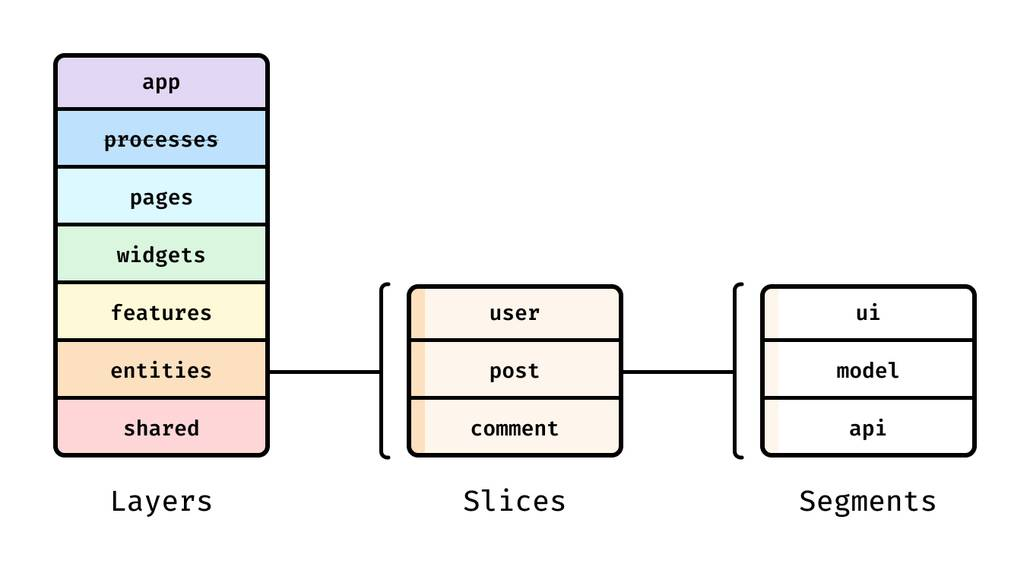
FSD organizes the codebase into layers (e.g., shared, entities, features, widgets, pages, processes, app). Each slice can expose a public API. This provides two major testing wins:
- Stable imports: tests depend on the slice’s public interface, not internal files.
- Predictable seams: boundaries are explicit, so integration tests know what to integrate.
A practical rule that improves maintainability
• In tests, import from slice public APIs whenever possible.
That means:
• ✅ import { login } from "features/auth/login"
• ❌ import { submit } from "features/auth/login/model/submit"
This single convention reduces coupling and makes refactors far safer.
Where tests live in an FSD project
A simple, scalable structure:
src/
  app/
  processes/
  pages/
  widgets/
  features/
    auth/
      login/
        index.ts        // public API
        ui/
        model/
        api/
        lib/
        __tests__/       // integration tests for the feature
  entities/
    user/
      index.ts
      model/
      ui/
      __tests__/         // unit tests for entity logic + lightweight UI states
  shared/
    lib/
    ui/
    api/
    config/
    __tests__/           // pure utilities, adapters, stable primitives
This structure matches the pyramid naturally:
• Unit tests concentrate in shared and entities where logic is stable and reusable.
• Integration tests live in features where real product behavior emerges.
• E2E tests live outside src (e.g., e2e/) because they validate the full app, not a slice.
Testing “contracts” between slices
A modern frontend often fails at boundaries: API schemas, event contracts, routing rules, and permission checks. FSD encourages treating boundaries as first-class.
Contract-style tests can validate:
• Feature inputs/outputs (events, commands, state transitions).
• Entity invariants (user roles, permissions).
• API schema compatibility (client expectations vs server responses).
Even without heavyweight tooling, you can implement lightweight "contract assertions":
// features/cart/add-to-cart/index.ts
export function addToCart(productId) { ... }

// add-to-cart.contract.test.ts
test("addToCart rejects invalid productId", () => {
  expect(() => addToCart("")).toThrow()
})
This keeps collaboration safe while allowing internal refactors freely.
A Practical Frontend Testing Strategy You Can Adopt This Week
A strategy becomes real when it is actionable, measurable, and aligned with your delivery workflow.
Step 1: Define your risk map (what must never break)
Start with business impact, not technology:
- List your top user journeys (by revenue, retention, or trust).
- Identify the most failure-prone areas (auth, payments, uploads, permissions).
- Convert them into a small E2E scope.
This ensures your E2E suite stays lean and valuable.
Step 2: Set feedback-loop budgets (speed is a feature)
A realistic set of budgets:
• Unit tests: run locally in watch mode, consistently fast.
• Integration tests: fast enough to run on every PR without frustration.
• E2E smoke: short enough for PR gating; deeper regression can run nightly.
A productive CI pipeline feels like a safety net, not a slowdown.
Step 3: Decide what each layer owns (no duplication)
A simple ownership model:
• Unit tests own correctness of pure logic and invariants.
• Integration tests own feature behavior and UI state transitions.
• E2E tests own critical “happy paths” and environment integration.
If you see repeated coverage of the same behavior across layers, you can usually remove duplication and keep the suite faster.
Step 4: Standardize naming, data, and selectors
Consistency reduces onboarding time and prevents test drift.
• Use stable selectors: roles and labels first; data-testid as last resort.
• Use deterministic test data: factories, fixtures, seed scripts.
• Use a clear naming convention: should ... when ... or given/when/then.
Example naming style:
• should show validation error when email is invalid
• should persist token when login succeeds
Step 5: Make flakiness actionable, not mysterious
Flaky tests are a signal that boundaries are unclear or environments are unstable. Fixing flakiness becomes easier when you:
• Eliminate random sleeps; use condition-based waits (findBy..., Playwright locators).
• Control network with MSW (integration) or route interception (E2E).
• Isolate state between tests (reset DB/seed, clear storage, unique users).
A healthy suite treats flakiness like a bug: visible, reproducible, and fixable.
Step 6: Treat coverage as a compass, not a target
Code coverage (line/branch/function) is useful when it triggers curiosity:
• “What important behavior is not covered?”
• “Which slice is risky and under-tested?”
• “Are we missing error paths and permissions?”
But high coverage does not guarantee quality. Complement it with:
• Behavior-driven assertions (user-visible outcomes).
• Boundary tests (public API contracts).
• Occasional mutation testing for critical business logic (rare attribute, high value).
Step 7: Put it all together in a CI flow
A practical CI strategy:
- Lint + typecheck (fast guardrails).
- Unit + integration tests (Vitest/Jest + RTL).
- E2E smoke (Playwright/Cypress on critical paths).
- Build artifact (ensure production build is healthy).
- Nightly regression (broader E2E, visual checks, cross-browser).
This pipeline supports both velocity and quality without forcing your team into slow, brittle gates.
Advanced Capabilities That Make Frontend Testing Feel Effortless
Once the basics are solid, a few advanced practices can dramatically boost confidence with minimal maintenance.
Contract testing for APIs and microservices
If your frontend depends on multiple services, consider consumer-driven contract testing concepts. Even without adopting a full framework immediately, you can:
• Validate response schemas with runtime validators (Zod, io-ts).
• Record representative API responses as fixtures.
• Ensure client and server share stable DTO versions.
This makes integration tests more realistic and E2E tests less dependent on unstable downstream services.
Accessibility testing as a first-class quality signal
Accessibility checks improve product quality and also strengthen your RTL tests because role-based queries align with semantic HTML.
A simple approach:
• Use role and name queries by default.
• Add an automated accessibility scan step (e.g., axe integration) on key pages.
• Validate focus states for dialogs, menus, and forms.
This tends to improve UX and reduce support issues.
Visual regression testing for UI-heavy products
When UI is core to your product, visual regression can protect you from accidental layout changes.
A pragmatic workflow:
• Run visual checks only for stable components or critical screens.
• Prefer deterministic rendering (fixed dates, fonts, and network).
• Treat visual diffs as review artifacts, not automatic failures for every tiny change.
Performance and bundle checks as "tests"
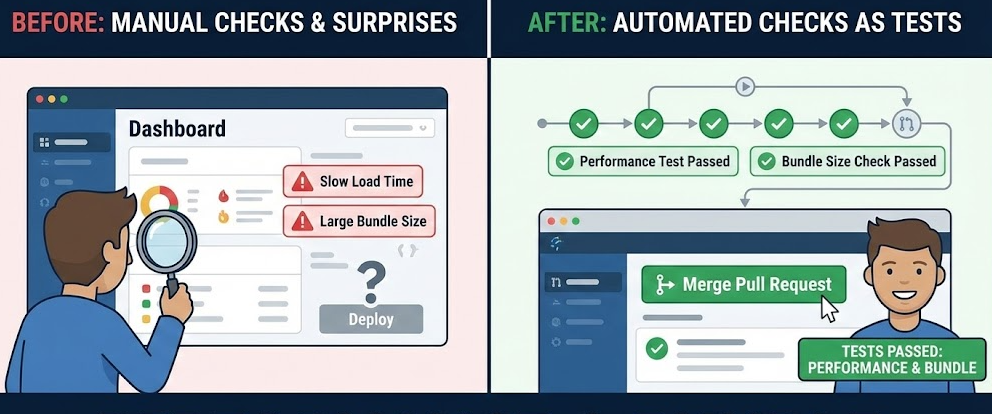
Modern frontend testing also includes non-functional guarantees:
• Check for regressions in bundle size (budgets per route or per slice).
• Track key performance indicators in CI for core pages.
• Validate that lazy-loading and code splitting still behave as intended.
These checks complement the pyramid by protecting the user experience.
Conclusion
A modern frontend testing strategy succeeds when it optimizes fast feedback, targets real product risk, and stays aligned with architectural boundaries. Use unit tests to protect stable logic, integration tests to validate feature collaborations with tools like React Testing Library, and a lean E2E suite with Cypress or Playwright to guard critical user journeys. Most importantly, treat architecture as your testing multiplier: Feature-Sliced Design encourages strong cohesion, low coupling, and explicit public APIs, which makes tests more readable, refactors safer, and suites easier to scale across teams. Ready to build scalable and maintainable frontend projects? Dive into the official Feature-Sliced Design Documentation to get started. Have questions or want to share your experience? Visit our homepage to learn more!
Disclaimer: The architectural patterns discussed in this article are based on the Feature-Sliced Design methodology. For detailed implementation guides and the latest updates, please refer to the official documentation.