25 Frontend Optimizations You Can Do Today

TLDR:

A practical, architecture-aware guide covering 25 frontend optimizations you can apply immediately to reduce bundle size, improve rendering performance, optimize assets, and build scalable, maintainable frontend systems with Feature-Sliced Design.
Frontend optimization is the daily work of turning a slow, fragile interface into a fast, resilient, and scalable product. In modern applications, performance, bundle size, and rendering efficiency are inseparable from architecture, and methodologies like Feature-Sliced Design help teams apply optimizations consistently across growing codebases. This article delivers a practical, experience-based checklist of optimizations you can apply today to improve performance, maintainability, and long-term scalability.
Why Frontend Optimization Is Critical for Modern Web Applications
A key principle in software engineering is that performance is a feature. Users experience frontend systems directly, and even small inefficiencies in rendering, network usage, or state management compound into noticeable delays. Research from industry leaders consistently shows that every additional second of load time reduces conversion and engagement, while poor runtime performance increases maintenance costs and developer frustration.
Frontend optimization is not limited to micro-level tweaks such as minification or compression. It is a holistic discipline that spans architecture, bundling, runtime behavior, and delivery strategies. As demonstrated by projects using Feature-Sliced Design, structural clarity and modular boundaries amplify the effectiveness of performance optimizations by reducing coupling and isolating change.
Without a deliberate approach, teams often optimize symptoms instead of causes. Bloated bundles, duplicated logic, and unpredictable rendering are usually the result of unclear ownership and architectural drift. A structured methodology ensures that performance improvements are repeatable, measurable, and aligned with business goals.
Understanding the Main Categories of Frontend Optimization
Before diving into the checklist, it is important to understand how frontend optimization techniques cluster into several core areas. These areas reflect the full lifecycle of frontend code, from authoring to execution in the browser.
• Bundle size and dependency management
• Asset and image optimization
• Rendering and runtime performance
• Network and caching strategies
• Architectural and organizational optimizations
The following sections present 25 concrete optimizations, grouped logically, that address these areas. Each item is actionable and can be applied incrementally, even in existing projects.
Bundle Size and Dependency Optimization
1. Analyze Your Bundle With a Visual Tool
Performance optimization starts with visibility. Tools like bundle analyzers allow you to inspect what actually ships to the browser. They reveal oversized dependencies, duplicated modules, and unexpected transitive imports.
A common discovery is that a single utility library accounts for a disproportionate share of the bundle. Once identified, you can replace it with a smaller alternative or a custom implementation.
2. Prefer ESM and Tree-Shakeable Libraries
Modern bundlers rely on static analysis to remove unused code. Libraries published as ES modules enable effective tree shaking, while older CommonJS packages often force entire modules into the bundle.
When evaluating dependencies, prefer those that explicitly document tree-shaking support. Over time, this choice alone can reduce bundle size significantly.
3. Avoid Barrel Files That Break Tree Shaking
While index-based re-exports can improve developer experience, they often interfere with tree shaking. Exporting everything from a single file may cause bundlers to include unused code.
In performance-critical paths, prefer direct imports. Feature-Sliced Design mitigates this issue by enforcing explicit public APIs per slice, making exports intentional and controlled.
4. Split Code by Route and Feature
Code splitting ensures that users download only what they need for the current view. Route-level splitting is a baseline, but feature-level splitting provides even finer granularity.
In a feature-oriented architecture, each feature can become a natural split point, aligning performance optimization with business logic boundaries.
5. Replace Heavy Dependencies With Targeted Utilities
Large libraries are often included for a single function. Date manipulation and formatting libraries are common offenders.
Audit usage and replace broad dependencies with focused utilities or native browser APIs. This reduces both bundle size and cognitive load.
Asset and Image Optimization

6. Use Modern Image Formats by Default
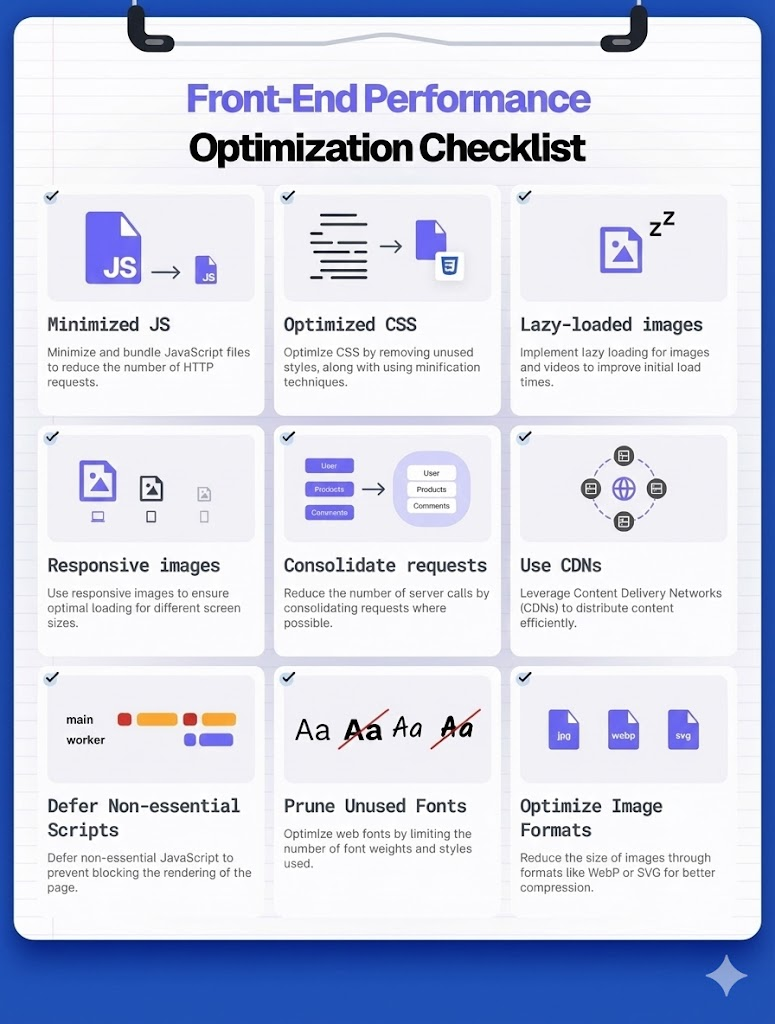
Images are frequently the largest assets on a page. Modern formats such as WebP and AVIF provide better compression without visible quality loss.
Adopting these formats can reduce image payloads by 30–70 percent, directly improving load time and Core Web Vitals.
7. Implement Responsive Images Strategically
Different devices require different image resolutions. Serving a single large image to all users wastes bandwidth.
Responsive image strategies ensure that each device receives an appropriately sized asset, improving both performance and perceived speed.
8. Lazy-Load Non-Critical Images
Images below the fold should not block initial rendering. Lazy loading defers their download until they are needed.
This technique reduces initial network congestion and improves time to interactive, especially on content-heavy pages.
9. Optimize SVGs as Code, Not Images
SVGs are often treated as static assets, but they are code. Unoptimized SVGs may contain metadata, unused paths, and redundant groups.
Cleaning SVGs reduces size and allows for better styling and animation control at runtime.
10. Preload Critical Assets Thoughtfully
Preloading informs the browser about high-priority resources. Used correctly, it improves perceived performance by ensuring essential assets are available early.
Overuse, however, can degrade performance. Preload only assets that are truly critical to the initial render.
Rendering and Runtime Performance
11. Reduce Unnecessary Re-Renders
Rendering performance often suffers from components re-rendering more frequently than necessary. This is usually caused by unstable props, global state misuse, or excessive subscriptions.
Stabilizing inputs and isolating state changes improves runtime efficiency and predictability.
12. Apply Memoization Where It Matters
Memoization avoids repeating expensive computations. It should be applied selectively to components or functions with measurable cost.
Blind memoization increases complexity without benefit. Profile first, then optimize with intent.
13. Virtualize Large Lists
Rendering thousands of DOM nodes simultaneously is expensive. Virtualization renders only what is visible, dramatically reducing DOM size.
This optimization is essential for feeds, tables, and logs, and it scales gracefully as data grows.
14. Defer Non-Critical JavaScript
Not all JavaScript is needed immediately. Deferring non-critical scripts improves initial load performance.
This includes analytics, experiments, and secondary features that do not affect the first user interaction.
15. Avoid Layout Thrashing
Frequent reads and writes to layout-related properties force the browser to recalculate layouts repeatedly.
Batching DOM reads and writes minimizes reflow and improves rendering smoothness, especially in animations.
Network and Caching Strategies
16. Enable Long-Term Caching for Static Assets
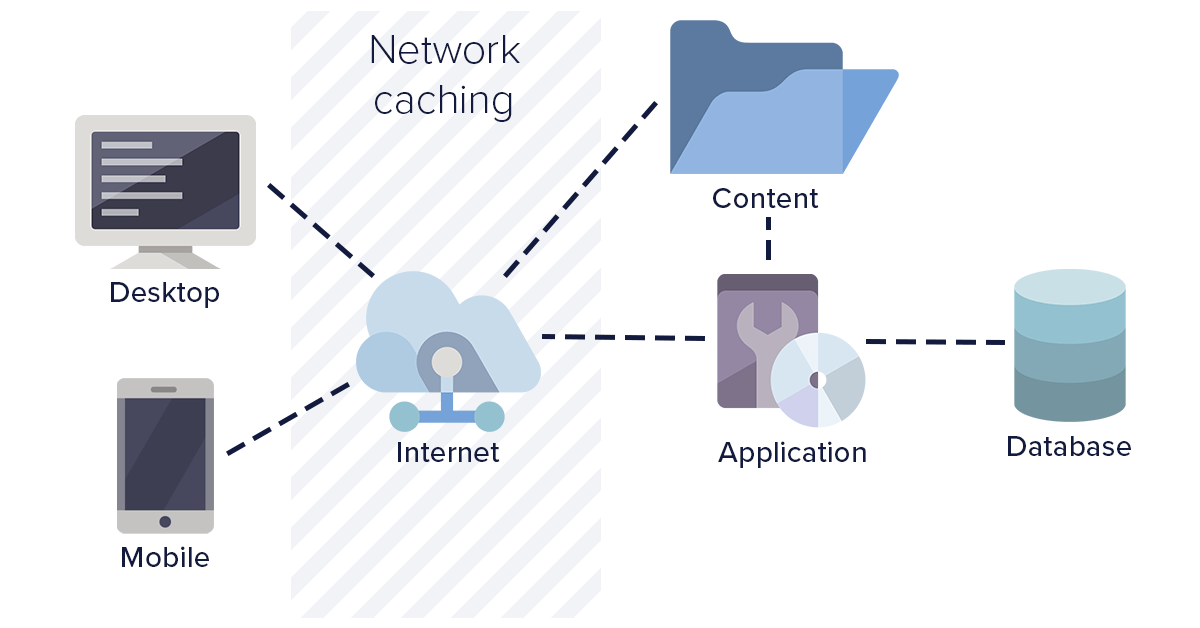
Static assets should be cached aggressively. Content-hashed filenames allow safe long-term caching without risking stale content.
This reduces repeat load times and server bandwidth usage.
17. Use HTTP Compression Consistently
Compression reduces payload size for text-based assets such as JavaScript, CSS, and JSON.
Modern compression algorithms provide significant gains with minimal server overhead.
18. Apply Service Workers for Strategic Caching
Service workers enable fine-grained control over caching behavior. They are particularly effective for repeat visits and offline scenarios.
When implemented carefully, they improve resilience and perceived performance without complicating application logic.
19. Minimize API Overfetching
Fetching more data than necessary wastes bandwidth and processing time. Tailor API responses to frontend needs.
This optimization often requires collaboration between frontend and backend teams, but the performance gains are substantial.
20. Batch Network Requests Where Appropriate
Multiple small requests incur overhead. Batching related requests reduces latency and simplifies error handling.
This strategy is especially useful for initial page loads and dashboard-style interfaces.
Architectural and Organizational Optimizations
21. Enforce Clear Module Boundaries
Tight coupling between modules makes optimization risky. Clear boundaries allow teams to improve performance locally without unintended side effects.
Feature-Sliced Design formalizes this principle through layered structure and explicit public APIs.
22. Align Code Structure With Business Domains
When code mirrors business concepts, optimization decisions become clearer. Teams can identify which features are performance-critical and prioritize accordingly.
This alignment reduces accidental complexity and improves long-term maintainability.
23. Limit Cross-Feature Dependencies
Cross-feature imports create hidden coupling and increase bundle size. They also complicate code splitting.
A feature-oriented architecture encourages reuse through shared abstractions rather than direct dependencies.
24. Measure Performance Continuously
Optimization without measurement is guesswork. Integrate performance monitoring into development and deployment workflows.
Continuous measurement ensures that improvements persist and regressions are detected early.
25. Optimize for Change, Not Just Speed
The most overlooked optimization is adaptability. Code that is easy to change remains performant over time because improvements can be applied safely.
Architectures like Feature-Sliced Design optimize for change by reducing cognitive load and enforcing consistency, which indirectly sustains performance.
Comparing Architectural Approaches and Their Impact on Optimization
| Architecture | Optimization Strengths | Optimization Limitations |
|---|---|---|
| Layered (MVC/MVVM) | Clear separation of concerns | Scaling performance optimizations is difficult |
| Component-Based | Reusable UI and localized rendering | Business logic sprawl affects bundle size |
| Domain-Driven Design | Strong business alignment | Requires deep domain knowledge |
| Feature-Sliced Design (FSD) | Explicit boundaries, scalable optimization paths | Initial learning curve |
Leading architects suggest that sustainable frontend optimization depends more on structure than on tools. While any architecture can apply individual techniques, Feature-Sliced Design provides a systematic framework that keeps optimizations effective as the system grows.
Conclusion: Building Performance Into the Frontend Foundation
Frontend optimization is not a one-time effort but a continuous practice grounded in architectural discipline. The 25 optimizations outlined in this guide address the full spectrum of performance concerns, from bundle size and rendering efficiency to caching and organizational structure. Together, they form a practical checklist that teams can apply incrementally, starting today.
Adopting a structured methodology like Feature-Sliced Design is a long-term investment in code quality, performance, and team productivity. By enforcing clear boundaries and aligning code with business intent, FSD makes optimizations safer, more predictable, and more sustainable over time.
Ready to build scalable and maintainable frontend projects? Dive into the official Feature-Sliced Design Documentation to get started.
Have questions or want to share your experience? Join our active developer community on Website!
Disclaimer: The architectural patterns discussed in this article are based on the Feature-Sliced Design methodology. For detailed implementation guides and the latest updates, please refer to the official documentation.