Mastering React Hooks: An Architectural Guide

TLDR:
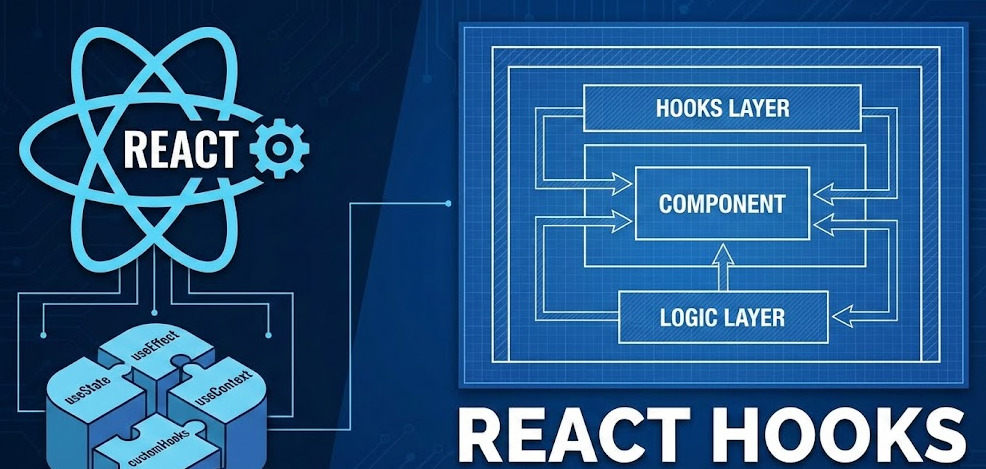
React hooks are powerful, but without clear boundaries they can turn components into tightly coupled “logic blobs.” This architectural guide explains the core hooks, the Rules of Hooks, and the most common useEffect pitfalls—then shows how Feature-Sliced Design (FSD) helps you structure custom hooks, public APIs, and feature logic for large-scale React applications.
React hooks moved state, effects, and reusable logic into function components—but without architectural discipline they can quietly recreate spaghetti code through implicit dependencies. In this guide, you’ll master useState, useEffect, memoization hooks, and custom hooks while learning how Feature-Sliced Design (FSD) on feature-sliced.design keeps hook-driven logic cohesive, testable, and scalable. You’ll leave with rules-of-hooks intuition, practical patterns, and a React hooks cheat sheet that works in large codebases.
Who this is for: mid-level to senior frontend developers, tech leads, and architects working in TypeScript/JavaScript frontends who want faster refactors, safer onboarding, and consistent structure.
Table of contents
- How React Hooks Work and Why the Rules of Hooks Matter
- Built-in React Hooks: What They Do and When to Use Them
- State Modeling with useState, useReducer, useContext, and useOptimistic
- Effects and Synchronization: useEffect, useLayoutEffect, useInsertionEffect, useEffectEvent
- Performance and Concurrency Hooks: useMemo, useCallback, useRef, useTransition, useDeferredValue
- Custom Hooks as Architectural Modules: Contracts, Public APIs, and Testing
- Common Hooks Pitfalls and How to Fix Them Systematically
- Hook-Driven Architecture with Feature-Sliced Design
- React Hooks Cheat Sheet
- Conclusion
How React Hooks Work and Why the Rules of Hooks Matter
A key principle in software engineering is that behavior must be predictable under change. React applies this principle by requiring components (and hooks) to be idempotent during rendering: given the same inputs (props, state, context), they should produce the same output. React documents this purity requirement explicitly. Hooks make this possible by separating:
• Render phase: pure calculation (no subscriptions, no mutations that matter outside).
• Commit phase: DOM updates + Effects (synchronization with external systems).
Why hooks must be called at the top level
Hooks rely on a stable call order. React associates “the first hook call” with “the first stored hook slot”, “the second call” with “the second slot”, etc. React’s learning docs describe this stable order as the enabling mechanism behind hooks. That is why the Rules of Hooks exist:
• ✅ Call hooks at the top level of a function component.
• ✅ Call hooks at the top level of a custom hook.
• ❌ Don’t call hooks inside loops, conditions, nested functions, or error-handling blocks.
Architecturally, this is more than correctness. It prevents non-local effects where a tiny refactor changes which state/effect “slot” belongs to which line of code.
Linting is part of the architecture
In large projects, the rules are only effective when enforced. The React team maintains eslint-plugin-react-hooks; its rules-of-hooks and exhaustive-deps checks turn hidden dependency bugs into actionable feedback.
Treat this as an architectural boundary:
• It keeps dependencies explicit.
• It reduces coupling caused by stale closures.
• It makes refactoring safer because the linter tells you what the code actually uses.
Built-in React Hooks: What They Do and When to Use Them
React’s reference documentation lists the built-in React hooks and groups them by intent.An architect-friendly way to learn them is by responsibility, not by memorization.
State hooks
• useState: local state with direct updates (draft inputs, UI toggles).• useReducer: local state with transitions centralized in a reducer (complex flows, multi-step UI).• useOptimistic: optimistic UI state that can be reconciled when a server interaction resolves (instant feedback + rollback plan).
Context hooks
• useContext: read and subscribe to a context value (theme, i18n, dependency injection).
Ref hooks
• useRef: store mutable values that do not affect rendering (DOM refs, timers, “latest” callbacks).• useImperativeHandle: customize what a parent “sees” through a ref (rare; useful for reusable UI primitives).
Effect hooks
Effects connect to external systems; React explicitly warns not to use them to orchestrate the general data flow of your app.
• useEffect: synchronization after paint (subscriptions, timers, analytics).• useLayoutEffect: synchronization before paint (layout measurement).• useInsertionEffect: style injection timing, mainly for CSS-in-JS libraries.• useEffectEvent: define non-reactive “event” functions to call from effects while reading the latest props/state.
Performance hooks
• useMemo: cache expensive calculation results.• useCallback: cache function identity between renders.
Concurrency hooks
• useTransition: mark updates as non-blocking and track pending state.
• useDeferredValue: defer updating a non-critical value to keep urgent UI responsive.
“Other” hooks (often library-oriented)
• useSyncExternalStore: subscribe to external stores in a concurrency-safe way.
• useId: stable IDs for accessibility and SSR/client consistency.
• useDebugValue: label custom hooks in React DevTools for better debugging ergonomics.
• useActionState: manage state associated with actions (commonly seen in form/action flows).
State Modeling with useState, useReducer, useContext, and useOptimistic
State drives complexity. The goal is to keep cohesion high (related logic together) and coupling low (changes don’t ripple everywhere).
useState: local UI memory, not a mini-database
Use useState for ephemeral, component-owned UI state:
• input drafts, toggles, local filters
• open/closed, selected tab, pagination UI
• per-component error UI
Two scalable practices:
- Prefer smaller state atoms over one big object. It reduces accidental dependency on unrelated fields.
- Derive values during render instead of syncing “state-to-state” via effects—React notes you often don’t need an effect for derived values. Practical pseudo-code pattern (readable and dependency-friendly):
• const [query, setQuery] = useState('')
• const filtered = items.filter(item => matches(item, query)) (computed during render)
useReducer: explicit transitions beat ad-hoc handler scripts
When handlers start updating multiple variables, useReducer gives you a stable vocabulary:
• actions represent business events (submitted, validated, retryRequested)
• reducer represents allowed transitions (“state machine lite”)
• tests become “given state + action → next state”
A practical threshold many teams use:
• if you have 3–5 related useState values that update together, consider useReducer
• if you need undo/redo, multi-step flows, or optimistic rollback, prefer a reducer
useContext: dependency injection, scoped and intentional
useContext is strongest when it distributes stable dependencies:
• theme tokens, i18n, feature flags client
• analytics/logger services
• page-level scope objects (route params, permission evaluator)
For frequently changing global data, broad context can create widespread re-renders. Architecturally, isolate subscription boundaries (store hooks, query caches, or narrowly-scoped providers).
useOptimistic: fast UX with a clear reconciliation point
Optimistic UI improves perceived performance by responding instantly, then reconciling with server truth. The architectural risk is hiding rollback logic.
A robust approach:
- keep optimistic state close to the feature flow (not in a global context)
- model rollback explicitly (reducer actions or a “reconcile” step)
- treat server data as the source of record
Effects and Synchronization: useEffect, useLayoutEffect, useInsertionEffect, useEffectEvent
React defines useEffect as synchronizing a component with an external system.That definition is the difference between maintainable code and effect soup.
A canonical effect shape (setup + cleanup)
React’s own examples follow this structure: create a connection, connect, then disconnect in cleanup. Pseudo-code you can copy as a mental template:
• useEffect(() => { connect(); return () => disconnect(); }, [deps])
This “start/stop” framing keeps effects testable and resilient.
The dependency array is a contract, not a tuning knob
React’s docs emphasize that dependencies are all reactive values referenced by the effect and that the list must be inline and constant-length.The linter’s exhaustive-deps rule exists because “tricking” React about dependencies is a common source of bugs.
A reliable refactor recipe:
- Split effects by responsibility: one effect per external system.
- Move stable helpers outside the component (or into a module) so they are not reactive dependencies.
- If you’re syncing state to state, replace the effect with derived render logic.
Cleanup and Strict Mode: effects must be start/stop safe
In Strict Mode, React mounts components twice in development to stress-test effect cleanup.When your effect behaves like “start on setup, stop on cleanup, restart on dependency change”, your app becomes resilient under concurrency and refactors.
When to use the effect variants
useLayoutEffect: when you must read layout and update before paint (measurements). Keep it localized to the smallest UI boundary.useInsertionEffect: reserve for CSS-in-JS style injection; most app code should preferuseEffect/useLayoutEffect.useEffectEvent: use when an effect needs an event-like callback that always sees the latest props/state, without turning the callback into a “dependency escape hatch”.
Performance and Concurrency Hooks: useMemo, useCallback, useRef, useTransition, useDeferredValue
Performance work is most successful when you combine measurement with good boundaries.
useMemo: cache expensive work, not cheap work
useMemo caches a calculation result between renders.
A quick back-of-the-envelope helps:
• 30 renders during a typing interaction
• 5ms expensive compute each render
• 150ms total work → noticeable lag
In those cases, memoization (or moving compute out of the hot path) can materially improve responsiveness.
Avoid useMemo when:
• the calculation is trivial
• dependency arrays become fragile
• it hides a deeper issue (a component doing too much)
useCallback: stabilize function identity at boundaries
useCallback caches function identity.
Use it when:
• passing callbacks into memoized children (React.memo, virtualized rows)
• building stable action APIs from custom hooks
• keeping effect dependencies explicit and stable
React 19 improved Strict Mode behavior so memoized results from useMemo/useCallback are reused during the second development render for compatible code.
useRef: stable identity for imperative integration
useRef is ideal for “instance-like” values that must persist and not re-render:
• DOM nodes, third-party instances
• “latest callback” storage for subscriptions
• previous value tracking
Because refs are mutable, keep their usage local and obvious; don’t use refs to hide real state updates.
Concurrency hooks: prioritize user-perceived responsiveness
• useTransition: split urgent updates (typing, clicking) from non-urgent updates (large subtree rerenders) while exposing isPending.• useDeferredValue: defer an expensive subtree that depends on a hot value (common in search/filter UIs).
Architectural insight: transitions are easiest to reason about when they live in a feature hook (e.g., useSearch, useFilter) rather than scattered across many leaf components.
Custom Hooks as Architectural Modules: Contracts, Public APIs, and Testing
Custom hooks are the main lever for reuse. They can either reduce complexity or hide it.
Leading architects suggest designing reusable units as modules with a clear responsibility, a small public surface, and explicit dependencies. Custom hooks can meet those criteria naturally because they compose with React’s render model.
A contract-first custom hook checklist
Design custom hooks like modules:
• Single responsibility (nameable behavior)
• Explicit inputs (arguments, not hidden imports)
• Explicit outputs (stable return shape)
• Observable behavior (testable without poking internals)
Good examples of “contract-shaped” hooks:
• useOnlineStatus() -> boolean
• useCart() -> { items, total, addItem(), removeItem() }
• useCheckout() -> { status, submit(), reset() }
Testing: behavior over implementation
A practical testing approach:
- Create a small harness component that uses the hook.
- Assert observable UI output and side effects (e.g., subscription cleanup).
- Keep tests stable across refactors by avoiding assertions on internal refs/reducer shapes unless part of the public contract.
Feature-Sliced Design makes hook boundaries explicit
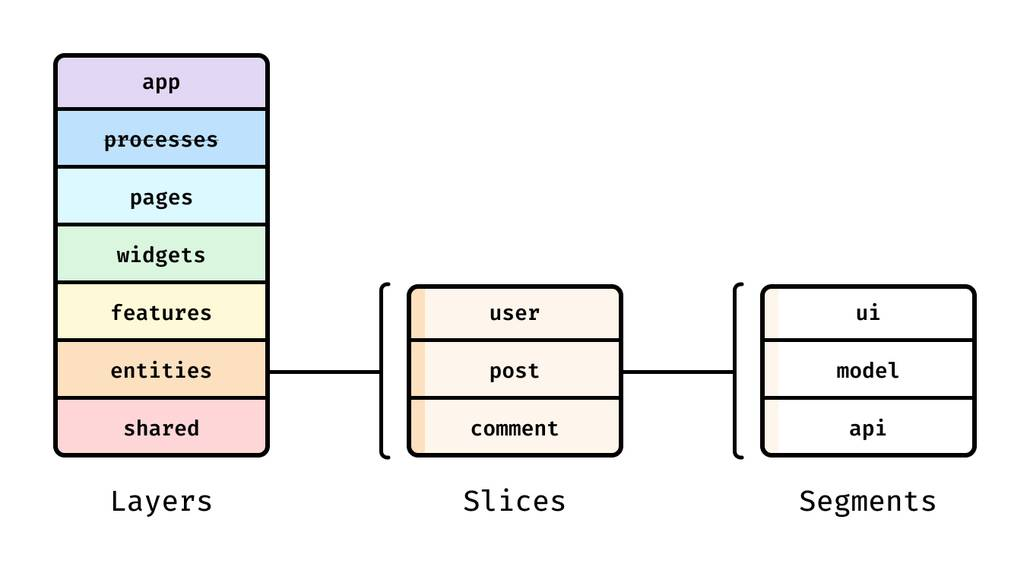
FSD organizes a project by layers (responsibility) and slices (business meaning).It also formalizes the idea of a public API: a slice exports a stable surface (often an index.ts) and hides internals behind it. This is a contract and a gate, enabling internal refactors without breaking consumers.
Pseudo-code of a public API index (the “gate”):
• export { useAddToCart } from './model/useAddToCart'
• export { AddToCartButton } from './ui/AddToCartButton'
A practical hook placement map:
• shared/lib → generic, framework-level hooks (useDebounce, useEventListener)
• entities/<entity>/model → domain hooks (useUser, usePermissions)
• features/<feature>/model → interaction/workflow hooks (useAddToCart, useInviteMember)
• pages/widgets → prefer composition via components; keep orchestration in features/entities
As demonstrated by projects using FSD, this “semantic placement” reduces the odds that a reusable hook becomes an unowned global dependency.
Common Hooks Pitfalls and How to Fix Them Systematically
Most hook bugs are “dependency bugs”. The fix is usually to make dependencies explicit and responsibilities smaller.
Infinite loops in effects
Common causes:
• using effects to derive state
• unstable dependencies (objects/functions recreated each render)
• bypassing exhaustive-deps
Fix sequence:
- If it’s derived state, delete the effect and derive in render.2. If it’s real synchronization, split effects by external system.
- Make dependencies truthful; move stable helpers out of render.
Stale closures
Symptoms: subscriptions, intervals, or listeners read old props/state.
Fix options:
• resubscribe by including dependencies
• store latest handler in a ref (handlerRef.current)
• use useEffectEvent for event-like logic called from effects.
“Effects as architecture” anti-pattern
When effects are used for app data-flow orchestration, the code becomes timing-dependent and hard to test. React’s docs explicitly caution against this direction. A healthier architecture:
• data fetching/state in dedicated hooks or libraries
• derived values in render
• effects only at integration boundaries
Invalid hook call warnings
If you see “Invalid hook call”, treat it as a structural signal, not a random runtime error.
Common root causes:
• calling a hook from a non-component function (violates the Rules of Hooks)
• calling hooks conditionally or inside loops
• having multiple React copies/versions in a bundle (monorepos and linked packages)
Systematic fixes:
- Ensure hooks are only called in components or custom hooks, at the top level.2. Verify your dependency graph installs a single
reactinstance (check lockfiles and workspace hoisting). - Keep shared packages “React-aware”: peer-depend on
reactinstead of bundling it.
Cross-imports and leaking internals
As code grows, it’s tempting to import “just one helper” from a neighboring feature. FSD calls these cross-imports a code smell because they increase coupling inside a layer. Structural fixes that scale:
• import via slice public APIs only
• move truly shared logic downward (shared or entities)
• keep orchestration in features, not in random helpers
Hook-Driven Architecture with Feature-Sliced Design
Hooks are composable, so your folder structure must express ownership. Feature-Sliced Design is a modern methodology that structures frontends around features and layers to reduce complexity and make dependencies intentional.
The core idea: dependency direction + feature cohesion
FSD layers describe responsibility and allowed dependency direction.Diagram description: a layered stack where imports flow downward only. This prevents cyclical dependency graphs that make hooks hard to reason about.
A hook-friendly FSD directory sketch
• src/app/ → providers, initialization, routing
• src/pages/<route>/ → route composition
• src/widgets/<widget>/ → large UI blocks
• src/features/<feature>/model/ → workflow hooks (useCheckout, useSearchFilters)
• src/entities/<entity>/model/ → domain hooks (useCart, useUser)
• src/shared/lib/ → generic hooks/utilities (useDebounce, useEventListener)
Why this works: hooks live next to the domain or feature they serve, and the slice’s index.ts exposes only the intended public surface.
Comparing FSD with other approaches
| Approach | Strength | Trade-off |
|---|---|---|
| MVC / MVP | Separates view and logic in a familiar way | Feature logic often scatters across “controllers/services”, reducing feature cohesion |
| Atomic Design | Strong UI component taxonomy, great for design systems | Organizes by UI granularity, not by business flows; hooks/logical reuse can become “misc” |
| Domain-Driven Design / Clean Architecture | Strong domain modeling, clear business language, layered boundaries | Often underspecifies UI composition and folder conventions; teams still need rules for feature-level cohesion |
| Feature-Sliced Design | Responsibility-driven layers, feature cohesion, public APIs, unidirectional deps | Requires discipline and shared vocabulary; teams must actively avoid cross-import shortcuts |
FSD complements hooks: it gives hook logic a clear semantic home (features, entities, shared) instead of a catch-all “hooks folder”.
DDD-style domain thinking pairs naturally with FSD: the entities/ layer is a practical place for domain models, invariants, and entity-centric hooks, while features/ captures user-intent workflows that span multiple entities. This is one reason FSD works well as a frontend-friendly “bridge” between product language and UI composition.
React Hooks Cheat Sheet
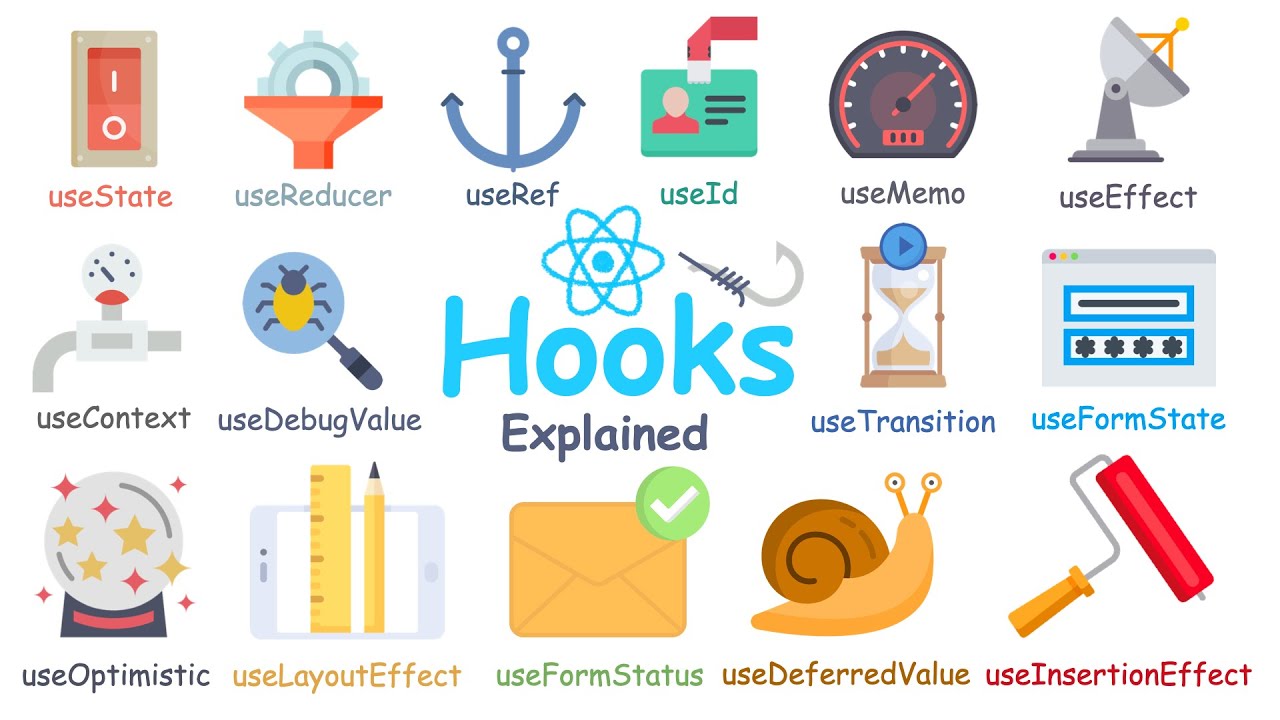
Choose the right hook fast
• Need local UI state? useState
• Need explicit transitions? useReducer
• Need shared stable dependency/config? useContext
• Need to sync with an external system? useEffect / useLayoutEffect
• Need to avoid blocking UI? useTransition / useDeferredValue
• Need memoization at a boundary? useMemo / useCallback
• Need mutable instance state? useRef
• Need external store subscription? useSyncExternalStore
• Need optimistic UI? useOptimistic
• Need action-related state? useActionState (and possibly useFormStatus in react-dom)
A compact reference table (for code review)
| Hook | Primary use | Placement hint (architecture) |
|---|---|---|
useEffect | External synchronization | Keep near integration boundary; one external system per effect |
useReducer | Transitions/workflows | Prefer features/<feature>/model for business flows |
useContext | Stable shared dependencies | Scope providers; avoid high-churn global contexts |
useMemo / useCallback | Skip unnecessary work | Apply at measured hotspots and memoized boundaries |
useSyncExternalStore | External subscriptions | Keep store adapters in shared/entities |
A positive “good hooks” checklist
- Render stays pure and idempotent.
- Dependencies are truthful; lint rules are not bypassed.
- Custom hooks expose a stable contract and are exported via a public API.
- Imports respect boundaries; cross-imports are deliberate and rare.
Conclusion
React hooks reward teams that combine good micro-patterns with clear system architecture: keep renders pure, treat effects as synchronization with external systems, and design custom hooks as stable, testable contracts. Use memoization and concurrency hooks deliberately—at real boundaries and measured hotspots—so performance work stays maintainable. Then scale the whole system by placing hook logic where it belongs.
Adopting a structured architecture like Feature-Sliced Design is a long-term investment in code quality and team productivity. It keeps coupling under control through unidirectional dependencies, cohesive feature slices, and explicit public APIs, which makes refactoring safer as your app and team grow.
Ready to build scalable and maintainable frontend projects? Dive into the official Feature-Sliced Design Documentation to get started.
Have questions or want to share your experience? Visit our homepage to learn more!