Partial Hydration: The End of Slow Websites

TLDR:

Slow websites often aren’t slow because of HTML—they’re slow because too much JavaScript is shipped and executed just to “wake up” the UI. Partial hydration flips the model: render the page as fast, SEO-friendly HTML, then hydrate only the interactive islands. In this guide, we explain islands architecture (including Astro Islands), compare it to full hydration, and show how Feature-Sliced Design helps teams keep boundaries clear, bundles small, and large codebases maintainable.
Partial hydration is a practical answer to the modern paradox: we use powerful frameworks, yet many sites still feel slow because they ship and execute too much JavaScript. By hydrating only the interactive “islands” on an otherwise server-rendered page, teams can improve Core Web Vitals while keeping developer ergonomics. With Feature-Sliced Design (FSD) from feature-sliced.design, you can scale this approach without turning your codebase into a maze of one-off boundaries.
Why partial hydration matters for real-world performance
A key principle in software engineering is that latency compounds: every extra task in the critical path (download → parse → execute → render → hydrate) increases the chance that users feel the page is “heavy”. In classic SPA-style rendering, the browser often needs to:
- Download a large JavaScript bundle
- Parse and compile it (CPU-bound on mid-tier phones)
- Run framework bootstrapping code
- Fetch data (sometimes after boot)
- Render DOM and then “hydrate” it into interactive components
Even when you add server-side rendering (SSR) to improve first paint, many frameworks still perform full hydration: the client executes component code for the whole page to attach event handlers and reconcile the DOM. You get HTML quickly, but still pay a large JavaScript tax before the page becomes truly responsive.
Partial hydration targets the dominant cost driver: unnecessary client-side work for parts of the UI that are static. Most pages are a mix of:
- Mostly-static content (headings, paragraphs, images, navigation)
- Light interactivity (theme toggles, “like” buttons, accordions)
- A few complex widgets (search, comments, checkout steps, editors)
Hydrating everything treats “static content” as if it were “interactive UI”, which is rarely needed. Partial hydration aligns performance with product reality: interactive code runs only where interaction exists.
To make the impact concrete, here are illustrative first-load JavaScript totals from a typical audit pattern (your numbers will vary based on framework, UI libraries, and third-party scripts):
| Page type (example) | Full hydration JS on first load | Partial hydration JS on first load |
|---|---|---|
| Documentation article (TOC + search) | 220 KB | 45 KB |
| Blog post (like + comments) | 280 KB | 70 KB |
| Product page (gallery + variants + cart) | 360 KB | 130 KB |
Even when the HTML is identical, shipping less JS tends to reduce long tasks, improve responsiveness, and lower the risk of regressions when you add features later.
The performance model in one picture
Imagine a page as a large rectangle:
- The rectangle is your SSR/SSG HTML (fast to display)
- Inside it, there are a few smaller rectangles (interactive islands)
- Only the small rectangles load JS and hydrate
- Everything else stays as static HTML and CSS
This model reduces both work (less JS executed) and risk (fewer moving parts on first load). It also improves predictability: you can reason about which parts of the page affect runtime cost.
A quick comparison of client work
| Rendering approach | What gets hydrated on the client | Typical impact on JS cost |
|---|---|---|
| CSR (SPA) | Everything, from scratch | Highest (render + routing + data + hydration-like setup) |
| SSR + full hydration | Entire page tree | High (HTML fast, JS still large) |
| SSR/SSG + partial hydration | Only interactive islands | Lower (critical JS limited to islands) |
What partial hydration is, in precise terms
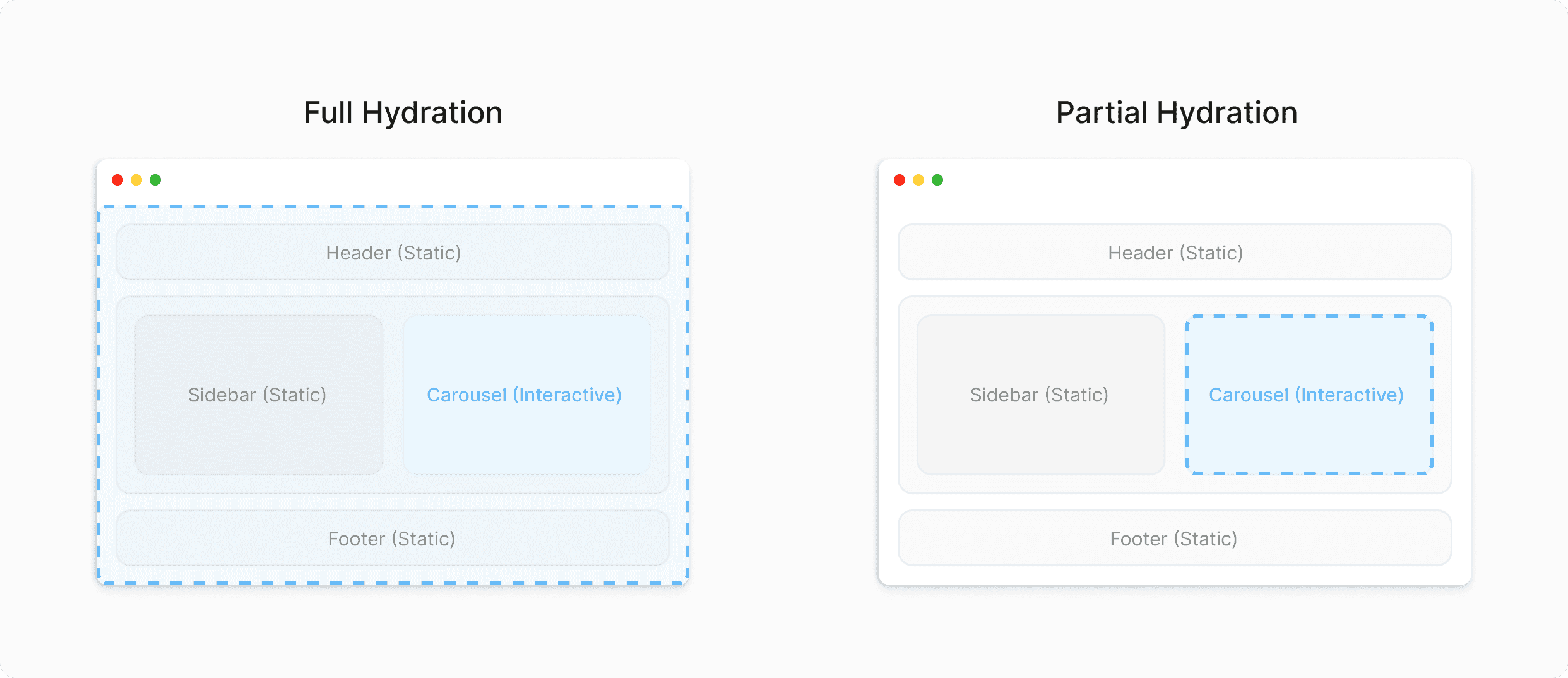
In precise terms, partial hydration (also called selective hydration, incremental hydration, or deferred hydration) is a rendering strategy where:
- The server (or build step) outputs mostly complete HTML for the page (SSR or SSG).
- The client loads JavaScript only for selected components that need interactivity.
- Those components hydrate within explicit hydration boundaries, while the rest of the DOM remains static.
Two terms matter for architecture discussions:
- Hydration boundary: the DOM “edge” where client code is allowed to attach interactivity.
- Island: a hydrated component subtree, bundled with its dependencies and bootstrapped independently.
From a dependency perspective, partial hydration pushes a useful discipline: islands must have stable inputs (props, attributes, serialized data) and minimal hidden coupling. That naturally encourages higher cohesion, lower coupling, and cleaner public APIs.
Partial hydration vs “just code splitting”
Code splitting reduces bundle size, but it does not guarantee that non-interactive parts avoid hydration. You can still code split and hydrate everything; you simply hydrate in chunks. Partial hydration changes what is hydrated, not only how it is packaged.
What’s required to make it work well
A reliable partial hydration setup typically includes:
- SSR/SSG output that is close to final UI (good for SEO and perceived speed).
- A way to declare which components run on the client (client directives, wrappers, build markers).
- An asset pipeline that produces isolated entrypoints for islands and avoids pulling huge shared dependencies.
- A strategy for data boundaries: what is embedded in HTML vs fetched later, and how caching works.
Leading architects suggest treating these boundaries as architecture decisions, not just framework features. The smaller and more explicit your boundaries are, the easier it is to keep performance stable over time.
Islands architecture and Astro Islands in practice
Islands architecture is the broader pattern that popularized partial hydration: render most of the page as static HTML, then hydrate only the interactive islands. It’s particularly effective for content-heavy websites where the majority of the page is readable without JavaScript.
Astro is widely associated with this approach, and its “Astro Islands” ergonomics make the pattern easy to apply: by default, components render to HTML without client-side JavaScript, and you opt into client execution per component using client directives.
How “Astro islands” map to runtime
- Static components: rendered on the server/build step, no JS shipped
- Island components: compiled and shipped as isolated client bundles
- Hydration triggers: you choose when an island becomes interactive
Common hydration triggers:
- Load: hydrate immediately after page load
- Idle: hydrate when the main thread is idle
- Visible: hydrate when the component enters the viewport
- Media: hydrate when a media query matches
Here is a simplified “page with islands” example (pseudo-code):
---
import Article from "../content/Article.astro"
import LikeButton from "../features/like/ui/LikeButton.jsx"
import Comments from "../widgets/comments/ui/Comments.jsx"
---

<Article />
<LikeButton client:idle articleId={id} />
<Comments client:visible articleId={id} />
What this implies:
- Article content ships as plain HTML (great for LCP)
- Like button JS is deferred until idle (less contention)
- Comments hydrate only when the user scrolls (saves bandwidth for bounce users)
Why this pattern is resilient
Islands architecture reduces the blast radius of change. If one widget grows in complexity, the rest of the page remains lightweight. It also encourages progressive enhancement: your baseline UX is functional and readable without JavaScript, and interactivity enhances it.
Partial hydration vs full hydration vs resumability
It’s helpful to compare three families of strategies:
- Full hydration: hydrate the entire SSR output (common in React SSR/Next.js, Vue/Nuxt, and similar stacks)
- Partial hydration / islands: hydrate only selected parts
- Resumability / zero-hydration: avoid executing component trees on the client by resuming from serialized state (popularized by Qwik)
These can be combined with modern delivery techniques like streaming SSR, CDN/edge rendering, and aggressive caching—partial hydration mainly controls the client execution surface area.
| Strategy | Client execution model | Practical trade-offs |
|---|---|---|
| Full hydration | Boot the whole tree; attach handlers everywhere | Simple mental model; can be JS-heavy on content pages |
| Partial hydration (islands) | Boot only selected islands | Great for content-first UX; requires explicit boundaries and careful shared deps |
| Resumability | Resume with minimal client execution until interaction | Very low startup cost; requires a framework built around serialization constraints |
In everyday product work, partial hydration is often the “sweet spot” because it works with many UI component models and scales well for documentation sites, blogs, marketing pages, e-commerce listings, and news portals.
When partial hydration shines (and when it doesn’t)
Partial hydration is not a universal rule; it’s a performance architecture tool. The best results show up when interactivity is sparse and localized.
Strong use cases
- Content-heavy pages (docs, blogs, landing pages)
- Catalog and listing pages (filters, sorting, favorites)
- E-commerce product pages (gallery, variants, add-to-cart, reviews)
- Performance-sensitive regions (mixed network quality, SEO-driven sites)
A useful heuristic: if a page is “worth reading” before JS loads, it’s a strong candidate for islands architecture.
Weaker use cases
- Highly interactive app shells (dashboards, editors, internal tools)
- Cross-cutting global state everywhere (many regions update together)
- Client-side routing dominates (every view transition depends on JS)
Partial hydration can still work here, but benefits shrink unless you also simplify state coupling and reduce the number of islands.
The hidden complexity: state, boundaries, and build pipelines
Partial hydration improves runtime performance, but it changes where complexity lives. Instead of “one app boot”, you manage multiple isolated boots. That’s an acceptable trade when you do it intentionally.
Boundary design: coupling and cohesion in action
A hydration boundary is also a dependency boundary. If you blur it, you pay in both performance and maintainability.
Signs your islands are too tightly coupled:
- Islands depend on global mutable state in ad-hoc ways
- Multiple islands fetch the same data independently
- A shared “commons” module pulls large dependencies into every island
- Behavior requires synchronized updates across islands (chatty events)
How to improve it:
- Prefer data-down, events-up contracts
- Keep each island cohesive: it owns its UI, state, and side effects
- Expose a small public API for cross-slice usage
- Use explicit communication channels when needed (URL params, custom events, scoped stores)
Build pipeline reality: “shared dependencies” are the silent killer
Even with partial hydration, you can accidentally ship a lot of JavaScript if:
- Every island imports a heavy UI library in a non-tree-shakable way
- Shared utilities include big date/format libraries or analytics wrappers
- Bundling config creates a giant vendor chunk loaded by all islands
Treat shared code like shared infrastructure in distributed systems: powerful, but risky when it becomes a dumping ground. Keep it small, stable, and measurable.
Where architecture decides the outcome: organizing islands with Feature-Sliced Design
Partial hydration can make a codebase cleaner—or messier—depending on how you structure it. Multiple islands mean multiple entrypoints and more chances for dependencies to leak. That’s where Feature-Sliced Design (FSD) becomes a strong ally.
FSD is an architectural methodology for frontend projects based on explicit layers, slices, and public APIs. It helps teams:
- Maintain isolation and modularity as the project grows
- Reduce accidental coupling across features and widgets
- Standardize structure across teams for faster onboarding
- Keep refactors local by design (change a slice, not the whole app)
Why classic UI structuring patterns struggle with islands
Many teams reach for familiar patterns, but islands expose their limits:
| Approach | What it optimizes for | Typical pain with partial hydration |
|---|---|---|
| MVC / MVP | Separation of concerns inside a single app | Assumes one runtime root; island entrypoints become awkward |
| Atomic Design | Reusable UI primitives | Great for design systems, but doesn’t define dependency rules for features/islands |
| Domain-Driven Design (frontend) | Domain language and bounded contexts | Strong concepts, but needs strict folder/import discipline to avoid drift |
| Feature-Sliced Design | Layered dependency rules + slice isolation | Aligns well with island boundaries and prevents “shared everything” creep |
The key difference is that FSD isn’t just naming. It’s a dependency model that makes performance boundaries easier to preserve over time.
Mapping islands to FSD layers
A practical mapping that works well:
- pages: route-level composition (mostly static structure + wiring)
- widgets: complex UI blocks that can be islands (Comments, ProductGallery)
- features: user actions and flows (AddToCart, LikeArticle)
- entities: domain objects (Product, User, Article) with model/UI logic
- shared: reusable infrastructure (UI kit, api client, lib utilities, config)
In partial hydration terms:
- Pages render as much static HTML as possible
- Islands typically live in widgets or features
- Shared code stays lean to avoid bloating every island’s bundle
A concrete example: an article page with two islands
Target UX:
- The article content is static and fast
- “Like” is a tiny island
- Comments hydrate only when visible
An FSD-friendly structure might look like this:
src/
  app/
    routing/
    providers/
  pages/
    article/
      ui/
        ArticlePage.astro
  widgets/
    comments/
      ui/
        Comments.tsx
      model/
        useComments.ts
      index.ts
  features/
    like-article/
      ui/
        LikeButton.tsx
      model/
        useLike.ts
      index.ts
  entities/
    article/
      model/
        types.ts
        articleApi.ts
      ui/
        ArticleContent.tsx
      index.ts
  shared/
    ui/
    lib/
    api/
    config/
Two details matter for long-term maintainability:
-
Public API per slice
Each slice exposes only what others need viaindex.ts. Pages import fromfeatures/like-articlerather than deep paths, preventing “spaghetti imports” that couple islands by accident. -
Island-friendly dependency flow
Features and widgets depend on entities and shared; pages compose features and widgets. That keeps the page thin and makes it easier to change hydration strategy without rewriting business logic.
Keeping hydration decisions out of low-level components
A common anti-pattern is sprinkling hydration directives across leaf components. Instead:
- Keep hydration choices near composition (pages/widgets)
- Keep leaf UI components reusable and testable
- Treat “client-only” behavior as a feature, not a default
For example, you can keep LikeButton as a normal UI component, and decide hydration in the page:
<LikeButton client:idle articleId={id} />
If later you choose lazy hydration (visibility-based), that’s a one-line change.
As demonstrated by projects using FSD, teams tend to ship less accidental JavaScript over time because shared code is curated, slices stay cohesive, and the dependency graph stays readable.
Step-by-step: implementing partial hydration in a real project
Below is a pragmatic implementation path that works across ecosystems, whether you use Astro islands, a custom SSR setup, or another framework with selective hydration.
Step 1: Choose the baseline rendering mode (SSR or SSG)
- SSG: great for docs/blogs/marketing; fast CDN delivery and caching
- SSR: great for personalization, auth, frequently changing content
Partial hydration works with both. The key is meaningful HTML without JavaScript.
Step 2: Inventory interactivity and define islands
Label components as:
- Pure content (no JS)
- Enhancements (optional JS)
- Critical actions (must be interactive)
- Heavy widgets (delay or load on demand)
Then define a small set of island candidates, especially above the fold.
Step 3: Define explicit data contracts for each island
Islands should receive what they need via props or serialized data:
- IDs and parameters (articleId, productId)
- Small view models (JSON)
- Initial UI state (variant, locale)
Avoid hidden coupling like “read from a global singleton store”.
Example:
<AddToCart client:load productId="p123" initialQuantity={1} />
Step 4: Place code in FSD slices to keep boundaries stable
- Actions and flows → features
- Complex blocks → widgets
- Domain knowledge → entities
- Infrastructure → shared (kept lean and audited)
This prevents “hydration leakage”, where one small island imports half the app.
Step 5: Choose hydration triggers intentionally
Hydration timing is a UX decision:
- Load for critical interactions (buy, login, search)
- Idle for helpful but non-urgent UI (theme toggle)
- Visible for below-the-fold widgets (comments, related posts)
- Media for responsive-only widgets (desktop-only filters)
Step 6: Measure and iterate
Track:
- JS shipped on first load
- Islands hydrated above the fold
- Long tasks during load
- Core Web Vitals: LCP, INP, CLS
Then tighten dependencies, delay non-critical hydration, and keep a performance budget.
Migration strategy from a fully hydrated SPA
Many teams want partial hydration but have an existing monolithic SPA. A sensible migration reduces risk by moving in layers.
1) Start with “content-first” routes
Pick routes where SSR/SSG is natural (marketing, docs, blog, product pages). Render the route server-side, then introduce islands for the few interactive parts.
2) Reuse components as islands, but fix coupling
Wrap existing components as island widgets, then:
- Provide explicit props
- Split heavy shared modules
- Keep routing/auth at the page layer
3) Standardize structure with FSD while migrating
Migration is when structure matters most. Use FSD as the target shape:
- Move new islands into
features/andwidgets/ - Consolidate domain logic into
entities/ - Keep
shared/small and measurable - Enforce slice public APIs to prevent deep import churn
Performance checklist and common pitfalls
Partial hydration is powerful, and it’s easy to undercut it unintentionally.
Bundle and dependency pitfalls
- Shared vendor bloat: audit what every island pulls in
- Non-tree-shakable imports: prefer modular imports
- Duplicate libraries: avoid shipping two versions of the same dependency
Hydration boundary pitfalls
- Too many islands above the fold: consolidate small widgets
- Islands that depend on each other: redesign contracts
- Implicit data fetching everywhere: cache per island and avoid duplication
UX and accessibility pitfalls
- Ensure a usable baseline without JS (progressive enhancement)
- Avoid layout shifts when islands hydrate (reserve space, stable CSS)
- Keep keyboard and focus behavior correct after hydration
A practical “definition of done” for islands
Before you ship an island, verify:
- The page is readable and usable without the island’s JS
- The island has a clear public API (props) and minimal hidden coupling
- Hydration trigger matches user value (load/idle/visible/media)
- Bundle impact is known and within budget
- Monitoring exists for regressions (at least a basic perf check)
Conclusion
Partial hydration reframes performance as an architectural choice: ship meaningful HTML first, then hydrate only the components that truly need interactivity. Islands architecture—popularized by patterns like Astro islands—reduces JavaScript payload, improves responsiveness, and makes Core Web Vitals easier to sustain. The key is disciplined boundaries: cohesive islands, explicit data contracts, and a build pipeline that avoids shared dependency bloat. Over the long term, adopting a structured methodology like Feature-Sliced Design is a practical investment in code quality, refactoring speed, and team productivity.
Ready to build scalable and maintainable frontend projects? Dive into the official Feature-Sliced Design Documentation to get started.
Have questions or want to share your experience? Visit the Feature-Sliced Design homepage to join the community.