The Perfect Folder Structure for Scalable Frontend

TLDR:
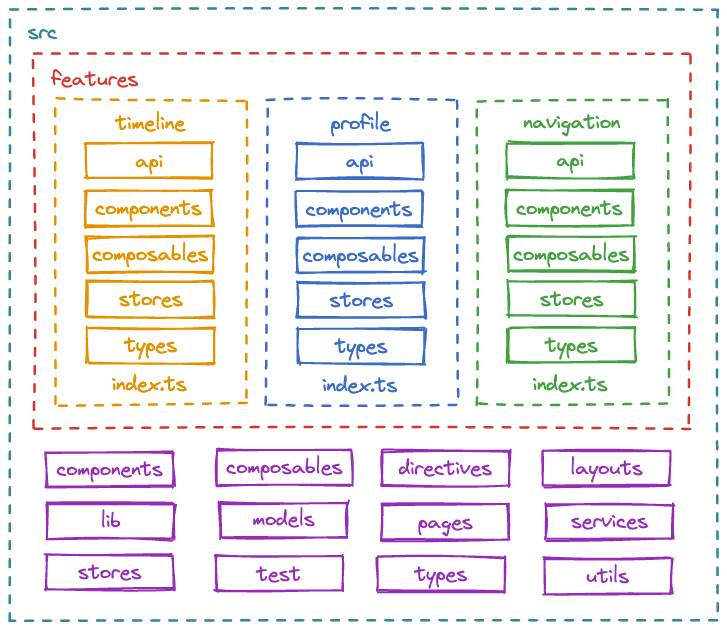
Learn how to organize React, Vue, or Angular projects around business features instead of technical types. This guide walks through Feature-Sliced Design layers, slices, and public APIs so your frontend stays modular, testable, and easy to evolve as your team and product grow.
Frontend organization often silently decides whether your application architecture will scale smoothly or turn into an expensive refactor. As projects grow, a clear, consistent folder structure becomes the backbone of predictable delivery, low technical debt, and fast onboarding. Feature-Sliced Design (FSD), as documented on feature-sliced.design, offers a modern, feature-centric approach to code organization that aligns your folders with real business capabilities instead of arbitrary technical types.
Why Frontend Folder Structure Matters for Scalability
A key principle in software engineering is that structure drives behavior. The way you organize your frontend codebase influences:
- How easily developers find things.
- How safely you can change or extend features.
- How quickly new team members become productive.
When the folder structure grows organically, it often reflects short-term decisions rather than long-term architecture. Over time you see:
- Low cohesion: related pieces of a feature spread across
components,hooks,utils, andstorefolders. - High coupling: unrelated modules importing each other through deep relative paths.
- Change amplification: a small requirement touches files in many distant places.
Good frontend organization improves:
- Cohesion: related code lives together and evolves together.
- Modularity: features behave like replaceable, testable modules.
- Isolation: a bug or refactor in one slice of the system has limited blast radius.
In practice, a scalable project structure solves common pains:
- “Where do I put this new feature?”
- “Is it safe to remove this component?”
- “Why does changing a button break the admin dashboard?”
A clear folder structure becomes part of your team’s shared language. It codifies conventions, reduces bikeshedding, and allows multiple teams to work in parallel on the same codebase architecture without stepping on each other’s toes.
Common Approaches to Frontend Organization (and Their Limits)
Before we talk about Feature-Sliced Design, it’s useful to look at the usual ways teams structure a frontend project and why they eventually hit a ceiling.
Type-Based Project Structure
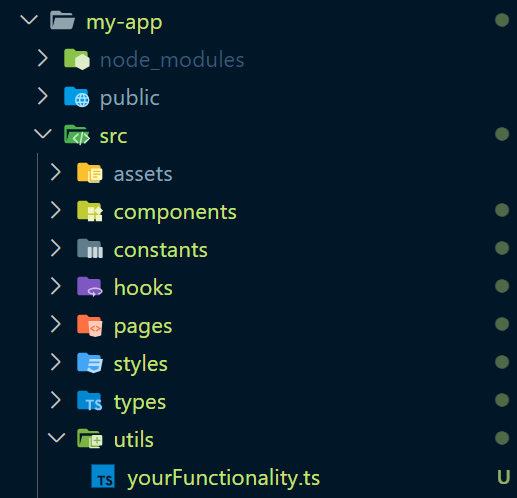
The most common starter layout:
my-app/
    node_modules/
    public/
    src/
        assets/
        components/
        constants/
        hooks/
        pages/
        styles/
        types/
        utils/
        yourFunctionality.ts
This is a type-based organization. Everything is grouped by technical role.
Advantages:
- Easy to start with.
- Familiar to most developers.
- Works fine for small to medium projects.
Issues at scale:
- Features are scattered. To understand “Checkout,” you open files in 5–7 directories.
- Changes cross many folders, increasing risk and merge conflicts.
- No obvious “boundaries” between business areas.
Layered or MVC-Inspired Structure
Some teams apply MVC/MVP concepts to the frontend:
src/modelsrc/viewsrc/controller
or more generic “layered” layouts:
src/presentationsrc/domainsrc/infrastructure
This improves separation of concerns, especially with Domain-Driven Design (DDD) influences, but still tends to group code by abstraction level, not by business task.
Atomic Design and UI-Centric Structures
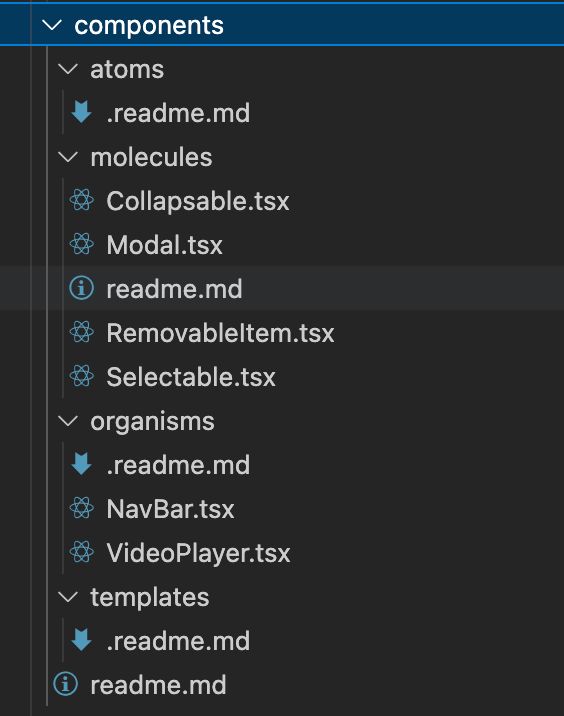
Atomic Design organizes UI by composition level:
components/
    atoms/
        .readme.md
    molecules/
        Collapsable.tsx
        Modal.tsx
        readme.md
        RemovableItem.tsx
        Selectable.tsx
    organisms/
        .readme.md
        NavBar.tsx
        VideoPlayer.tsx
    templates/
        .readme.md
    readme.md
This is excellent for design systems and reusable UI libraries. For feature-heavy products, however, Atomic Design alone does not answer:
- Where do you put feature-specific logic?
- How do you separate “User Profile” concerns from “Billing” concerns?
Atomic Design is powerful for UI components, but it does not fully solve feature boundaries or business-driven frontend organization.
High-Level Comparison
A simplified view:
| Approach | Organizing Principle | Works Best For |
|---|---|---|
| Type-based | Component/service type | Small apps, prototypes |
| MVC / layered | Abstraction or layer | Apps with clear domain vs. UI split |
| Atomic Design | UI complexity level | Design systems, component libraries |
Each method provides value, but none explicitly map your folder structure to business features, processes, and domains. That mapping becomes critical when you want to scale to multiple teams, microfrontends, or long-lived products.
From Type-Based Folders to Feature-Centric Architecture
Leading architects suggest that a healthy frontend architecture should align with business language rather than framework details. That’s where feature-based or domain-based structures enter.
Feature-Based Structure Basics
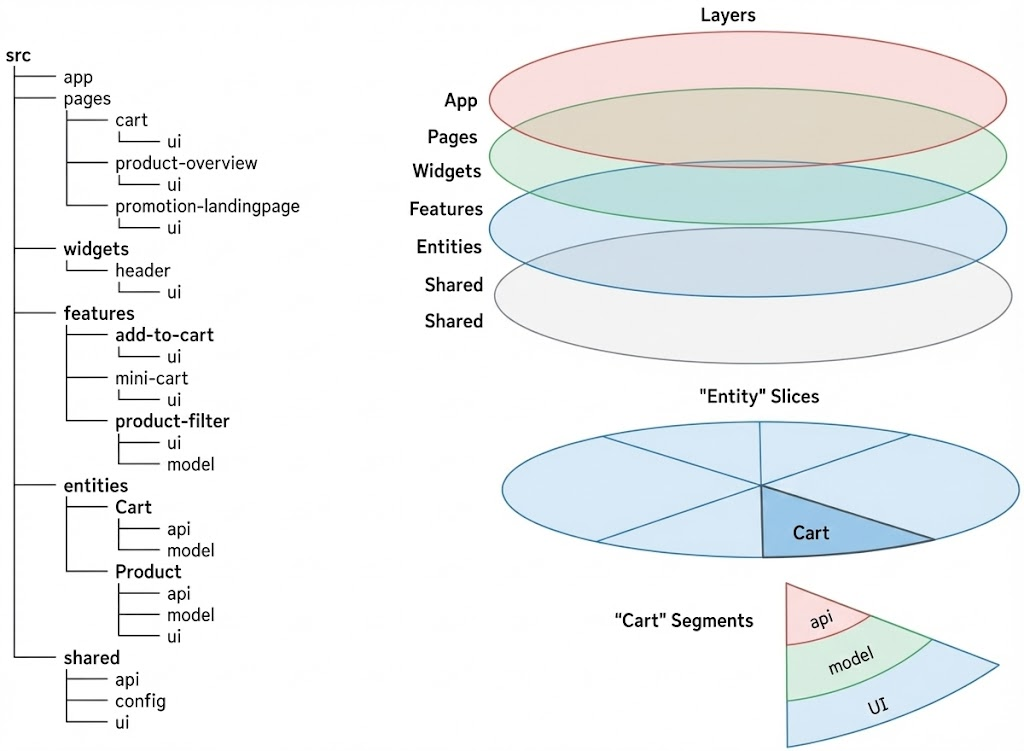
Instead of spreading code across technical types, you organize by business features with FSD layers:
src/
    app/
    pages/
        cart/
            ui/
        product-overview/
            ui/
        promotion-landingpage/
            ui/
    widgets/
        header/
            ui/
    features/
        add-to-cart/
            ui/
        mini-cart/
            ui/
        product-filter/
            ui/
            model/
    entities/
        Cart/
            api/
            model/
        Product/
            api/
            model/
            ui/
    shared/
        api/
        config/
        ui/
Each feature becomes a mini-application containing everything it needs:
- UI components
- State management
- API calls
- Local utilities
This improves cohesion and creates natural modularity. You can reason about a feature in isolation and change it without hunting through unrelated folders.
However, naive feature-based structures still raise questions:
- Where do cross-cutting utilities live?
- How do we avoid circular imports between features?
- How do we keep feature boundaries consistent across teams?
This is exactly where Feature-Sliced Design adds structure and proven patterns.
Introducing Feature-Sliced Design as a Scalable Methodology
Feature-Sliced Design (FSD) is a methodology for frontend organization that systematizes feature-based architecture. Instead of ad-hoc “feature folders,” FSD defines:
- Layers that describe what role a piece of code plays in the app.
- Slices that encapsulate which business domain or feature it belongs to.
- Segments inside each slice that group UI, logic, and helpers with clear rules.
- Public APIs for slices so each part of the app has an explicit interface.
As demonstrated by projects using FSD, this approach scales from small SPAs to complex enterprise frontends with multiple teams and shared libraries.
FSD Layers (High-Level Overview)
The canonical FSD layers are:
app– application root, configuration, routing, providers.processes– long-running cross-page flows (e.g., onboarding, checkout).pages– routable screens composed from widgets and features.widgets– page sections combining features and entities (e.g.,Header,Sidebar).features– user-facing capabilities (e.g.,auth-by-email,article-rating).entities– business entities with behavior (e.g.,user,article).shared– reusable, implementation-agnostic code (e.g., UI kit, libs, API client).
Each layer has its own ownership and dependencies. Higher layers can depend on lower ones, but not the other way around. This enforces directional dependencies and prevents chaotic coupling.
Why FSD Works Well at Scale
FSD brings together ideas from:
- DDD: think in terms of domains, entities, and processes.
- Clean Architecture: invert dependencies and keep business logic at the core.
- Component-driven UIs: keep UI cohesive and composable.
It offers:
- Predictable project structure across products.
- Clear rules for file placement and import paths.
- Reduced accidental coupling between unrelated areas.
- Easier extraction of microfrontends or libraries if needed.
Instead of “just another folder convention,” FSD is a robust methodology for designing scalable frontend architecture, with terminology, guidelines, and a strong community behind it.
Core Building Blocks of an FSD Folder Structure
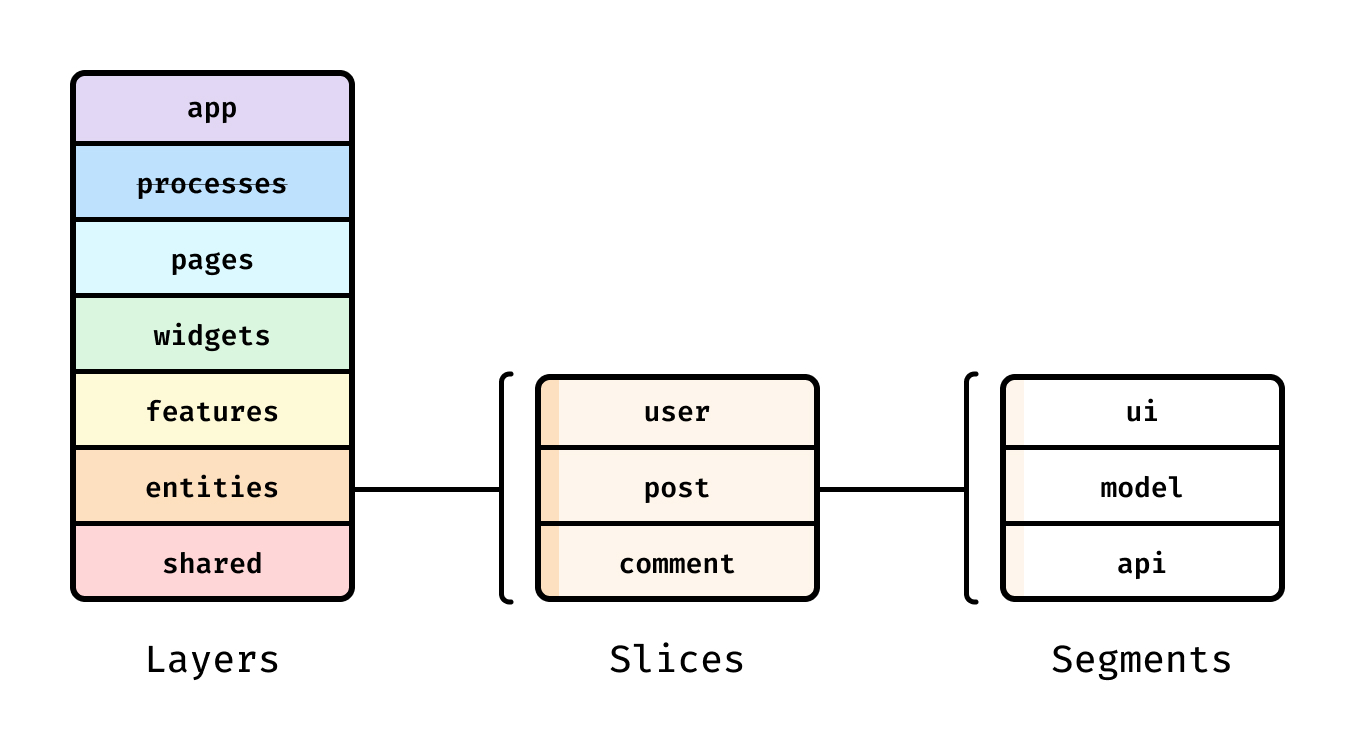
Let's examine the most important parts of an FSD-based folder structure and how they map to real-world projects.
Layers and Allowed Dependencies
At the top level:
src/appsrc/processessrc/pagessrc/widgetssrc/featuressrc/entitiessrc/shared
A typical dependency rule set:
appcan import from anywhere.processescan import frompages,widgets,features,entities,shared.pagescan import fromwidgets,features,entities,shared.widgetscan import fromfeatures,entities,shared.featurescan import fromentities,shared.entitiescan import fromshared.sharedcannot import from above.
This creates a directed acyclic graph of dependencies. It’s easier to reason about impact: lower layers are more stable, while upper layers are more volatile.
Slices: Encapsulating Business Areas
Inside layers like features and entities, you organize by slice, typically named by domain or behavior:
features/auth-by-emailfeatures/article-ratingentities/userentities/article
Each slice represents a cohesive business concept. It contains the UI, logic, and helpers needed for that concept.
Segments: UI, Model, Lib, and More
Within a slice, we split code by responsibility, not by generic type names:
ui– components, composables, directives, templates.model– state, business logic, state machines, effects.lib– internal utilities, helpers, adapters.api(optional) – API client wrappers specific to this slice.
For example, features/article-rating might look like:
features/article-rating/ui/RateArticleButton.tsxfeatures/article-rating/model/useArticleRating.tsfeatures/article-rating/lib/formatRating.tsfeatures/article-rating/index.ts(public API)
This structure improves cohesion inside the slice and keeps responsibilities familiar across features.
Public API of a Slice
A crucial FSD concept is the public API file:
features/article-rating/index.tsentities/user/index.ts
This file exports only what other layers are allowed to use:
// features/article-rating/index.ts
export { RateArticleButton } from "./ui/RateArticleButton";
export { useArticleRating } from "./model/useArticleRating";
Other slices import from this public API:
// widgets/article-card/ui/ArticleCard.tsx
import { RateArticleButton, useArticleRating } from "features/article-rating";
This pattern ensures that:
- Internal implementation details stay hidden.
- Breaking changes are limited to the public API.
- Refactoring internals doesn't affect dependent code.
Practical Examples: Real-World FSD Folder Structures
To make this concrete, here's a real e-commerce application structure following FSD:
Complete E-commerce Example
src/
    app/
        # Application initialization, routing, providers

    pages/
        cart/
            ui/
                CartPage.tsx
        product-overview/
            ui/
                ProductOverviewPage.tsx
        promotion-landingpage/
            ui/
                PromotionLandingPage.tsx

    widgets/
        header/
            ui/
                Header.tsx

    features/
        add-to-cart/
            ui/
                AddToCartButton.tsx
        mini-cart/
            ui/
                MiniCart.tsx
        product-filter/
            ui/
                ProductFilter.tsx
            model/
                filterStore.ts

    entities/
        Cart/
            api/
                cartApi.ts
            model/
                cartStore.ts
        Product/
            api/
                productApi.ts
            model/
                productStore.ts
            ui/
                ProductCard.tsx

    shared/
        api/
            baseApi.ts
        config/
            constants.ts
        ui/
            Button.tsx
            Input.tsx
This example shows how FSD organizes code by business meaning rather than technical type:
- Pages represent routes (cart, product overview, promotions)
- Widgets are composite UI sections (header combining multiple features)
- Features are user interactions (add to cart, mini cart, filtering)
- Entities are business models (Cart, Product with their data and UI)
- Shared contains reusable utilities and components
Each slice is self-contained, testable, and has clear boundaries.
When to Use Feature-Sliced Design
Feature-Sliced Design works best when:
- Your application has multiple business domains or features.
- The project will grow over time with new features and teams.
- You need clear ownership and boundaries between different parts of the app.
- You want to reduce coupling and make refactoring safer.
FSD may be overkill if:
- You're building a small prototype or single-page marketing site.
- The project has a very short lifespan.
- You have a single developer working on a simple application.
However, even for smaller projects, adopting FSD principles (like feature-based organization and public APIs) can prevent future pain as the codebase grows.
Conclusion: Structure That Scales With Your Product
A well-designed folder structure is not just about organization—it's about creating a foundation that supports growth, change, and collaboration. Feature-Sliced Design provides a proven methodology for organizing frontend code that aligns with business capabilities rather than framework conventions.
By adopting FSD's layered approach with clear boundaries, public APIs, and directional dependencies, you create a codebase that:
- Scales with features: New capabilities map naturally to new slices.
- Scales with teams: Different squads can own different slices without conflicts.
- Scales with time: The structure remains understandable as the app evolves.
Instead of fighting against a maze of components/, hooks/, and utils/ folders, FSD gives you a predictable, maintainable structure that grows with your product. Whether you're building a React, Vue, Angular, or Svelte application, the principles of Feature-Sliced Design help you organize code in a way that matches how your product actually works.
Ready to build scalable and maintainable frontend projects?
Dive into the official Feature-Sliced Design Documentation to get started.
Have questions or want to share your experience?
Join our active developer community on Website!
Disclaimer: The architectural patterns discussed in this article are based on the Feature-Sliced Design methodology. For detailed implementation guides and the latest updates, please refer to the official documentation.