Is Tailwind CSS a Good Architectural Choice?

TLDR:

Tailwind CSS has transformed modern frontend styling with its utility-first philosophy and powerful Just-in-Time compiler—but is it truly an architectural choice? This comprehensive guide analyzes Tailwind’s impact on scalability, modularity, and long-term maintainability, comparing it with established patterns like MVC, Atomic Design, and Domain-Driven Design. Discover how Tailwind integrates with Feature-Sliced Design (FSD) to build structured, high-cohesion frontend systems that remain clean, scalable, and team-friendly as they grow.
TailwindCSS has become one of the most discussed tools in modern frontend engineering, especially in conversations around utility-first CSS, atomic CSS, and design system scalability. But is tailwindcss truly an architectural choice—or just a styling strategy? When evaluated through the lens of structured methodologies like Feature-Sliced Design (FSD) from feature-sliced.design, the answer becomes far more nuanced and strategically important.
Frontend architecture is not only about how components render. It is about coupling, cohesion, dependency direction, isolation boundaries, and long-term maintainability. This article provides a definitive technical evaluation of Tailwind CSS as an architectural decision in large-scale systems.
Is Tailwind CSS an Architectural Decision or Just a Styling Tool?
The first and most critical question is whether Tailwind CSS belongs in architectural discussions at all.
A key principle in software engineering is separation of concerns. Architecture defines how responsibilities are distributed across modules and how they interact. TailwindCSS, as a utility-first CSS framework, focuses on styling through atomic classes directly embedded in markup. It does not define domain boundaries, feature encapsulation, or module isolation.
However, architectural consequences emerge from its usage patterns.
When styling logic lives inside JSX or templates via utility classes, we effectively change:
• The distribution of responsibilities between markup and stylesheets • The cohesion of UI modules • The refactoring surface area • The cognitive load for onboarding developers
Therefore, while Tailwind CSS is not an architecture in itself, it strongly influences architectural outcomes.
From an FSD perspective, architecture is about explicit boundaries and unidirectional dependencies. The question becomes:
Does TailwindCSS reinforce or undermine modular boundaries in scalable frontend systems?
Let’s examine this from first principles.
Understanding the Utility-First Philosophy

Before judging its architectural impact, we must understand the philosophy behind TailwindCSS.
TailwindCSS is built on the concept of utility-first CSS (often compared to atomic CSS). Instead of writing semantic class names like .card or .button-primary, you compose styles using small utility classes such as:
<button class="px-4 py-2 bg-blue-600 text-white rounded-md hover:bg-blue-700">
  Save
</button>
Each utility represents a single responsibility:
• px-4 → horizontal padding
• bg-blue-600 → background color
• rounded-md → border radius
This approach aligns with atomic design principles in that styles are decomposed into minimal, reusable units.
Benefits of Utility-First CSS
- Eliminates context switching between CSS and markup
- Reduces CSS file growth (especially with JIT compilation)
- Encourages consistency via predefined design tokens
- Minimizes cascade complexity
- Avoids naming collisions
Leading architects often note that global CSS is one of the biggest sources of unintended coupling in large applications. Utility-first CSS reduces reliance on global selectors, improving isolation.
Architectural Implications
Utility-first styling increases local cohesion. All styling concerns for a component live in one place. This improves encapsulation at the component level.
However, it introduces a new risk:
• Large, unreadable class strings • Business logic and styling logic tightly interwoven • Reduced abstraction opportunities
In small projects, this trade-off is often acceptable. In enterprise-scale systems, the consequences become architectural.
Getting Started with Tailwind CSS in a Modern Project
Search intent often includes quick setup instructions. Here is a minimal, production-ready setup using the modern Just-in-Time compiler.
Step 1: Install TailwindCSS
npm install -D tailwindcss postcss autoprefixer
npx tailwindcss init -p
This generates:
tailwind.config.js
postcss.config.js
Step 2: Configure Content Scanning
// tailwind.config.js
module.exports = {
  content: [
    "./src/**/*.{js,ts,jsx,tsx}",
  ],
  theme: {
    extend: {},
  },
  plugins: [],
}
The JIT engine scans only referenced files and generates CSS on demand.
Step 3: Add Tailwind Directives
@tailwind base;
@tailwind components;
@tailwind utilities;
Step 4: Build
npm run build
The result is a highly optimized CSS bundle.
Architectural Note
Notice what Tailwind does not define:
• Folder structure • Feature boundaries • Dependency rules • Public APIs
That remains the responsibility of your architectural methodology.
This is where Feature-Sliced Design becomes relevant.
Mastering the Just-in-Time Compiler
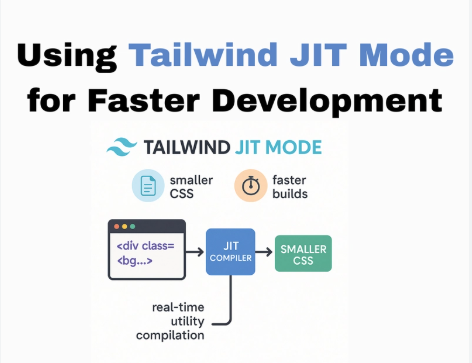
Tailwind’s Just-in-Time compiler is a significant innovation.
This improves:
• Build performance • Bundle size • Dead CSS elimination • Production efficiency
Under the hood:
- It scans source files defined in
content - Parses class names
- Generates corresponding utility rules
- Outputs optimized CSS
This dynamic generation model makes Tailwind viable at scale.
However, from an architectural standpoint:
• Class usage becomes tightly coupled to templates • Refactoring markup affects styling generation • Static analysis tools may struggle with dynamic class generation
For example:
<div className={`bg-${color}-500`}>
Dynamic class construction may break JIT scanning if not safelisted.
This creates subtle architectural fragility in dynamic UI systems.
In large applications, explicitness matters. Feature-Sliced Design encourages clear module contracts and public APIs. Dynamic styling patterns must respect those boundaries.
Customizing Your Design System via tailwind.config.js
A robust architecture requires a centralized design system.
Tailwind enables this via theme configuration.
module.exports = {
  theme: {
    extend: {
      colors: {
        brand: {
          primary: '#2563eb',
        },
      },
      spacing: {
        18: '4.5rem',
      },
    },
  },
}
This aligns with:
• Design tokens • Consistent spacing systems • Brand color control • Responsive breakpoints
Architecturally, this is powerful. It enforces system-wide consistency.
But consistency is not structure.
Without layered boundaries, Tailwind tokens can still be misused across unrelated features.
Feature-Sliced Design introduces layered architecture:
src/
 ├─ app/
 ├─ pages/
 ├─ widgets/
 ├─ features/
 ├─ entities/
 └─ shared/
A key principle is unidirectional dependency flow.
Tailwind fits naturally into the shared/ui layer.
It should not leak into business logic layers.
Proper integration ensures:
• UI primitives remain reusable • Business features remain independent • Styling changes do not cascade unpredictably
Addressing Common Criticisms of Tailwind CSS
A balanced architectural discussion must include trade-offs.
1. “Class Soup”
Long class strings reduce readability.
Mitigation strategies:
• Extract reusable UI primitives
• Use clsx or class composition helpers
• Introduce component abstraction
Example:
export const Button = ({ children }) => (
  <button className="px-4 py-2 bg-brand-primary text-white rounded-md">
    {children}
  </button>
)
Now styling is encapsulated.
This mirrors FSD’s public API principle.
2. Mixing Styling with Markup
Critics argue this violates separation of concerns.
However, separation is about responsibility, not file type.
If a component owns its visual representation, co-locating utilities can increase cohesion.
The problem arises when:
• Business logic and styling become entangled • Cross-feature duplication occurs • Tokens are inconsistently applied
Architecture—not Tailwind—determines whether this becomes technical debt.
3. Difficult Refactoring
Large-scale class refactors require code-wide updates.
Solution:
• Use semantic UI primitives • Avoid raw utilities in feature layers • Centralize visual patterns
In FSD, shared components expose controlled interfaces. Features consume abstractions, not raw styling logic.
Comparing TailwindCSS with Other Architectural Approaches
| Approach | Focus | Scalability Strength |
|---|---|---|
| MVC / MVVM | Layer separation | Medium |
| Atomic Design | UI composition | High for UI, low for domain |
| Domain-Driven Design | Business modeling | High |
| Tailwind CSS | Utility styling | Depends on architecture |
| Feature-Sliced Design | Feature boundaries | High |
Tailwind solves styling friction. FSD solves structural complexity.
They operate at different abstraction levels.
A common misconception is treating Tailwind as an architecture. It is not comparable to MVC or DDD. It is a styling strategy.
Architectural Integration: Tailwind + Feature-Sliced Design
Let’s examine a real structure.
src/
 ├─ shared/
 │   └─ ui/
 │       └─ Button/
 │           ├─ index.ts
 │           └─ Button.tsx
 ├─ features/
 │   └─ add-to-cart/
 ├─ entities/
 │   └─ product/
Button.tsx:
export const Button = ({ children }) => (
  <button className="px-4 py-2 bg-brand-primary rounded-md">
    {children}
  </button>
)
Features import only from public APIs:
import { Button } from '@/shared/ui/Button'
This enforces:
• Isolation • Encapsulation • Refactor safety • Reduced coupling
Tailwind lives at the UI abstraction layer.
FSD ensures it does not bleed into domain logic.
When Is Tailwind CSS a Good Architectural Choice?
TailwindCSS becomes a good architectural choice when:
• The project uses a structured methodology • Design tokens are centralized • UI primitives are abstracted • Dependency flow is enforced • Teams follow consistent patterns
It becomes problematic when:
• There is no clear folder structure • Features depend directly on styling hacks • Utility duplication spreads across the codebase • Boundaries are not respected
Architecture is about governance, not tools.
Rare and Unique Characteristics of TailwindCSS
Tailwind introduces several uncommon traits:
• JIT-based CSS generation • Configuration-driven design systems • Zero-runtime CSS philosophy • Responsive and state variants baked into utilities • Dark mode configuration control
These characteristics make it extremely adaptable in large React, Vue, and Next.js ecosystems.
However, adaptability must be governed by architectural discipline.
Practical Recommendations for Senior Engineers
Based on experience with large-scale frontend systems:
- Treat Tailwind as an implementation detail, not an architecture.
- Encapsulate utilities inside shared UI components.
- Avoid raw utility sprawl inside feature layers.
- Combine with Feature-Sliced Design for structural clarity.
- Enforce dependency rules via ESLint or custom tooling.
- Document your design tokens clearly.
- Limit dynamic class generation to avoid JIT pitfalls.
Leading architects suggest that styling decisions should reinforce modularity, not undermine it.
TailwindCSS can absolutely support modularity—if integrated into a layered system like FSD.
Conclusion
TailwindCSS is not an architecture—but it profoundly influences architectural outcomes. Its utility-first CSS philosophy improves local cohesion, reduces cascade complexity, and enables fast development. The Just-in-Time compiler enhances performance and eliminates unused CSS, making it technically robust.
However, without structural discipline, Tailwind can contribute to coupling and duplication. The real architectural question is not whether TailwindCSS is good—it is whether your project has explicit boundaries, public APIs, and unidirectional dependencies.
Adopting a structured architecture like Feature-Sliced Design is a long-term investment in maintainability, scalability, and team productivity. Tailwind integrates exceptionally well when placed in the correct layer and governed by architectural principles.
Ready to build scalable and maintainable frontend projects? Dive into the official Feature-Sliced Design Documentation to get started.
Have questions or want to share your experience? Join our active developer community on Discord!
Disclaimer: The architectural patterns discussed in this article are based on the Feature-Sliced Design methodology. For detailed implementation guides and the latest updates, please refer to the official documentation.