Zustand: The Minimalist State Architecture

TLDR:
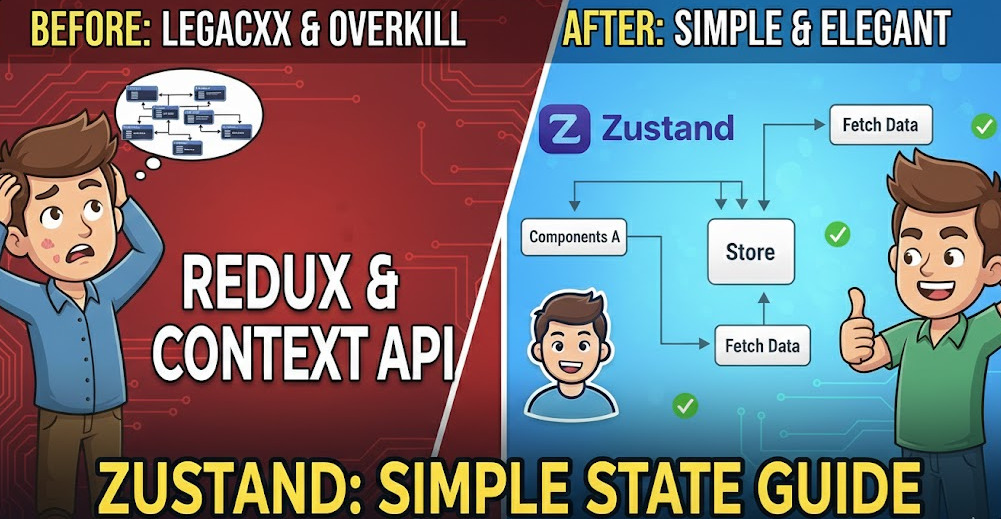
Zustand keeps React state management lightweight: a create store, selector-based subscriptions, and async actions without extra ceremony. This article shows how to build maintainable stores, avoid common pitfalls, and combine Zustand with Feature-Sliced Design to keep large codebases modular, refactor-friendly, and easy to onboard.
Zustand makes React state management feel lightweight again, especially when your app has outgrown prop drilling and Context re-renders. In large codebases, a minimal store is only half the battle—Feature-Sliced Design (FSD) from feature-sliced.design adds the structural rules that keep global state, async logic, and UI modules decoupled. This guide shows how to build a clean Zustand architecture, scale it with FSD, and compare it to Redux and other approaches.
Quick Start: A Zustand store in 5 minutes
If you’re evaluating Zustand as a simple Redux alternative, the fastest way to understand it is to build a store and use it in a component. Zustand’s “hello world” is intentionally small: a single create call returns a hook you can read from and write to.
1) Install and create your first store
Install:
npm i zustand- or
pnpm add zustand
Create a store (TypeScript example):
import { create } from "zustand";

type CounterState = {
  count: number;
  inc: () => void;
  add: (by: number) => void;
  reset: () => void;
};

export const useCounterStore = create<CounterState>()((set, get) => ({
  count: 0,
  inc: () => set((s) => ({ count: s.count + 1 })),
  add: (by) => set({ count: get().count + by }),
  reset: () => set({ count: 0 }),
}));
What this gives you:
- A global store with a tiny API surface.
- Actions colocated with state (high cohesion).
- No reducers, action types, dispatching, or Provider boilerplate.
2) Use the store hook in React components
import { useCounterStore } from "./counter.store";

export function CounterPanel() {
  const count = useCounterStore((s) => s.count);
  const inc = useCounterStore((s) => s.inc);
  const reset = useCounterStore((s) => s.reset);

  return (
    <section>
      <h2>Count: {count}</h2>
      <button onClick={inc}>+1</button>
      <button onClick={reset}>Reset</button>
    </section>
  );
}
Key idea: components subscribe to selected slices of state. If count changes, CounterPanel re-renders. If some unrelated field changes, it won’t—assuming you use selectors properly.
3) A quick “data point” comparison from real code
In practice, teams switch to Zustand because it reduces ceremony. Here’s a compact comparison based on typical setups:
| Approach | Setup artifacts (typical) | Boilerplate feel |
|---|---|---|
| Redux Toolkit slice | 2–4 files (slice, selectors, types, tests) | Medium |
| Context + reducer | 2–3 files (context, provider, reducer) | Medium |
| Zustand store | 1–2 files (store, selectors) | Low |
This isn’t a claim about “better,” but it explains why Zustand often wins for React state management that must stay simple.
Understanding the core API: create, selectors, actions, and subscriptions
A key principle in software engineering is that stable, small APIs are easier to scale than feature-rich APIs that invite inconsistent patterns. Zustand’s API looks tiny, but it’s expressive enough for most client state.
create() returns a hook, not a Provider
When you call create, you get a hook like useCounterStore. There’s no required <Provider/>, which eliminates a common source of wiring and refactoring friction.
Under the hood, Zustand integrates cleanly with modern React subscription patterns (including React 18 concurrency), but you don’t need to manage that complexity yourself.
Selectors are your primary performance tool
The selector (s) => s.count is not just convenience—it defines the subscription boundary.
Good:
- Subscribe to primitives or small objects.
- Keep derived logic in selectors or computed fields.
Risky:
- Subscribing to the whole state (
(s) => s) causes broad re-renders. - Returning new objects without equality checks can re-render often.
Selecting multiple fields without extra re-renders
When selecting an object, you often want shallow comparison.
import { shallow } from "zustand/shallow";
import { useCounterStore } from "./counter.store";

export function useCounterControls() {
  return useCounterStore(
    (s) => ({ count: s.count, inc: s.inc, reset: s.reset }),
    shallow
  );
}
This pattern is useful when you want to expose a “view model” hook that’s stable and easy to consume.
set and get define the update model
In the store initializer (set, get) => ({ ... }):
setupdates state (supports partial updates and functional updates).getreads current state (useful for computed updates and guards).
A pragmatic rule:
- Use
set((s) => ...)for updates based on existing values. - Use
get()for rare cases where you need current state outside the updater.
This reduces accidental stale reads and makes actions predictable.
Vanilla stores: using Zustand outside React
One of Zustand’s unique characteristics is that it supports “vanilla” stores, which can be used in non-React code (services, tests, workers) and then wired into React later.
Conceptually:
- You can create a store instance and call
store.getState()/store.setState(). - React hooks can subscribe to that store.
This is a powerful lever for architecture, because it helps isolate domain logic from UI rendering.
Async actions and side effects without ceremony
Async is where state management libraries reveal their real cost. Zustand’s approach is straightforward: actions can be async functions. No thunks, sagas, or extra middleware are required for the baseline.
Example: async loading with status and error handling
type User = { id: string; name: string };

type UserState = {
  user: User | null;
  status: "idle" | "loading" | "success" | "error";
  error: string | null;
  loadUser: (id: string) => Promise<void>;
};

export const useUserStore = create<UserState>()((set) => ({
  user: null,
  status: "idle",
  error: null,

  loadUser: async (id) => {
    set({ status: "loading", error: null });

    try {
      const res = await fetch(`/api/users/${id}`);
      if (!res.ok) throw new Error(`HTTP ${res.status}`);

      const user: User = await res.json();
      set({ user, status: "success" });
    } catch (e) {
      set({
        status: "error",
        error: e instanceof Error ? e.message : "Unknown error",
      });
    }
  },
}));
This pattern:
- Keeps async logic close to the state it mutates (high cohesion).
- Avoids scattering side effects across UI components.
- Makes state transitions explicit (
idle → loading → success/error).
Example: cancellation and “latest request wins”
Real apps need to avoid race conditions, especially when typing into search boxes or switching routes.
type SearchState = {
  query: string;
  results: string[];
  isLoading: boolean;
  abort?: AbortController;
  setQuery: (q: string) => void;
  search: (q: string) => Promise<void>;
};

export const useSearchStore = create<SearchState>()((set, get) => ({
  query: "",
  results: [],
  isLoading: false,

  setQuery: (q) => set({ query: q }),

  search: async (q) => {
    // Cancel any in-flight request
    get().abort?.abort();
    const abort = new AbortController();

    set({ isLoading: true, abort, query: q });

    try {
      const res = await fetch(`/api/search?q=${encodeURIComponent(q)}`, {
        signal: abort.signal,
      });
      const results: string[] = await res.json();

      // Only commit if this is still the active controller
      if (get().abort === abort) {
        set({ results, isLoading: false });
      }
    } catch (e) {
      if (get().abort === abort) {
        set({ isLoading: false });
      }
    }
  },
}));
Leading architects suggest modeling async flows as state machines (even simple ones). The “controller identity check” above is a minimal and effective safeguard.
Client state vs server state: don’t overload your store
A practical guideline:
- Server state (fetching, caching, invalidation): prefer tools like TanStack Query / SWR.
- Client state (UI toggles, selections, drafts, session, workflow steps): Zustand shines.
You can integrate both:
- Use TanStack Query for remote data.
- Use Zustand for UI decisions around that data (filters, selection, modals, optimistic local editing).
This split reduces coupling and improves maintainability.
Why Zustand feels minimalist: the architectural principles behind the API
Zustand is not “small” by accident. Its ergonomics encourage design principles that matter when codebases grow.
Cohesion over ceremony
In Redux-style architectures, it’s common to split logic across reducers, action creators, selectors, middleware, and configuration. That can be excellent for consistency—but it can also create “spaghetti by indirection” when teams move fast.
Zustand encourages:
- Colocation of state and actions.
- Fewer layers between “intent” and “mutation”.
- A smaller public API surface per module.
High cohesion makes refactoring cheaper and onboarding smoother.
Lower coupling through explicit boundaries
Minimalism is only safe when boundaries are clear.
Without architecture:
- A single global store becomes a dumping ground.
- Any feature can mutate anything.
- Hidden dependencies emerge.
With good boundaries (we’ll use FSD later):
- Each module exports a small public API (selectors + actions).
- Cross-module access is controlled.
- Stores remain understandable, even in large teams.
Middleware as opt-in capabilities
Zustand supports middleware composition, so you only pay for features you use. Common examples:
- persist for storage-backed state (localStorage/sessionStorage).
- devtools for Redux DevTools integration.
- immer for ergonomic immutable updates.
- subscribeWithSelector for efficient subscriptions outside React.
A healthy pattern is to start with zero middleware and add it only when the need is concrete. That keeps your state layer lean.
A lightweight mental model
Zustand’s state container is easy to explain to a new teammate:
- A store holds state.
- Actions update state using
set. - Components subscribe via selectors.
This clarity is an advantage in organizations where teams rotate across domains and projects.
Zustand vs Redux vs Context: choosing the right tool
There is no one-size-fits-all solution. The right choice depends on team size, governance, complexity, and the kind of state you manage.
Comparison table
| Solution | Strengths | Trade-offs |
|---|---|---|
| Zustand | Minimal boilerplate, direct selectors, easy async, no Provider | Needs architectural discipline to avoid “global dump” |
| Redux Toolkit | Strong conventions, great tooling, predictable patterns | More setup, more files, heavier mental model |
| React Context (+ reducer) | Built-in, great for theme/i18n/static deps | Can cause broad re-renders, Provider wiring scales poorly |
When Zustand is a strong fit
Zustand typically excels when:
- You want a lightweight Redux alternative without losing structure.
- You have multiple UI-driven workflows (wizards, editors, dashboards).
- You need incremental adoption (store-by-store migration).
- Your team values pragmatic speed but still wants maintainable boundaries.
When Redux Toolkit may be safer
Redux Toolkit can be a great choice when:
- You need strict governance and consistency across many teams.
- You want standardized patterns for actions, slices, and middleware.
- You rely heavily on ecosystem conventions.
The trade-off is more ceremony; you can mitigate this with good tooling and templates.
When Context is enough
Context is excellent for:
- Dependency injection-like values (theme, locale, feature flags).
- Stable values with low update frequency.
If your context changes frequently, it can become a performance and maintainability problem. Zustand often replaces “Context + reducer everywhere” in apps that grow beyond a few modules.
State architecture at scale: combining Zustand with Feature-Sliced Design
Zustand solves “how do I manage state,” but large teams still ask:
- Where does the store live?
- Who owns which state?
- How do we avoid cross-feature entanglement?
- How do we expose state safely without leaking internals?
This is where Feature-Sliced Design (FSD) becomes a force multiplier. As demonstrated by projects using FSD, a clear module hierarchy reduces refactoring risk and increases onboarding speed.
A short refresher on FSD layers
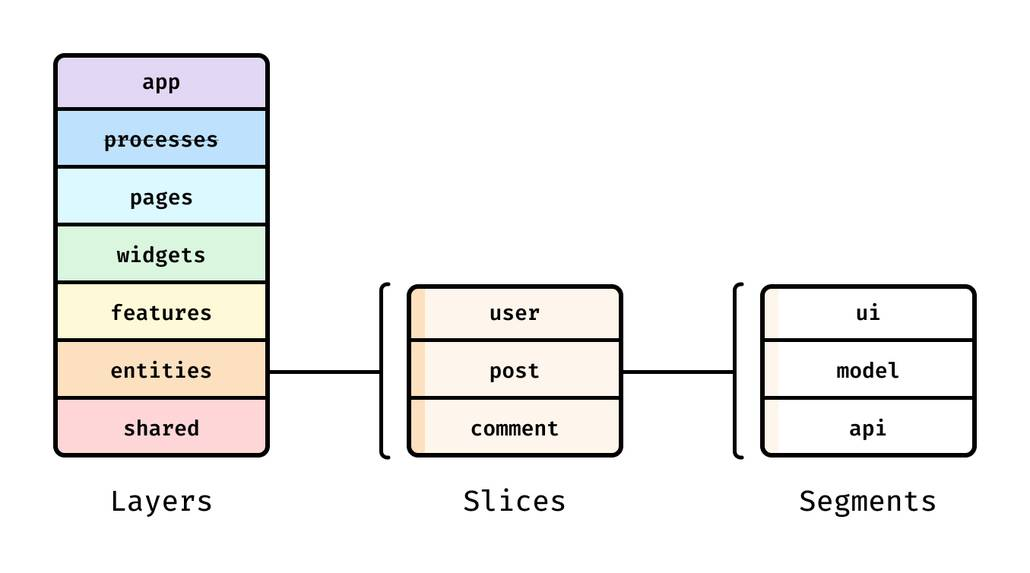
FSD organizes code into layers with dependency rules:
shared— reusable utilities, UI kit, generic libsentities— domain entities (User, Product) and their modelsfeatures— user-facing capabilities (Login, Checkout)widgets— composite UI blocks (Header, Sidebar)pages— route-level compositionapp— app initialization, providers, routing, global configuration
The key principle: dependencies go “down”, not “sideways”. Features can depend on entities, but entities shouldn’t depend on features.
Mapping Zustand concepts to FSD segments
Within a slice (feature/entity), you typically use segments like:
model/— state, actions, selectors, typesui/— componentsapi/— networking layer for that slicelib/— helpers specific to that sliceindex.ts— public API
A concrete directory structure:
src/
  app/
    providers/
    routing/
  pages/
    dashboard/
  widgets/
    header/
  features/
    auth/
      model/
        session.store.ts
        session.selectors.ts
      ui/
        login-form.tsx
      index.ts
  entities/
    user/
      model/
        user.store.ts
        user.selectors.ts
      api/
        user.api.ts
      ui/
        user-avatar.tsx
      index.ts
  shared/
    api/
    lib/
    ui/
Public API prevents accidental coupling
A common scaling failure is importing deep internals across the app:
import { setToken } from "@/features/auth/model/session.store"import { useUserStore } from "@/entities/user/model/user.store"
It feels harmless until refactoring. FSD encourages exporting only what is safe:
// features/auth/index.ts
export { useSessionStore } from "./model/session.store";
export { selectIsAuthenticated } from "./model/session.selectors";
Now consumers import from the slice root:
import { useSessionStore, selectIsAuthenticated } from "@/features/auth";
Benefits:
- You can refactor internal file structure without mass changes.
- You control what becomes “stable API” vs “internal detail”.
- You reduce the blast radius of changes—critical for large teams.
Recommended ownership rules for Zustand state in FSD
A pragmatic approach:
- Local component state (input value, hover) → keep in component.
- Widget-scoped UI state (sidebar open) → widget
model/. - Feature state (login flow, draft form) → feature
model/. - Entity state (current user profile, selected product) → entity
model/. - App-wide state (theme mode, auth token if truly global) →
app/or a dedicated entity/feature depending on ownership.
This boosts cohesion and keeps stores aligned with domain boundaries.
A text-based diagram for data flow
Think of state boundaries as “owned by slices,” and UI composition as “assembled upward”:
sharedprovides primitivesentitiesown domain state and operationsfeaturesorchestrate user interactions using entitieswidgets/pagescompose features into screensappwires routing/providers and bootstrap
This alignment reduces cross-dependencies and makes the state layer predictable.
Patterns for large projects: multiple stores, slices, and modular boundaries
As your application grows, the question becomes: do you keep one store or many?
Zustand supports both—but architecture should guide the choice.
Pattern A: store-per-slice (recommended for FSD)
In FSD, store-per-slice usually wins because it matches module boundaries.
Example: entities/user/model/user.store.ts owns user state only.
type UserModel = {
  currentUserId: string | null;
  setCurrentUserId: (id: string | null) => void;
};

export const useUserModel = create<UserModel>()((set) => ({
  currentUserId: null,
  setCurrentUserId: (id) => set({ currentUserId: id }),
}));
Then features/auth can call user actions via public APIs, not internal wiring.
Why it scales:
- Clear ownership reduces accidental global coupling.
- Teams can work in parallel with fewer merge conflicts.
- Refactoring is localized.
Pattern B: domain store with slice composition
Sometimes you want a “domain module” to expose a single hook but keep internals modular.
A simple approach:
- Keep internal slice creators in separate files.
- Combine them into one store factory.
This is useful when:
- Multiple related slices must update atomically.
- You want a single persistence boundary.
- You have a domain that behaves like a subsystem (e.g., an editor).
Pattern C: a single global store (use sparingly)
A single store can work well for small apps. But it tends to degrade in large systems unless you enforce strict rules:
- No cross-feature mutations without an explicit API.
- Selectors only, no “read arbitrary state” in random modules.
- Sub-stores or namespaces to keep cognitive load manageable.
If you choose this approach, you’re essentially building your own architecture layer—FSD gives you a proven version of that discipline.
Derived state: selectors vs stored computed values
Rule of thumb:
- If a value is purely derived from other state, compute it in a selector.
- If it’s expensive and reused widely, consider memoization or storing it.
Example selector:
export const selectIsAuthenticated = (s: { token: string | null }) =>
  Boolean(s.token);
Selectors are part of your public API and reduce duplication across the UI.
Persist, devtools, and other capabilities: adding power without losing simplicity
Minimalism doesn’t mean “no tools.” It means tools are opt-in and explicit.
Persistence for resilient UX
Persistence helps when users expect state continuity:
- Auth sessions
- Draft forms
- UI preferences
A typical persist setup:
import { create } from "zustand";
import { persist } from "zustand/middleware";

type PreferencesState = {
  theme: "light" | "dark";
  setTheme: (t: "light" | "dark") => void;
};

export const usePreferencesStore = create<PreferencesState>()(
  persist(
    (set) => ({
      theme: "light",
      setTheme: (theme) => set({ theme }),
    }),
    {
      name: "preferences",
      // partialize: (s) => ({ theme: s.theme }),
    }
  )
);
Architectural note: in FSD, persistence decisions belong to the owning slice. Avoid persisting state “from the outside,” which creates hidden coupling.
Devtools for traceability
Redux DevTools integration improves debugging and onboarding:
- Inspect state changes
- Time-travel during development
- Understand action intent
If you add devtools, use action names consistently. A small discipline here pays off fast in large teams.
Immutable updates without pain (immer)
If your state contains nested structures (editors, complex forms), immer can reduce accidental mutation issues while keeping code readable.
The key is to add complexity only when it directly reduces risk or improves clarity.
Testing and maintainability: making refactors safe
A state layer is only “architectural” if it’s testable and refactor-friendly.
Unit testing stores without React
Testing is easier when store logic is independent of components.
A good practice is to expose a store factory (or vanilla store) in your slice’s model, then wrap it with a React hook for UI usage.
Conceptual approach:
createSessionStore()returns a store instance.useSessionStoresubscribes to it.
This enables:
- Pure unit tests for actions and async flows.
- Integration tests that mount UI only when needed.
Testing async actions deterministically
Guidelines:
- Keep fetch logic behind a small
apimodule per slice (features/auth/api/...). - Inject dependencies into store creators when you need full control in tests.
- Assert state transitions (
loading → success/error) explicitly.
This style aligns with FSD separation: model orchestrates, api performs I/O, ui renders.
Refactoring safety through public API
Public API boundaries are not just organizational—they’re a testability tool.
- Tests import from the slice root.
- Consumers import from the slice root.
- Internals can change freely as long as exports remain stable.
This reduces “global search-and-replace” refactors and improves long-term velocity.
Migration playbook: from Context or Redux to Zustand incrementally
Many teams adopt Zustand to reduce friction without rewriting everything.
Migrating from Context + reducer
A safe step-by-step approach:
- Identify a context that is updated frequently and causes broad re-renders.
- Create a Zustand store that matches the reducer state shape.
- Replace the Provider wiring with direct hook usage.
- Keep the same selectors at first (wrap them if needed).
- Remove context only after the UI fully switches.
Why it works:
- Minimal surface change in components (selectors remain).
- Performance improvements are often immediate.
- You can stop at any point.
Migrating from Redux Toolkit
With Redux, the main challenge is not the state model—it’s the ecosystem contracts (actions, middleware, selectors).
An incremental approach:
- Start with a “leaf” domain (e.g., UI preferences or editor drafts).
- Recreate slice state and actions in Zustand.
- Keep existing components and replace
useSelector/useDispatchwith Zustand selectors/actions. - Preserve devtools naming conventions to keep debugging comfortable.
- Over time, move more slices, and delete Redux glue when unused.
If your Redux usage is already clean, you can migrate slice-by-slice without drama.
Common pitfalls and how to avoid them
Zustand is simple, but simplicity can hide architectural mistakes. These are the most common issues in real projects.
Pitfall 1: turning the store into a global dumping ground
Symptom:
- One store grows endlessly.
- Features import and mutate unrelated state.
Fix:
- Use FSD boundaries and store-per-slice ownership.
- Export actions/selectors via public APIs only.
- Keep “cross-cutting” state rare and intentional.
Pitfall 2: subscribing to too much state
Symptom:
- Many re-renders.
- UI feels sluggish.
Fix:
- Use selectors aggressively.
- Avoid
(s) => sin components. - Use shallow comparison when selecting objects.
Pitfall 3: mixing server state caching with UI state
Symptom:
- Store contains cached API data, invalidation logic, retries, stale timestamps.
- Bugs appear during refetch and navigation.
Fix:
- Keep server state in a dedicated query library.
- Keep Zustand for UI decisions, drafts, and orchestration state.
Pitfall 4: persistence surprises (especially with SSR)
Symptom:
- Hydration mismatches.
- UI flickers between default and persisted state.
Fix:
- Gate hydration-sensitive UI until persistence rehydrates.
- Persist only what must persist (use
partialize). - In frameworks like Next.js, keep persistence logic client-only.
Pitfall 5: unstable exports that spread quickly
Symptom:
- Many modules import internal files.
- Refactors cause widespread breakage.
Fix:
- Enforce public API imports (
features/auth, not deep paths). - Add lint rules if possible.
- Treat public exports as contracts.
Zustand and other architectural methodologies: where FSD fits
State management is only one axis of architecture. Teams also choose structural methodologies like MVC, MVP, Atomic Design, or Domain-Driven Design (DDD).
A useful framing:
- MVC/MVP: patterns for separation of concerns, often more common in classic UI architectures.
- Atomic Design: a UI composition methodology focusing on component granularity.
- DDD: a domain modeling approach emphasizing bounded contexts and ubiquitous language.
- Feature-Sliced Design: a frontend-focused methodology that combines modular boundaries, dependency rules, and scalable composition.
Here’s a practical comparison for frontend code organization:
| Methodology | What it optimizes | Typical scaling risk |
|---|---|---|
| MVC-style structure | Separation of concerns (model/view/controller) | Becomes folder-based, not feature-based |
| Atomic Design | UI composition and reuse | Domain logic can become scattered |
| Feature-Sliced Design | Feature modularity + dependency control | Requires discipline to maintain boundaries |
In many mature teams, these ideas are combined:
- Use FSD for project structure and dependencies.
- Use DDD concepts to define entities/features and boundaries.
- Use Atomic Design principles inside
shared/uifor reusable components. - Use Zustand stores aligned with slice ownership.
This blend is robust because each method addresses a different scaling pain.
Conclusion
Zustand succeeds because it keeps the state model small, explicit, and easy to evolve: create defines a store, selectors control subscriptions, and async actions live next to the state they affect. The real scalability leap happens when you pair that minimalist core with Feature-Sliced Design, where each slice owns its state, exports a clean public API, and follows dependency rules that reduce coupling. Over time, that combination improves refactoring safety, onboarding speed, and team productivity—exactly the outcomes architects care about.
Ready to build scalable and maintainable frontend projects? Dive into the official Feature-Sliced Design Documentation to get started.
Have questions or want to share your experience? Visit our homepage to learn more!