Feature-Sliced Design: Stop Complicating Your App

TLDR:

Feature-Sliced Design offers a clear, scalable way to structure modern frontend applications by organizing code around features, domains, and layered boundaries—eliminating spaghetti code and making complex projects easier to build, maintain, and expand.
Feature-Sliced Design is a modern architectural methodology that helps you stop fighting your own frontend codebase and start scaling it predictably. Instead of organizing files by vague technical folders like components and utils, it guides you to structure your app by business features, clear layers, and explicit public APIs. This article shows how Feature-Sliced Design (FSD) turns messy, ad-hoc project structures into a stable, maintainable architecture for real-world teams.
Why Your Frontend Architecture Keeps Getting More Complicated
Most teams don’t wake up one day and decide to build a “big ball of mud”. It happens gradually.
You start with a simple React app and a few folders: components, pages, maybe hooks or services. As features grow, new developers join, and requirements change, you add more folders: common, shared, lib, store, helpers. After a year, nobody can answer a basic question quickly:
- “Where should I put this new feature?”
- “What will break if I change this component?”
- “Why does this import create a circular dependency?”
What you’re facing is not just messy code, but missing architecture. Files are grouped primarily by technical concerns instead of domain intent. As a result:
- Cohesion is low: related behavior is scattered across multiple folders.
- Coupling is high: everything imports everything, often through global utilities.
- Refactoring is risky: you fear touching anything near core flows.
- Onboarding is slow: newcomers ask “where is X?” more than “how does X work?”.
A key principle in software engineering is that architecture is about guiding change. If your current structure makes every change harder, it is already working against you. Feature-Sliced Design directly targets this problem by making features, layers, and explicit boundaries the first-class concepts of your project.
What Is Feature-Sliced Design?
Feature-Sliced Design (FSD) is an architectural methodology for scaffolding front-end applications. In practice, it is a set of rules and conventions for organizing code so that your project remains understandable and stable under constantly changing business requirements. Rather than grouping code by file type (components, hooks, API, styles), FSD organizes your app by:
- Layers – the macro-level structure that sets dependency direction.
- Slices – business- or domain-focused groupings within each layer.
- Segments – technical groupings inside a slice (e.g., UI, model, API).
The primary goals are:
- High cohesion around business features.
- Low coupling enforced by directional dependencies.
- Explicit public APIs instead of “reach into any folder” imports.
- An architecture that is friendly to refactoring and large teams.
From an E-E-A-T perspective, FSD has been refined through real projects, open-source documentation, and community discussion. It is used by teams building complex React and SPA applications that must evolve quickly while staying maintainable.
Core Concepts: Layers, Slices, Segments, and Public APIs
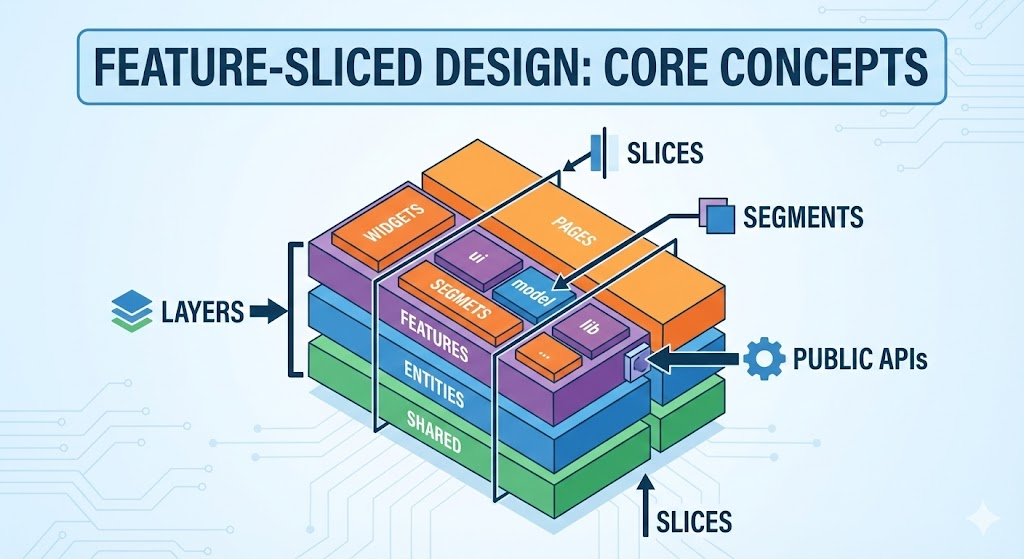
Feature-Sliced Design is built on a simple but powerful hierarchy: layers → slices → segments. Understanding these three concepts is crucial before you apply the methodology.
Layers: The Backbone of Dependency Direction
Layers are top-level folders that define scope of responsibility and allowed dependencies. In the current methodology, the canonical layers typically look like:
app– Application bootstrap, global configuration, providers, routing, layout shell.pages– Page-level compositions corresponding to routes and user flows.widgets– Large UI blocks that combine multiple features and entities (e.g., dashboard header).features– User-facing capabilities and interaction scenarios (e.g.,auth/login,cart/apply-coupon).entities– Core business objects and their behaviors (e.g.,user,product,order).shared– Reusable, business-agnostic code (UI kit, primitives, helpers, configs).
Some projects also introduce layers like processes for cross-page flows, or adjust naming slightly, but the dependency rule remains constant:
Higher layers may depend only on lower layers – never the other way around.
That is, pages can use widgets, features, entities, shared, but entities can never import from features or pages. This unidirectional dependency flow is the foundation that prevents circular imports and keeps responsibilities clear.
Slices: Grouping by Business Meaning
Inside each layer (except app and shared), you organize code into slices. A slice represents a business domain or product concept. For example:
- In an e-commerce app:
entities/product,entities/cart,entities/userfeatures/cart/add-item,features/cart/checkout
- In a social app:
entities/post,entities/comment,entities/profilefeatures/post/like,features/post/share,features/profile/edit
Slices are not standardized; they follow your ubiquitous language from Domain-Driven Design. The question you keep asking is:
“What does this feature mean to the product?”
When naming slices by meaning, developers can quickly find relevant code, and new features fit naturally into the structure.
Segments: Grouping by Technical Purpose
Within each slice, you separate code by technical purpose using segments. Typical segment names follow conventions such as:
ui– Presentational components and visual elements.model– State, data transformations, facades around external stores.api– Client functions, endpoints, and contracts for server interaction.lib– Local utilities specific to this slice.config– Configuration particular to this slice.types– Type definitions and models.
Segments give you fine-grained modularity inside a feature. Instead of stuffing everything into a single file or random subfolders, you know exactly where to look for “UI” vs “business state” vs “API calls”.
Public API: Encapsulation by Design
A key concept of FSD is the Public API. Each slice typically exposes an index.ts (or equivalent) that re-exports only what other modules are allowed to use.
For example, the features/cart/add-item slice might have:
- Internal files:
model/use-add-to-cart.tsui/add-to-cart-button.tsx
- Public API:
index.tsexportingAddToCartButtonand auseAddToCarthook.
Other parts of the app import only from the public API:
- Good:
import { AddToCartButton } from "features/cart/add-item"; - Bad:
import { useAddToCart } from "features/cart/add-item/model/use-add-to-cart";
This encapsulation:
- Prevents accidental coupling to internal implementation details.
- Makes refactoring safe because you can reorganize internals without breaking imports.
- Encourages a “design your API first” mindset, similar to good library design.
A Concrete Project Structure: From components/ Hell to FSD
Let’s walk through a practical example: a mid-sized SaaS dashboard with authentication, billing, and analytics.
Before: Chaotic Folder Structure
A typical starting point may look like:
src/ components/ Button.tsx Table.tsx UserCard.tsx pages/ Login.tsx Dashboard.tsx Billing.tsx hooks/ useAuth.ts useBilling.ts services/ api.ts authService.ts billingService.ts utils/ formatDate.ts formatCurrency.ts
Problems:
- No clear domain boundaries –
UserCardanduseAuthlive separately. - Global services –
authServiceused everywhere, difficult to refactor. - No dependency rules – anything can import anything else.
- Onboarding friction – new developers must learn implicit rules.
After: Feature-Sliced Structure
Migrating to FSD, you might reshape it into:
src/ app/ index.tsx providers/ routes/ pages/ dashboard/ index.tsx billing/ index.tsx login/ index.tsx widgets/ dashboard-header/ ui/ model/ billing-summary/ ui/ model/ features/ auth/login/ ui/ model/ api/ index.ts auth/logout/ ui/ model/ api/ index.ts billing/update-plan/ ui/ model/ api/ index.ts entities/ user/ ui/ model/ api/ index.ts subscription/ ui/ model/ api/ index.ts shared/ ui/ Button.tsx Input.tsx lib/ format-date.ts format-currency.ts api/ client.ts config/ env.ts
Now:
- Each feature (login, logout, update plan) has its own slice.
- Each slice has clear segments for UI, state, and API.
- Entities (
user,subscription) have reusable domain logic. - Shared utilities are explicitly non-domain-specific.
- Pages are compositions of widgets, features, and entities, not random imports.
If a new developer asks, “Where do I add the new ‘Change password’ flow?”, the answer is immediate: features/auth/change-password with ui, model, and api segments.
Implementation Guide: How to Introduce FSD Without a Big Bang Rewrite
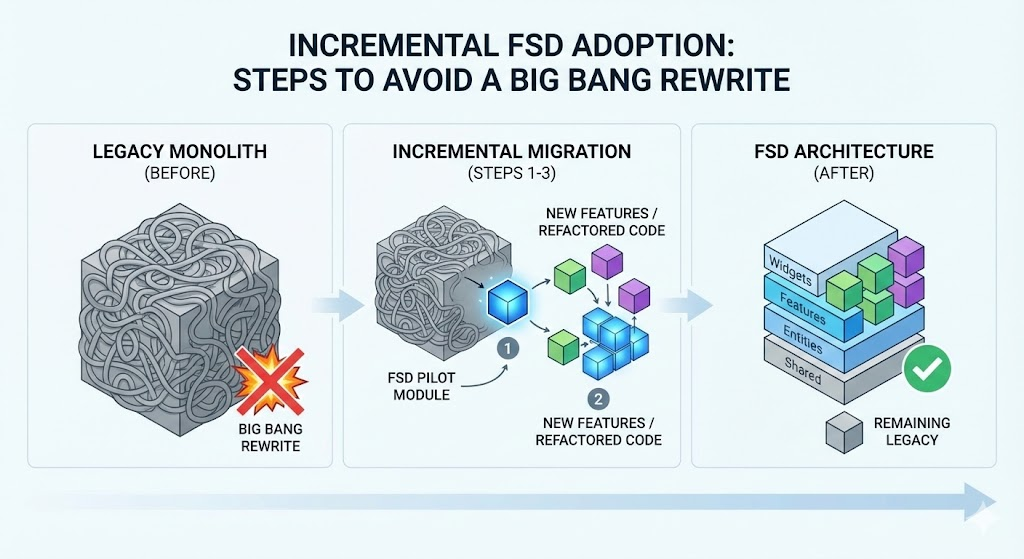
You rarely have the luxury of rewriting an entire app. Fortunately, Feature-Sliced Design can be introduced incrementally.
Step 1: Map Your Existing Domains and Flows
Start by listing core domains and user journeys:
- Domains:
user,team,billing,notifications,project. - Flows:
user registers,team invites member,billing updates plan.
Group existing components and logic into draft slices by domain, even if they still sit inside components/ and hooks/. This mental model prepares your refactor.
Step 2: Introduce Layers Gradually
Add the FSD layers at the top-level of src:
- Create
app,pages,widgets,features,entities,shared. - Move your routing and providers into
app. - Start moving page components into
pages.
Don’t move everything at once. Prioritize active features where you’re already changing code.
Step 3: Create the First Proper Feature Slice
Pick a common, self-contained flow, for example auth/login:
- Move login-related components into
features/auth/login/ui. - Move hooks and state into
features/auth/login/model. - Move API calls into
features/auth/login/api. - Create
features/auth/login/index.tsas the public API.
Update pages/login to import only from features/auth/login. This is your first “true” FSD slice.
Step 4: Establish Dependency Rules
From now on, enforce rules such as:
pagescan import fromwidgets,features,entities,shared.featurescan import fromentitiesandshared, but not frompages.entitiescan import only fromshared.- All external imports must go through public APIs of slices.
You can encode these rules using ESLint import rules or custom lint plugins to prevent regressions.
Step 5: Expand Slice by Slice
As you work on new features or bug fixes, gradually refactor surrounding modules into FSD slices:
- When you touch a billing feature, move it under
features/billing/.... - When you improve the user profile, move it into
features/profile/...andentities/user.
Over time, the legacy components, hooks, and services folders shrink until they disappear or become simple facades into FSD slices.
Step 6: Align With “Pages First” Decomposition
Recent revisions of FSD emphasize starting from pages and breaking them down into widgets, features, and entities from there. Practically, this means:
- Take a page component (e.g., Dashboard).
- Identify self-contained UI blocks → move them to
widgets. - Identify user interactions → extract to
features. - Identify underlying domain data → extract to
entities.
This pages-first approach mirrors how users experience the app while still aligning with FSD’s layer rules.
Comparing Feature-Sliced Design with Other Architectures
To evaluate FSD objectively, it helps to compare it with widely used frontend patterns like MVC/MVVM, Atomic Design, and Clean Architecture / Domain-Driven Design.
FSD vs Layered MVC/MVP/MVVM
Classical layered patterns (MVC, MVP, MVVM) separate responsibilities into technical layers: model, view, controller/presenter/view-model. They are great for teaching separation of concerns, but in large SPAs:
- Controllers or view-models often become “god objects”.
- Business logic ends up split between view-models and services with unclear boundaries.
- There is no built-in notion of domain slices; everything is still “horizontal”.
Feature-Sliced Design keeps the idea of layers but adds domain slicing and segments, enforcing more granular modularity and clearer boundaries between business domains.
FSD vs Atomic Design
Atomic Design focuses on building interfaces from atoms → molecules → organisms → templates → pages. It is highly effective for design systems and reusable UI libraries.
However:
- It talks primarily about visual hierarchy, not application architecture.
- It doesn’t specify where business logic, API, or state management live.
- Below the page/template layer, many teams still end up with ad-hoc file structures.
FSD can coexist with Atomic Design: you might use Atomic principles inside shared/ui or within a ui segment of a slice. But FSD covers the application architecture: layers, slices, and dependencies between features.
FSD vs Clean Architecture and DDD
Clean Architecture and Domain-Driven Design are powerful, theory-heavy approaches that emphasize domain models, use-cases, and clear boundaries. Many frontend implementations, however, struggle with:
- Over-abstracted layers for small teams.
- Difficulty mapping theory onto concrete components and routes.
- Lack of community consensus on idiomatic frontend implementations.
Feature-Sliced Design can be seen as a practical, frontend-tailored adaptation of these ideas: domain-oriented slices, explicit boundaries, and direction of dependencies, but with concrete guidance for React/SPA projects.
Summary Table: Where FSD Fits
| Approach | Primary Focus | What FSD Adds for Frontend Teams |
|---|---|---|
| MVC / MVVM | Technical separation (model / view) | Domain-based slices and strict layer dependency rules |
| Atomic Design | UI composition and design systems | Integration of UI with business features and domains |
| Clean Architecture / DDD | Domain modeling and use-cases | Concrete, React-friendly folder structure and rules |
| Feature-Sliced Design (FSD) | Feature-centric, layered architecture | Unified approach: layers, slices, segments, public API |
Rather than replacing these patterns, FSD operationalizes them into a consistent, enforceable project structure.
Real-World Benefits and Trade-Offs of FSD
As demonstrated by projects using FSD in production and engineers sharing their experiences, several practical advantages emerge.
Benefits
1. Predictable Structure for Every New Feature
When a new requirement appears (e.g., “add invitation flow to teams”), the location for code is obvious:
features/team/invite-memberentities/teampages/teamand relatedwidgets
This predictability drastically lowers cognitive load and speeds up implementation.
2. Safer Refactoring and Reduced Technical Debt
Because slices expose only a public API and respect dependency direction, internal refactors are localized:
- You can change
modelorapiinternals without touching imports across the app. - Migrations (e.g., from one state manager to another) can be done slice by slice.
Leading architects suggest that this kind of modularity is essential for long-lived products where refactoring is the norm, not the exception.
3. Better Team Collaboration and Ownership
Slices become natural ownership boundaries:
- One squad owns
features/payments/*. - Another owns
features/analytics/*.
They can evolve independently while still sharing entities and shared utilities through stable APIs. This mirrors how microservices partition backends but without needing a micro-frontend infrastructure.
4. Clear Separation Between Business and Generic Code
By design, business-agnostic code lives in shared, while product-specific logic lives in features and entities. This separation:
- Makes it easier to extract reusable packages from
shared. - Prevents “global helpers” from leaking business logic across domains.
5. Onboarding New Developers Faster
Newcomers don’t have to memorize tribal folder rules. Instead, they:
- Learn the layer hierarchy once.
- Learn the domains (slices) relevant to their work.
- Navigate via
entities,features,pagesthat match the product vocabulary.
This is particularly helpful for distributed teams and projects that live for several years.
Trade-Offs and Challenges
1. Initial Learning Curve
Developers used to components/ and hooks/ may find FSD “over-structured” at first. There is an adjustment period where people learn:
- Layer rules.
- Difference between a feature and an entity.
- How to design a good public API.
2. Overkill for Very Small Projects
For a simple landing page or a micro-widget, full FSD might be too heavy. In those cases, you can adopt selective ideas:
- Use public APIs for modules.
- Group by domain rather than file type.
- Introduce layers only when the app starts to grow.
3. Ambiguity in Slicing Decisions
Real products are messy. Sometimes it’s not obvious whether a responsibility belongs in a feature, widget, or entity. Even official examples have evolved over time with different slicing logic. The key is to treat FSD as a guideline, not dogma. As your understanding of the domain matures, your slices can evolve too.
Case-Style Scenarios: How FSD Simplifies Everyday Tasks
To make the impact of FSD more tangible, consider a few common scenarios.
Scenario 1: Adding a New Payment Method
You need to add “Apple Pay” support to the billing flow.
Without FSD:
- Payment logic is spread across
services/billingService,components/BillingForm, andpages/Billing. - You risk touching unrelated code and introducing regressions.
With FSD:
- You locate
features/billing/update-plan. - You add
ApplePayButtontofeatures/billing/update-plan/ui. - You adjust billing API calls in
features/billing/update-plan/api. - You extend domain behavior in
entities/subscription/model.
The change is localized. You don’t touch unrelated entities like user or notifications by accident.
Scenario 2: Extracting a Shared Component Library
Your design team wants a UI kit that can be reused across multiple apps.
Because FSD already separates generic and domain-specific code:
- You review
shared/uiandshared/lib. - You extract components that have no business logic (buttons, dropdowns, layout primitives).
- You publish them as a library while leaving domain-specific components in
featuresandentities.
The architecture has already done the hard work of classification for you.
Scenario 3: Migrating State Management
You decide to migrate from Redux to a signals-based store or React Server Components.
With a traditional structure:
- State logic is scattered across pages, hooks, and components.
- Migration requires a wide, risky sweep.
With FSD:
- State is primarily concentrated in
modelsegments of slices. - You can migrate a slice (or layer) at a time.
- The rest of the app interacts with state only via public APIs.
This incremental approach reduces risk and lets you test new technologies safely.
Is Feature-Sliced Design Right for Your Project?
There is no one-size-fits-all architecture, but you can use some practical criteria.
FSD is a strong candidate if:
- Your app has multiple domains (auth, billing, analytics, messaging, etc.).
- You expect the project to live for years, not months.
- Several developers or teams work on different parts of the frontend.
- You struggle with modules knowing too much about each other.
- You’ve had painful refactors or circular dependency nightmares.
FSD may be heavier than necessary if:
- You’re building a small marketing site or micro-widget.
- A single developer owns the entire project with limited long-term scope.
In many cases, teams start by adopting FSD principles (domain-based slices, public APIs, dependency rules) and then grow into the full methodology as their application scales.
Conclusion: Stop Complicating Your App Structure
Feature-Sliced Design is not about adding ceremony to your codebase; it is about removing accidental complexity. By organizing your frontend around layers, slices, and segments, you create a structure that matches how your product actually works, not just how your tools generate files. You gain clearer boundaries, safer refactoring, and a more humane onboarding experience for every future team member.
Adopting a structured architecture like FSD is a long-term investment in code quality and team productivity. Instead of fighting a maze of components and utils, you build on an architecture that guides change, makes dependencies explicit, and keeps your business features at the center of the design. As your application and team grow, Feature-Sliced Design gives you a stable backbone that can evolve without collapsing under its own weight.
Ready to build scalable and maintainable frontend projects? Dive into the official Feature-Sliced Design Documentation to get started.
Have questions or want to share your experience? Join our active developer community on Website!
Disclaimer: The architectural patterns discussed in this article are based on the Feature-Sliced Design methodology. For detailed implementation guides and the latest updates, please refer to the official documentation.