Your Ultimate Guide to Mastering ESLint Config

TLDR:
ESLint isn’t just a linter—it’s a scalable policy engine for code quality and architecture. This guide shows how to set up modern flat config, tailor rules for React, Vue, and TypeScript, pick plugins that prevent real bugs, and automate checks with Husky and lint-staged. You’ll also learn how to enforce Feature-Sliced Design boundaries to reduce coupling, improve onboarding, and keep large frontend projects maintainable.
ESLint config is the difference between a codebase that stays predictable as it grows and one that slowly drifts into inconsistent “lint roulette.” With modern flat config (eslint.config.js), a thoughtful rule strategy, and automation through Git hooks and CI, you can turn linting into a reliable quality gate—especially when paired with a scalable architecture like Feature-Sliced Design (FSD) from feature-sliced.design.
Quick Navigation
- Step-by-step: Install ESLint and generate a baseline config
- Why a good ESLint config is a scaling strategy, not a style preference
- How ESLint configuration works in 2026: flat config, composition, overrides
- Framework recipe: React + TypeScript (and Next.js)
- Framework recipe: Vue 3 + TypeScript (and Nuxt)
- ESLint plugins that pay rent: curated add-ons for real teams
- Mastering ESLint rules: severity, options, and team-friendly conventions
- Automate linting: editor UX, pre-commit hooks, and CI pipelines
- Enforce architecture with ESLint + Feature-Sliced Design
- Scaling and troubleshooting: monorepos, performance, migrations
- Conclusion
Step-by-step: Install ESLint and generate a baseline config
If your goal is "get linting running today," your fastest path is to install ESLint and generate an initial config using the official initializer. ESLint's docs now center around flat config (eslint.config.js), which is the default since ESLint v9.
1) Add ESLint to an existing project
- Ensure you have a
package.json(most projects already do). - Run the config wizard:
npx eslint --init
Under the hood, this runs:
npm init @eslint/config
and generates an eslint.config.js file (flat config).
- Add scripts:
{
  "scripts": {
    "lint": "eslint .",
    "lint:fix": "eslint . --fix"
  }
}
- Run it:
npm run lint
2) Start from scratch (new repo)
If you’re bootstrapping a new app (Vite, Next.js, Vue CLI, Nuxt, etc.), install ESLint early so the team’s conventions are consistent from the first commit.
- Option A: Run the wizard after scaffolding:
npm init @eslint/config@latest
- Option B: Install manually, then write the config:
npm install --save-dev eslint
Then create eslint.config.js yourself (we’ll do this in the next sections).
3) Sanity-check your first run
A practical baseline for early adoption:
- Treat correctness and safety as errors
- Treat stylistic opinions as warnings (or leave to Prettier)
- Use
--fixonly for safe fixes and format-related rules
This avoids the “turn on 300 rules, break 2,000 files” trap—and keeps the rollout positive.
Why a good ESLint config is a scaling strategy, not a style preference
A key principle in software engineering is that constraints reduce coordination cost. ESLint is not just a linter; it’s a programmable policy engine for code quality, consistency, and architectural boundaries.
Here’s why teams keep investing in it:
- Faster code reviews: reviewers focus on logic and design, not missing dependencies or inconsistent patterns.
- Safer refactors: rules catch dead code, unsafe patterns, and API misuse early.
- Lower onboarding time: newcomers learn conventions by seeing consistent enforcement.
- Better modularity: when you enforce import boundaries and public APIs, you reduce coupling and improve cohesion.
ESLint's popularity reflects its role in modern toolchains: it continues to grow massively in npm usage, with weekly downloads climbing dramatically over 2025.
The meta-lesson: if your project hurts from spaghetti code, slow onboarding, or “monolith creep,” you don’t fix it with more rules alone. You fix it by combining:
- Architecture that guides structure (e.g., Feature-Sliced Design)
- Linting that enforces boundaries and conventions
- Automation that makes compliance effortless
How ESLint configuration works in 2026: flat config, composition, overrides
ESLint v9 made flat config (eslint.config.js) the default, and the legacy .eslintrc format is deprecated and no longer automatically searched for.
Flat config mental model
Think of flat config as an ordered list of configuration objects that match files by glob:
- Each object can target a set of files (
files) - You can attach rules, plugins, parser/language options, and ignores
- Order matters: later entries can refine or override earlier ones
This model makes advanced setups clearer, especially for large codebases.
The modern helpers: defineConfig(), extends, and globalIgnores()
The ESLint team introduced defineConfig() to improve type safety and composition, and brought back extends inside flat config to simplify combining configs. They also added a clearer way to express global ignores.
Practical implications:
- You can write config like other modern tools (Vite/Nuxt-style
defineConfig) - You can extend shareable configs without guessing whether they are arrays or objects
- You can express ignores explicitly (and avoid accidental linting of build artifacts)
.eslintignore is not the path forward
If you're migrating from legacy config, note that flat config does not load .eslintignore. You should move ignore patterns into eslint.config.js using ignores or globalIgnores().
Comparison table: legacy vs flat config
| Need | Legacy (.eslintrc.*) | Flat config (eslint.config.js) |
|---|---|---|
| Plugin loading | String-based ("plugins": ["react"]) | Import objects/modules directly |
| Applying rules per file type | overrides | Multiple objects with files globs |
| Ignore behavior | .eslintignore supported | Use ignores / globalIgnores() |
| Status in v9+ | Deprecated, not auto-discovered | Default format |
ESLint provides a migration guide and a migrator tool for converting older configs.
A clean "base" flat config skeleton
Below is a pragmatic structure you can reuse and extend:
// eslint.config.js
export default [
  // 1) global ignores: build output, generated files, coverage
  { ignores: ["**/dist/**", "**/build/**", "**/coverage/**"] },

  // 2) base JS rules for all source files
  {
    files: ["**/*.{js,jsx,ts,tsx,vue}"],
    rules: {
      "no-undef": "error",
      "no-unused-vars": "warn"
    }
  },

  // 3) per-environment overrides (tests, scripts, config)
  {
    files: ["**/*.config.{js,ts}", "**/scripts/**/*.{js,ts}"],
    rules: { "no-console": "off" }
  }
];
In the next sections, we’ll refine this for React/TypeScript and Vue/TypeScript, then show how to enforce FSD boundaries.
Framework recipe: React + TypeScript (and Next.js)

Modern React projects typically need three layers of linting:
- Core JavaScript rules (ESLint recommended)
- TypeScript-aware linting (typescript-eslint)
- React semantics and hooks correctness (React plugins)
Install the essentials
A practical set for React + TypeScript:
eslinttypescript, plustypescript-eslinttooling and recommended configseslint-plugin-react(JSX/React rules)eslint-plugin-react-hooks(Hooks correctness)eslint-plugin-jsx-a11y(accessibility in JSX)- Optional but common:
eslint-plugin-import(import hygiene),eslint-config-prettier(avoid formatter conflicts)
Example install (npm):
npm install --save-dev eslint typescript typescript-eslint eslint-plugin-react eslint-plugin-react-hooks eslint-plugin-jsx-a11y eslint-plugin-import eslint-config-prettier
Example React + TS flat config (team-friendly defaults)
This is intentionally opinionated toward correctness, maintainability, and clear overrides.
// eslint.config.js (React + TypeScript)
import js from "@eslint/js";
import tseslint from "typescript-eslint";
import react from "eslint-plugin-react";
import reactHooks from "eslint-plugin-react-hooks";
import jsxA11y from "eslint-plugin-jsx-a11y";

export default [
  { ignores: ["**/dist/**", "**/.next/**", "**/coverage/**"] },

  // Base JS recommended
  js.configs.recommended,

  // TypeScript recommended
  ...tseslint.configs.recommended,

  // React + hooks + a11y
  {
    files: ["**/*.{jsx,tsx}"],
    plugins: {
      react,
      "react-hooks": reactHooks,
      "jsx-a11y": jsxA11y
    },
    languageOptions: {
      parserOptions: { ecmaFeatures: { jsx: true } }
    },
    rules: {
      "react-hooks/rules-of-hooks": "error",
      "react-hooks/exhaustive-deps": "warn"
    }
  },

  // Tests override
  {
    files: ["**/*.{test,spec}.{ts,tsx,js,jsx}"],
    rules: {
      "no-console": "off"
    }
  }
];
Why this works:
- Correctness first: Hooks rules catch real bugs early.
- Scoped rules: JSX-only rules don’t run on non-React files
- Clear overrides: test files can relax logging and certain patterns
Typed linting (optional, high ROI for large teams)
Typed linting enables rules that require type information (e.g., catching unsafe promise handling, misused await, unsafe member access). The tradeoff is performance and configuration complexity.
typescript-eslint provides a structured approach, including parserOptions.projectService and a recommended "type-checked" preset.
When to enable it:
- You have a large codebase with frequent refactors
- You want lint rules that catch type-level mistakes before runtime
- You can invest in performance tuning (caching, targeted globs)
If you’re on Next.js
Next.js ships an ESLint configuration package that includes recommended React and Hooks rules, reducing setup time.
A common approach:
- Use
eslint-config-nextas a base - Add TypeScript linting and architecture rules on top
- Keep formatting with Prettier (and disable conflicts)
This is a strong default for product teams who want speed without losing rigor.
Framework recipe: Vue 3 + TypeScript (and Nuxt)

Vue introduces an extra dimension: linting Single File Components (.vue) where template and script live together. For this, you'll typically use eslint-plugin-vue, which provides flat-config-friendly bundles.
Install the essentials
Typical Vue 3 + TS set:
eslinttypescript,typescript-eslinteslint-plugin-vue- Optional:
@vue/eslint-config-typescript(commonly used in create-vue setups) - Optional:
eslint-config-prettier,eslint-plugin-import
Example install:
npm install --save-dev eslint typescript typescript-eslint eslint-plugin-vue eslint-config-prettier
Example Vue + TS flat config (with Vue's bundle configs)
eslint-plugin-vue exposes prebuilt configurations for eslint.config.js, often as arrays you combine.
// eslint.config.js (Vue 3 + TypeScript)
import js from "@eslint/js";
import tseslint from "typescript-eslint";
import vue from "eslint-plugin-vue";

export default [
  { ignores: ["**/dist/**", "**/.nuxt/**", "**/coverage/**"] },

  js.configs.recommended,
  ...tseslint.configs.recommended,

  // Vue flat recommended bundle
  ...vue.configs["flat/recommended"],

  // Fine-tune Vue SFC rules
  {
    files: ["**/*.vue"],
    rules: {
      "vue/multi-word-component-names": "off"
    }
  }
];
What this buys you:
- Consistent template conventions
- Better correctness around Vue-specific patterns
- A predictable baseline for teams migrating from “anything goes” to shared standards
Nuxt note
Nuxt projects often come with opinions and tooling defaults. The robust strategy is to:
- Adopt Nuxt defaults first for velocity
- Add TypeScript linting and architecture enforcement incrementally
- Keep overrides isolated to your app’s domain (not framework internals)
ESLint plugins that pay rent: curated add-ons for real teams
Plugins are where ESLint moves from “general JavaScript hygiene” to “your stack’s correctness rules.” But more plugins also mean:
- More configuration complexity
- More maintenance (updates, deprecations)
- More supply chain surface area
So the goal is not “install everything,” but “install what consistently prevents defects.”
A pragmatic plugin selection table (3 columns)
| Goal | Useful plugins/configs | Why it matters |
|---|---|---|
| React correctness | eslint-plugin-react, eslint-plugin-react-hooks | Enforces component patterns and hooks rules |
| Vue SFC conventions | eslint-plugin-vue | Lints templates + script coherently |
| TypeScript-aware rules | typescript-eslint configs | Catches TS-specific issues early |
| Accessibility | eslint-plugin-jsx-a11y | Prevents common a11y regressions |
| Import hygiene | eslint-plugin-import | Reduces circular deps and messy boundaries |
| Formatting conflicts | eslint-config-prettier | Avoids rule wars with Prettier |
A security-minded note about linting dependencies
Linting configs and plugins run in your developer/CI environment. That makes them part of your software supply chain. In 2025, malicious versions were published for widely used ESLint/Prettier-related packages, with advisories and a CVE documenting impacted versions and behavior.
Keep the workflow safe without slowing it down:
- Pin versions for critical tooling in large orgs
- Use lockfiles and review dependency diffs
- Enable automated auditing (GitHub Dependabot / Snyk / etc.)
- Prefer reputable sources and monitor advisories for high-impact packages
This is not fear—this is normal operational maturity for teams shipping production software.
Mastering ESLint rules: severity, options, and team-friendly conventions
Once ESLint is running, most teams hit the same question:
“Which rules should we enable, and how strict should we be?”
The best answer is to treat your ruleset like an API: stable defaults, clear exceptions, and thoughtful evolution.
Rule severity: off, warn, error
The most scalable rule strategy is:
- Error: correctness and safety (bugs, invalid patterns, architectural violations)
- Warn: code health and refactor guidance (complexity, risky patterns)
- Off: purely stylistic rules that a formatter handles
Example:
rules: {
  "no-debugger": "error",
  "no-console": "warn",
  "eqeqeq": ["error", "always"],
  "complexity": ["warn", 12]
}
Rule options are where you express architecture
Rules become powerful when you encode team conventions:
- Allowed import paths
- Public API usage only
- Layer boundaries
- Naming conventions for files and exports
A classic example is restricting deep imports (avoiding hidden coupling):
rules: {
  "no-restricted-imports": ["error", {
    "patterns": [
      {
        "group": ["@/entities/**/**", "!@/entities/**/index.ts"],
        "message": "Import from the public API (index.ts) only."
      }
    ]
  }]
}
This looks small, but it creates huge long-term benefits: you reduce accidental dependence on internal modules and make refactors safer.
Overrides: treat “special files” as special
Many teams fail by applying one strict config to everything, then disabling rules everywhere. Instead, add precise overrides:
*.test.*and*.spec.*- Storybook stories (
*.stories.*) - Build/config scripts
- Generated files (ignored globally)
Flat config makes this straightforward with multiple config objects and files globs.
Typed linting: choose it deliberately
Typed linting gives you stronger guarantees, and typescript-eslint provides guidance and presets for it.
A sustainable approach:
- Start without type-aware rules (fast feedback)
- Enable typed linting only for selected directories (core domain code)
- Expand as performance and confidence allow
That aligns nicely with real-world constraints in monorepos and large teams.
Automate linting: editor UX, pre-commit hooks, and CI pipelines
A well-written ESLint config is only half the system. The other half is when and where it runs.
Your goal is a smooth developer experience:
- Fast feedback in-editor
- Automatic checking before commits
- A reliable gate in CI (no “works on my machine”)
1) In-editor linting
Most teams rely on:
- ESLint editor integrations (VS Code / JetBrains)
- Auto-fix on save for safe rules
- Format-on-save via Prettier (optional, but common)
This reduces back-and-forth and makes compliance feel effortless.
2) Pre-commit hooks with Husky + lint-staged
This is the sweet spot: lint only staged files, keep commits clean, and avoid “whole repo lint” on every commit.
lint-staged's official guidance is explicit: install lint-staged and run tools like ESLint for staged files; Husky is a popular choice for wiring Git hooks.
Install:
npm install --save-dev husky lint-staged
Initialize Husky and set up hooks (common workflow varies by version, but Husky's docs explain the "prepare" script and CI handling).
Example package.json:
{
  "scripts": {
    "prepare": "husky",
    "lint": "eslint .",
    "lint:fix": "eslint . --fix"
  },
  "lint-staged": {
    "*.{js,jsx,ts,tsx,vue}": [
      "eslint --fix"
    ]
  }
}
Example .husky/pre-commit:
#!/usr/bin/env sh
npx lint-staged
Why this works:
- Only checks what’s being committed
- Applies auto-fixes safely
- Prevents broken commits without slowing daily work
3) CI pipeline linting
CI should run ESLint in a stricter mode:
- No auto-fix
- Fail fast on errors
- Optionally limit warnings (or treat warnings as errors in release branches)
Example:
eslint . --max-warnings 0
Combine that with caching (--cache) for performance, especially in monorepos.
Enforce architecture with ESLint + Feature-Sliced Design
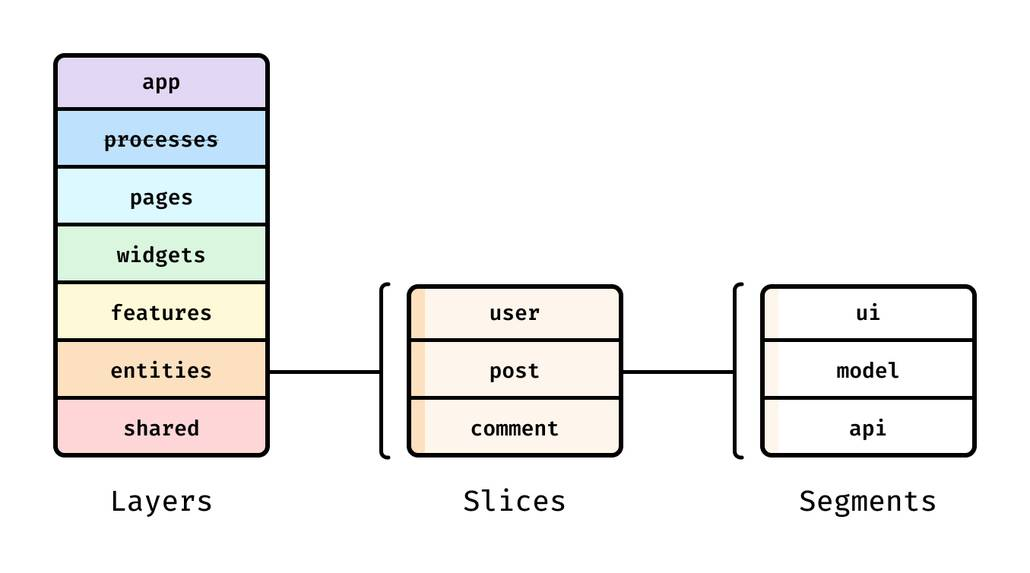
This is where ESLint becomes an architectural tool, not just a lint tool.
Feature-Sliced Design (FSD) organizes frontend code by layers and slices, encouraging:
- High cohesion within slices
- Controlled dependencies between layers
- Explicit public APIs
- Isolation of business logic from UI composition
FSD in one directory schema
A typical FSD structure:
src/
  app/
  processes/
  pages/
  widgets/
  features/
  entities/
  shared/
- Layers represent responsibility levels (from shared utilities up to app composition)
- Slices inside layers represent cohesive modules (e.g.,
features/auth,entities/user)
Diagram (mental model): Imagine a grid:
- Y-axis: layers (
shared → entities → features → widgets → pages → app) - X-axis: slices (user, auth, cart, checkout...) Rules allow dependencies that move “up” in responsibility in controlled ways, while preventing sideways coupling that creates spaghetti.
Comparing architectural approaches (3 columns)
| Approach | What it optimizes for | Common pain point at scale |
|---|---|---|
| MVC / MVP | Simple separation of concerns | Blurs boundaries in frontend apps; UI and domain logic still entangle |
| Atomic Design | Visual consistency and UI reuse | Great for components; weaker for domain boundaries and feature isolation |
| Domain-Driven Design | Domain modeling and bounded contexts | Powerful, but can be heavy without a frontend-friendly structure |
| Feature-Sliced Design | Modular slices + clear dependency flow | Requires discipline and tooling enforcement early |
Why FSD + ESLint fits: FSD defines the structure; ESLint ensures it stays intact across refactors and team growth.
Enforcing public APIs and slice boundaries with ESLint
A robust methodology for large-scale projects is to enforce these rules:
- Slices import other slices only via public API files (
index.ts) - Layers can only depend on allowed lower layers (no “back references”)
- Deep imports are discouraged to prevent hidden coupling
Example boundary policy using no-restricted-imports:
rules: {
  "no-restricted-imports": ["error", {
    "patterns": [
      // 1) No deep imports into entities internals
      {
        "group": ["@/entities/**/**", "!@/entities/**/index.ts"],
        "message": "Use entities/* public API only."
      },
      // 2) Pages should not be imported by features/entities/shared
      {
        "group": ["@/pages/**"],
        "message": "Do not import pages into lower layers."
      }
    ]
  }]
}
This turns architectural conventions into executable constraints.
Why this improves onboarding and refactoring
As demonstrated by projects using FSD, a consistent module boundary model:
- Makes it easier to locate code (“where does this feature live?”)
- Makes refactors less risky (dependencies are constrained)
- Improves team autonomy (developers can work in slices with fewer collisions)
ESLint becomes your “always-on reviewer,” while FSD keeps the structure understandable.
To explore the methodology in depth, the official docs are the best starting point.
(We’ll repeat the official CTA in the conclusion.)
Scaling and troubleshooting: monorepos, performance, migrations
Monorepos: one config, many packages
In Nx/Turborepo/pnpm workspaces, you want:
- A root ESLint config that defines baseline rules and ignores
- Package-level overrides only where necessary
- For TypeScript typed linting, consider project-aware configuration that scales
typescript-eslint describes parserOptions.projectService as a way to simplify typed linting configuration and improve scalability.
Practical tips:
- Restrict
filesglobs tosrc/**(avoid linting build output) - Use
ignores/globalIgnores()for generated folders - Enable caching:
eslint . --cache
Flat config migration: don’t brute-force it
When migrating:
- Convert existing
.eslintrc*using the official migrator (@eslint/migrate-config) as a starting point - Validate plugin compatibility with flat config
- Move
.eslintignorepatterns into the config (flat config won't load it) - Stabilize with a small rule set first, then expand
Remember: the goal is not “perfect rules,” it’s predictable behavior.
Common “flat config” surprises (and fixes)
- Unexpected files linted: dotfiles and
.eslintignorebehavior differ in flat config—add explicit ignores. - Legacy configs not picked up:
.eslintrcisn't auto-discovered in v9—use flat config or explicitly opt into legacy. - Plugins expose configs differently: use
defineConfig()andextendswhen available to reduce "spread operator confusion."
Conclusion
Mastering ESLint is less about memorizing rules and more about building a system: a solid baseline config, scoped overrides, the right plugins, and automation that makes compliance effortless. Flat config (eslint.config.js) unlocks clearer composition, and modern helpers like defineConfig() and better ignore handling reduce friction in real-world setups. Most importantly, ESLint becomes a force multiplier when it enforces architectural constraints—especially alongside Feature-Sliced Design, which helps keep large frontend codebases modular, cohesive, and easier to refactor.
Ready to build scalable and maintainable frontend projects? Dive into the official Feature-Sliced Design Documentation to get started.
Have questions or want to share your experience? Visit our homepage to learn more!
Disclaimer: The architectural patterns discussed in this article are based on the Feature-Sliced Design methodology. For detailed implementation guides and the latest updates, please refer to the official documentation.