esbuild Architecture: How is it So Fast?

TLDR:

esbuild reaches compiler-level speed through a parallel scan/link/print pipeline, minimal whole-AST passes, and incremental build contexts. This article shows practical CLI and API recipes for bundling, minifying, code splitting, and metafile analysis, explains how Vite and Vitest leverage esbuild, and compares trade-offs with Webpack and SWC—then connects it all to Feature-Sliced Design for scalable, maintainable frontend architecture.
esbuild delivers a "fast JavaScript bundler" experience by combining a native Go bundler, heavy parallelism, and a deliberately compact compilation pipeline that favors cache locality and minimal AST passes. When paired with a scalable code organization like Feature-Sliced Design (FSD) from feature-sliced.design, that speed becomes a durable advantage: short feedback loops, predictable refactors, and clearer boundaries for large teams.
Table of contents
- Why esbuild speed matters beyond bragging rights
- The architectural bets that make esbuild fast
- Inside esbuild’s pipeline: scan, link, print
- Using esbuild CLI: practical recipes (bundle, minify, split)
- Using the esbuild API: build, transform, context, plugins
- How Vite and Vitest use esbuild for speed
- Trade-offs and limitations vs Webpack (and why they exist)
- esbuild vs SWC: choosing the right “fast toolchain”
- Speed is not architecture: how FSD keeps your codebase scalable
- Conclusion
Why esbuild speed matters beyond bragging rights
Build tooling performance is a business metric disguised as developer ergonomics.
A 5–30 second rebuild doesn’t just “feel slow.” It changes behavior:
- Developers postpone refactors because the edit–compile–run loop is painful.
- Teams accumulate incidental complexity (workarounds, “temporary” scripts, duplicated configs).
- CI pipelines become longer, which increases merge latency and reduces release confidence.
This is why esbuild's goal is explicitly to reset expectations for build tool performance—stating that many existing web build tools are "10–100x slower than they could be."
What “fast” really means in a bundler
When teams benchmark a fast JavaScript bundler, they often measure only “full build time.” For real projects, speed has multiple layers:
- Startup overhead (cold start): process spawn + tool initialization.
- Graph discovery: crawling imports, resolving packages, reading from disk.
- Compilation throughput: parsing, lowering syntax, minifying, generating source maps.
- Incremental rebuild: reusing work across edits (watch mode, long-running service).
- Developer-facing latency: how quickly the browser/test runner reflects changes.
A great illustration is 1Password's extension build system rewrite: they report warm build times dropping from around 1 minute 10 seconds to ~5 seconds, and describe watch-mode rebuilds under a second for many edits.
That outcome is not magic. It’s an architectural consequence.
The architectural bets that make esbuild fast
esbuild’s performance is not “because Go is fast” (though native code helps). The speed comes from a stack of reinforcing decisions that reduce overhead, maximize parallel work, and avoid redundant transformations. The official FAQ spells this out: native Go compilation avoids repeated JIT warmup costs, parallelism is used heavily, everything is written from scratch with consistent data structures, and memory is used efficiently with few AST passes.
To understand the architecture, it helps to name the core bets.
Bet #1: Native code + low startup cost beats CLI JIT reality
A key principle in software engineering is to optimize the critical path. For most teams, the critical path is “run tool → get output.”
The esbuild FAQ describes a CLI-specific pain point for JIT languages: each run begins with the VM parsing the bundler itself before it can bundle your app, while esbuild is already parsing your project.
That means even if a JS bundler eventually gets fast, it still pays recurring process-level overhead.
This is why esbuild distribution as a single native executable matters. It’s also why many tools embed it (or call it as a long-running service) rather than re-implement its hot paths.
Bet #2: Parallelize everything that can be parallelized
esbuild treats CPU cores as a baseline resource, not an optimization.
- The architecture documentation lists "Maximize parallelism" as a design principle.
- The FAQ explains that parsing and code generation are "fully parallelizable" phases, and that shared memory makes work-sharing easier across entry points.
This matters because modern frontend builds often process thousands of modules. If your build tool does “some parallel work,” you still lose time on serial chokepoints.
esbuild aims to saturate available cores whenever possible—especially in the heavy stages.
Bet #3: Avoid unnecessary work, especially format conversions
Many build pipelines look like this:
- parse → transform → print → parse again → minify → print again
The architecture doc explicitly calls out intermediate stages where tools write out JavaScript and read it back in using another tool, calling that work "unnecessary" and avoidable if consistent data structures are used.
This is one reason esbuild feels so fast compared to “Webpack + Babel + Terser” chains: it’s not just faster code, it’s fewer total conversions.
Bet #4: Keep whole-AST passes minimal for cache locality
CPU cache locality is a real-world constraint that can dominate compiler throughput.
Both the FAQ and the architecture doc highlight that esbuild touches the full JavaScript AST only a small number of times (three passes in the FAQ; three full-AST passes enumerated in the architecture doc).
In the architecture document, these passes are explicitly merged:
- lexing + parsing + scope setup + symbol declaration
- symbol binding + constant folding + syntax lowering + syntax mangling
- printing + source map generation
This merging makes the implementation harder to “modularize,” but it improves locality and reduces the overhead of traversing huge trees repeatedly.
Bet #5: Make incremental builds a first-class design constraint
Fast full builds are great; fast incremental rebuilds are what makes teams stay productive.
The architecture doc states a principle: structure things to permit watch mode where compilation can happen incrementally, reusing unchanged work, and that shared data across builds must be immutable to allow safe sharing.
That design shows up in esbuild's modern API as "build contexts" that can watch, serve, and rebuild incrementally.
Inside esbuild’s pipeline: scan, link, print
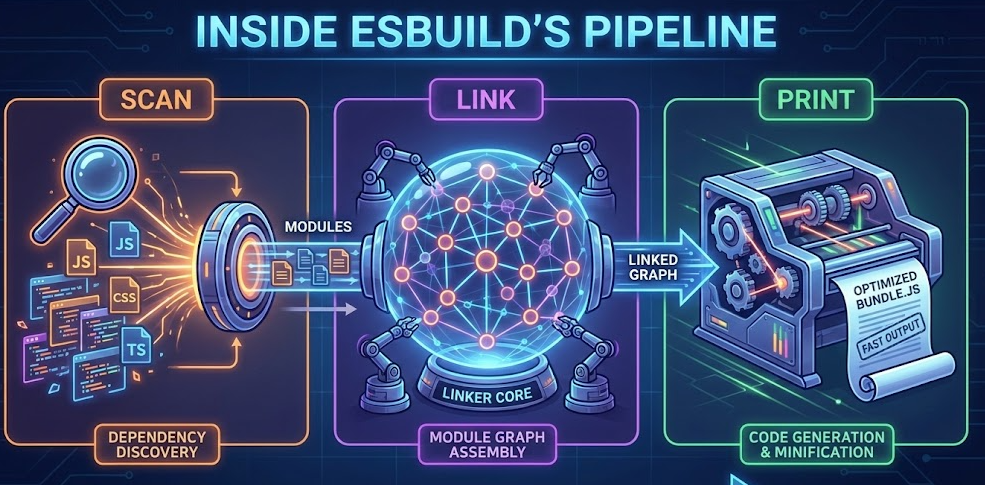
esbuild’s bundler architecture is easiest to reason about as two main phases:
- Scan phase: discover the dependency graph.
- Compile phase: link modules, generate output, concatenate chunks/files.
A mental model diagram (described)
Imagine this pipeline (boxes are work units; arrows are data flow):
- Entry points
→ Scan (parallel worklist): parse file A/B/C concurrently, discover imports/requires, enqueue new files
→ Module graph + per-file ASTs
→ Compile:- Link (mostly serial coordination)
- Print/codegen (parallel per-chunk where possible)
- Source map generation (integrated with printing) → Output files + metafile (optional)
This shape is important: most of the expensive work sits in phases that can run on many cores.
Scan phase: a parallel worklist algorithm
The architecture doc explains that scanning begins with user entry points and traverses the dependency graph. It is implemented as bundler.ScanBundle() using a parallel worklist algorithm:
- Start with entry points as the initial worklist.
- Parse each file into an AST on a separate goroutine.
- Each parsed file can add more files to the worklist if it contains
import, dynamicimport(), orrequire()dependencies. - Stop when the worklist is empty.
This is a direct, practical design for large graphs: you don’t wait to finish one file before starting others, and you don’t serialize discovery.
Parsing that also transforms (and why that matters)
esbuild’s parser isn’t “parse only.” It’s designed to do useful work in a small number of passes.
From the architecture documentation:
- The lexer is called on-the-fly while parsing, because some syntax requires semantic context (regex vs division, JSX vs
<). - Transformations are condensed into two parser passes:
- Pass 1: parse + scope tree setup + symbol declarations
- Pass 2: bind identifiers, apply compile-time defines, constant folding, lower syntax for target, and mangle/compress for production builds
It also highlights that syscalls in import path resolution can be costly and caching resolver/filesystem results yields a sizable speedup.
These details explain why esbuild performs well on monorepos and large dependency graphs: it’s engineered around I/O and parsing overhead, not just code generation.
Linking: tree shaking always on, code splitting optional
The architecture doc defines linking’s goals:
- Merge modules so imports reference exports correctly.
- Perform tree shaking (dead code elimination).
- Optionally split code into multiple chunks (
--splitting), disabled by default.
Two nuanced decisions stand out:
- Tree shaking is always active in esbuild.
This simplifies mental models ("production output is never less optimized because a flag was missed") and pushes users toward ESM-friendly structure. - Code splitting is a conscious opt-in.
That’s pragmatic: chunk graphs add complexity, and many libraries/tools don’t need multi-entry chunking for their default case.
ES modules vs CommonJS: hybrid support without separate parsing modes
esbuild supports both module systems transparently:
- It parses a superset of ES modules and CommonJS without forcing a strict "module type" upfront.
- It distinguishes CommonJS modules (closures) vs ES modules (scope hoisting group) for bundling efficiency and smaller output.
- Hybrid modules are supported, with ES imports converted to
require()and ES exports represented via getters onexportsfor compatibility.
This matters operationally: real codebases mix ecosystems. A tool that forces purity usually forces friction.
Using esbuild CLI: practical recipes (bundle, minify, split)
The CLI is the fastest way to adopt esbuild in a repo, and it maps closely to the JavaScript and Go APIs.
1) Bundle a browser app with source maps
esbuild src/main.ts --bundle --sourcemap --outdir=dist --format=esm --target=es2018
Useful flags to consider:
--define:process.env.NODE_ENV="production"to enable dead-code elimination patterns (common in React ecosystems).--minifyfor production output.--loader:.svg=dataurl(orfile,text) when importing assets.
2) Bundle for Node.js (SSR, tooling, scripts)
esbuild src/server.ts --bundle --platform=node --target=node18 --outfile=dist/server.js
--platform=node changes how built-ins and module resolution behave, aligning output with Node runtime expectations.
3) Enable code splitting for multiple entry points
If you have multiple pages/entries:
esbuild src/entries/admin.ts src/entries/app.ts \
  --bundle --format=esm --splitting --outdir=dist --chunk-names=chunks/[name]-[hash]
Remember: splitting is opt-in in esbuild.
This is a good default because chunking is only valuable when you truly have multiple entry points or lazy routes.
4) Watch mode (incremental rebuilds)
esbuild src/main.ts --bundle --outdir=dist --watch
The API docs describe watch mode as incremental builds under a long-running context.
In practice, this avoids redoing work for unchanged files and makes “save → rebuild” feel instant on many projects.
5) Serve mode (dev server with build-integrated freshness)
esbuild src/main.ts --bundle --outdir=dist --serve --servedir=public
The esbuild API docs emphasize a nice property: on each incoming request, esbuild can trigger a rebuild and wait for it to complete, so it doesn't serve stale output after edits.
This is not a replacement for a full HMR ecosystem like Vite, but it’s a strong minimal dev setup for small apps, prototypes, or internal tools.
6) Generate a metafile and analyze bundle composition
esbuild src/main.ts --bundle --minify --metafile=meta.json --outdir=dist
Then open the official bundle analyzer and upload meta.json.
Teams routinely use this to track bundle growth and identify "why is this library included?"—a workflow 1Password highlights as valuable during optimization.
Using the esbuild API: build, transform, context, plugins
The esbuild JavaScript API covers two common workflows:
build/contextfor file-based bundling pipelinestransformfor "string in → string out" operations (minify, TS/JSX transpile)
Build API: a minimal bundler script
// build.mjs
import * as esbuild from 'esbuild'

await esbuild.build({
  entryPoints: ['src/main.tsx'],
  bundle: true,
  format: 'esm',
  sourcemap: true,
  outdir: 'dist',
  target: ['es2018'],
  define: { 'process.env.NODE_ENV': '"production"' },
  minify: true,
  metafile: true,
})
Why this is useful:
- It avoids shell quoting edge cases (the API docs call out that shells interpret arguments).
- It becomes a stable “build contract” you can evolve, version, and test.
Transform API: fast transpilation and minification
Transform is for isolated code:
import * as esbuild from 'esbuild'

const result = await esbuild.transform('let x: number = 1', {
  loader: 'ts',
  minify: true,
  sourcemap: 'inline',
  target: 'es2018',
})
This is a common replacement for Babel in simple pipelines, or a component inside larger tools.
Context API: watch, serve, rebuild, dispose
The API documentation describes "build contexts" as long-running objects that reuse work and enable incremental builds. It explicitly lists three incremental modes: watch, serve, and rebuild.
A practical pattern:
import * as esbuild from 'esbuild'

const ctx = await esbuild.context({
  entryPoints: ['src/main.ts'],
  bundle: true,
  outdir: 'dist',
  sourcemap: true,
})

// Use either:
await ctx.watch()          // filesystem-driven rebuilds
// or:
const server = await ctx.serve({ servedir: 'public' })

// Later, clean up:
await ctx.dispose()
This approach is especially strong for:
- internal platforms
- microfrontends build orchestration
- monorepo “package builds” where you want one process, many incremental rebuilds
Plugin API: power with intentional constraints
Plugins exist because no bundler can predict every ecosystem nuance. But plugins also risk destroying performance if they run for every module.
esbuild's plugin docs recommend using a filter regex to keep plugin work narrow, and explain that this reduces overhead by avoiding JS callbacks for non-matching paths.
Also note a structural limitation:
- Plugins are not available from the command line.
- Plugins work with the build API, not the transform API.
A lightweight "virtual module" plugin pattern:
const virtual = {
  name: 'virtual-env',
  setup(build) {
    build.onResolve({ filter: /^virtual:env$/ }, () => ({
      path: 'virtual:env',
      namespace: 'virtual',
    }))

    build.onLoad({ filter: /.*/, namespace: 'virtual' }, () => ({
      contents: `export const ENV = ${JSON.stringify(process.env.NODE_ENV)};`,
      loader: 'js',
    }))
  },
}
You can keep plugins fast by ensuring:
- filters are specific
onLoadonly runs for the minimal set of paths- heavy transforms are avoided unless absolutely necessary
How Vite and Vitest use esbuild for speed
Many teams “use esbuild” without calling it directly—because modern tooling composes it.
Vite: esbuild for dependency pre-bundling and fast transforms
Vite uses esbuild in development for dependency pre-bundling and for transpiling TypeScript quickly. The Vite docs state that esbuild transpiles TypeScript to JavaScript roughly 20–30x faster than vanilla tsc, while recommending type-checking in a separate process when needed.
Vite's dependency pre-bundling guide explains that pre-bundling (dev-only) uses esbuild to convert dependencies to ESM and speed up cold starts.
Why Vite doesn’t (usually) bundle production with esbuild
This is a great example of “performance vs flexibility.”
Vite's "Why" guide explains that while esbuild is faster, Vite's plugin API is aligned with Rollup's flexible ecosystem, and that plugin compatibility is a major reason Vite does not use esbuild as the production bundler by default.
This is an important architectural lesson: speed is a constraint, not the only constraint.
Vitest: reuse Vite’s pipeline, plus esbuild optimization
Vitest positions itself as "Vite-native," reusing the same resolve and transform pipeline.
Its dependency optimization documentation also states that included external libraries can be bundled into a single file using esbuild for performance reasons.
In practice, this means:
- If your app is already configured for Vite, your test runner benefits from the same fast transforms.
- The “fast path” is shared across dev/build/test, reducing toolchain drift.
Trade-offs and limitations vs Webpack (and why they exist)
If esbuild is so fast, why isn’t everyone using it as the universal standard?
Because Webpack (and similar mature bundlers) optimize for extensibility and ecosystem reach, while esbuild optimizes for throughput and simplicity.
Webpack’s superpower: a deeply extensible compilation lifecycle
Webpack's plugin concept is explicitly about tapping into the full compilation lifecycle: a plugin is an object with an apply method called by the compiler, giving access across phases.
That flexibility is why Webpack can power:
- complex asset pipelines
- custom loaders for niche formats
- long-tail enterprise integrations
But flexibility usually introduces overhead:
- more abstraction layers
- more intermediate representations
- more plugin hooks executed per module
esbuild’s intentional limitations (common ones teams hit)
These aren’t “missing features” so much as “features not prioritized for the sweet spot.”
- Type checking is not the bundler's job. Vite explicitly recommends running
tsc --noEmit --watchseparately if you need more than IDE checks.
Many esbuild-based workflows adopt the same split: fast transpile + separate typecheck (sometimes in CI only). - Plugin API exists, but is narrower than Webpack's (and not CLI-based).
This reduces the "anything can hook anywhere" capability that large enterprises sometimes require. - Ecosystem expectations differ. Vite highlights plugin API compatibility as a key reason for sticking with Rollup for production builds, despite esbuild speed.
A concise comparison table (architecture-focused)
| Tool | Architectural focus | Typical trade-off |
|---|---|---|
| esbuild | Native Go bundler, parallel scan/print, minimal AST passes, incremental contexts | Smaller plugin surface and fewer "exotic" build flows out of the box |
| Webpack | Extensible compilation lifecycle via plugins/loaders | More overhead and configuration complexity, especially for large graphs |
| Rollup | ESM-first bundling with strong plugin ecosystem (commonly used for production builds) | Slower cold builds than esbuild in many cases; relies on ecosystem choices |
This table should guide decisions without ideology: pick the tool whose constraints match your product needs.
esbuild vs SWC: choosing the right “fast toolchain”
Teams often compare esbuild and SWC because both are modern, native, high-performance toolchains.
But they are not perfect substitutes.
SWC’s positioning: an extensible Rust platform
SWC describes itself as an extensible Rust-based platform used by tools like Next.js, Parcel, and Deno, and usable for compilation and bundling.
In many stacks, SWC replaces Babel for:
- TypeScript/JS transpilation
- JSX transforms
- fast minification (depending on integration)
SWC bundling status: important nuance
SWC has had bundling capability (historically "spack" / "swcpack"), but its own docs note that this bundling feature will be dropped in v2 in favor of SWC-based bundlers such as Parcel 2, Turbopack, Rspack, and others.
That guidance is valuable:
- SWC is foundational infrastructure.
- Bundling is increasingly handled by integrated systems that embed SWC rather than relying on “SWC the bundler” as the primary product.
Practical decision rules
Use esbuild when you need:
- a fast bundler with simple configuration
- excellent CLI ergonomics for bundling/minification
- incremental build contexts (watch/serve/rebuild)
- predictable performance on large module graphs via parallel scanning and limited passes
Use SWC when you need:
- a compiler-grade transform engine embedded in a framework/toolchain
- Rust ecosystem integration
- advanced transform customization via ecosystem-specific plugins (depending on host tool)
And remember: you can combine them.
A common pattern is:
- SWC for transforms inside a framework (e.g., React/Next pipelines)
- esbuild for fast local bundling tasks, library builds, or dev-time transforms (often through Vite)
The real “winner” is the one that reduces end-to-end cycle time in your constraints.
Speed is not architecture: how FSD keeps your codebase scalable
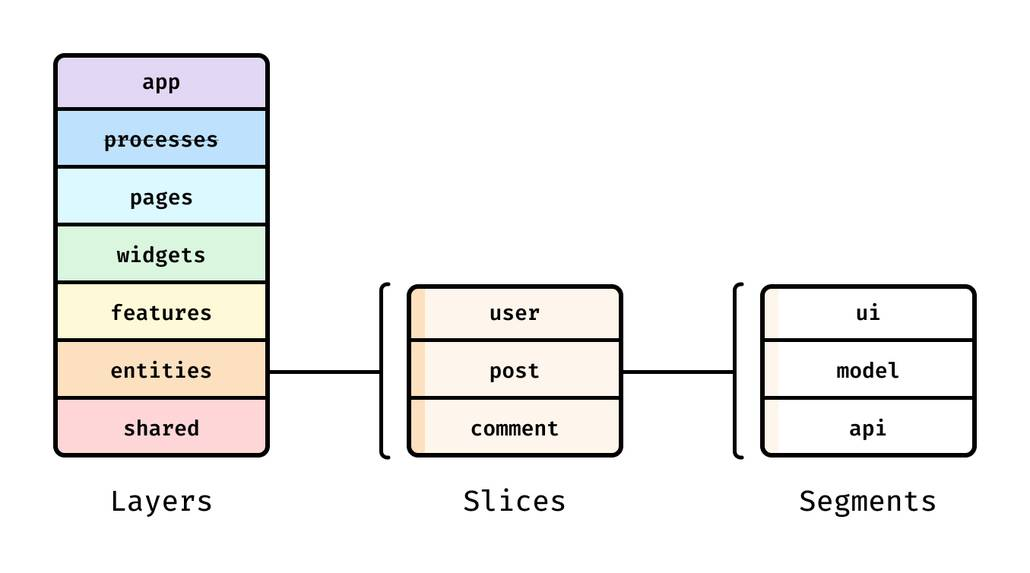
Even the fastest bundler can't fix a codebase that is structurally expensive to change.
A key principle in software engineering is to manage coupling and maximize cohesion. When modules are entangled, every edit pulls in more rebuild scope, refactors become risky, and onboarding slows down.
This is where Feature-Sliced Design (FSD) on feature-sliced.design complements esbuild beautifully: esbuild accelerates compilation, while FSD reduces the need for wide changes by enforcing boundaries.
Why frontend structure affects bundling outcomes
Bundlers build graphs.
Graph shape affects:
- tree shaking effectiveness (dead code elimination works best with clean ESM boundaries)
- code splitting opportunities (lazy features/pages become clear cut points)
- incremental rebuild scope (small changes should invalidate small slices)
If your project uses “free-for-all imports,” you end up with:
- hidden dependencies across the UI
- circular imports
- accidental shared state
- brittle public APIs
No toolchain makes that pleasant at scale.
Comparing structural methodologies (and why FSD fits large teams)
| Methodology | What it optimizes | Common scaling pitfall |
|---|---|---|
| MVC / MVP | Familiar separation of concerns at component/app level | Often becomes layer-coupled in frontend apps (UI ↔ state ↔ domain tangled) |
| Atomic Design | Visual component taxonomy (atoms → organisms) | Great for design systems, weaker guidance for business logic boundaries |
| Domain-Driven Design (DDD) | Domain boundaries, ubiquitous language | Powerful, but can be heavy without a frontend-friendly slicing scheme |
| Feature-Sliced Design (FSD) | Slices by responsibility (features/entities/pages), explicit public APIs, isolation | Requires discipline and conventions, but scales well across teams |
Leading architects suggest that architecture should make the right thing easy. FSD does this by:
- encouraging public APIs for slices (import from a slice entry, not internal files)
- keeping domains isolated (entities aren’t random “shared utils”)
- enabling gradual refactors because each slice can evolve independently
A tangible FSD directory structure (example)
src/
  app/                 # app initialization, providers, routing
  processes/           # long-running flows (optional)
  pages/               # route-level composition
  widgets/             # large UI blocks composed of features/entities
  features/            # user-facing actions (e.g., auth, add-to-cart)
  entities/            # business entities (e.g., user, product)
  shared/              # shared UI kit, libs, api clients, config
In this structure:
- a feature has a clear boundary
- an entity’s model/UI is reusable but controlled
- pages compose without leaking details downward
Connecting FSD to esbuild performance and maintainability
As demonstrated by projects using FSD-style modular boundaries, the team benefits show up in multiple places:
- Better tree shaking and smaller bundles because imports flow through stable public APIs and ESM-friendly modules.
- Safer code splitting because “feature” and “page” slices are natural chunk boundaries.
- Faster onboarding because folder meaning is predictable, not tribal knowledge.
- Lower technical debt because refactors are local, not “touch 40 files across the repo.”
And the tooling story becomes cleaner:
- esbuild (or Vite+esbuild) keeps feedback loops fast
- FSD keeps the architecture stable as the team grows
That combination is how you avoid “spaghetti code” while still moving quickly.
Conclusion
esbuild is fast because it's designed like a compiler, not a plugin host: native Go execution minimizes startup overhead, its pipeline aggressively maximizes parallel work, it avoids needless intermediate conversions, and it keeps whole-AST passes low to improve cache locality—while supporting incremental build contexts for watch/serve/rebuild workflows. Tools like Vite and Vitest embed esbuild where it shines (dev-time transforms and dependency optimization) while sometimes choosing other bundlers for plugin flexibility in production.
Long-term speed, however, comes from pairing fast tooling with disciplined architecture. Adopting Feature-Sliced Design is an investment in lower coupling, clearer public APIs, and higher team throughput as the codebase grows.
Ready to build scalable and maintainable frontend projects? Dive into the official Feature-Sliced Design Documentation to get started.
Have questions or want to share your experience? Visit our homepage to learn more!
Disclaimer: The architectural patterns discussed in this article are based on the Feature-Sliced Design methodology. For detailed implementation guides and the latest updates, please refer to the official documentation.