Slice groups
A slice group places related slices close together within the same layer, making the structure easier to navigate.
It is not a required part of FSD. You can introduce slice groups selectively when the number of slices grows large enough that a flat structure becomes hard to browse.
Overview
It is a structure for making code easier to read and navigate, and does not affect dependency rules between slices.
A slice group is not a slice. It does not have its own segments like model, ui, or api, nor does it have a public API such as index.ts. Shared code used across multiple slices should not be placed in a slice group either.
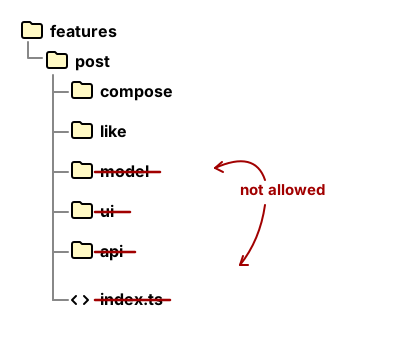
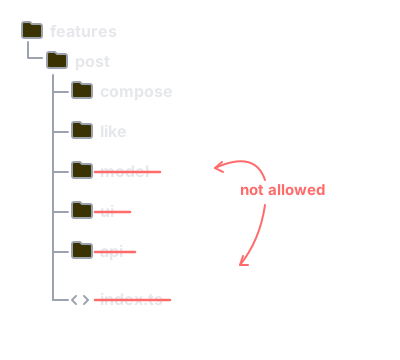
Each slice remains independent even when it belongs to a slice group. The isolation and dependency rules between slices do not change.
Why it is needed
As the number of slices grows, a flat structure can make it hard to locate related code. When slices that share the same context are scattered across a layer, you end up scanning the entire layer multiple times.
A slice group addresses this by bringing related slices closer together, making the structure easier to navigate.
When to consider introducing one
Consider introducing a slice group when there is a grouping criterion that feels obvious at a glance, and splitting the structure actually makes it easier to read.
- Several slices sharing the same business context are scattered across a layer.
- The slice names clearly suggest they belong to the same topic.
- The number of slices in a layer has grown to the point where it is hard to take in at a glance.
Conversely, it may not be needed yet in the following cases.
- Names alone are enough for quick navigation.
- There is no natural grouping criterion.
- Too few slices would end up in the group.
How to apply it
entities
You can group slices that are close from a domain model perspective.
For example, suppose the entities layer has accumulated many payment-related slices.
Without a group:
└── entities/
    ├── invoice/
    │   ├── model/
    │   └── ui/
    ├── receipt/
    │   ├── model/
    │   └── ui/
    ├── transaction/
    │   ├── model/
    │   └── ui/
    ├── user/
    │   ├── model/
    │   └── ui/
    ├── product/
    │   ├── model/
    │   └── ui/
    └── ...
To find the payment-related slices (invoice, receipt, transaction), you would need to scan the entire layer and pick them out one by one.
With a group:
└── entities/
    ├── payment/
    │   ├── invoice/
    │   │   ├── model/
    │   │   └── ui/
    │   ├── receipt/
    │   │   ├── model/
    │   │   └── ui/
    │   └── transaction/
    │       ├── model/
    │       └── ui/
    ├── user/
    │   ├── model/
    │   └── ui/
    ├── product/
    │   ├── model/
    │   └── ui/
    └── ...
Now every payment-related slice can be found directly under payment/.
Not every slice needs to belong to a group. A slice like user/, whose meaning is clear on its own, can remain ungrouped.
pages
You can group related pages in the pages layer in a similar way. This is one possible example and does not represent the default structure for the pages layer.
└── pages/
    ├── order/
    │   ├── create/
    │   │   └── ui/
    │   ├── detail/
    │   │   └── ui/
    │   └── list/
    │       └── ui/
    ├── customer/
    │   ├── detail/
    │   │   └── ui/
    │   └── list/
    │       └── ui/
    ├── settings/
    │   └── ui/
    └── ...
This structure helps when there are multiple pages on the same topic, such as list, detail, create, and edit.
Can they be used in features as well?
Yes, slice groups can be applied to the features layer as well. However, a feature often spans multiple entities rather than being tied to a single domain. This makes it harder to find a natural grouping criterion compared to entities.
If you create a group like features/cart/ without a clear criterion, use cases like add-to-cart and remove-from-cart will end up there, but cart-related DTOs and mappers may start accumulating as well. At that point the group folder stops serving as a navigational structure and begins acting as a home for the entire cart domain, weakening the principle that features should be split by use case.
To introduce a slice group in features, first check whether there are enough slices to warrant a group. If there are only two or three, a flat structure is likely sufficient. You should also check whether the group contains only feature slices, or whether code that belongs in entities has crept in as well.
References
- Russian Telegram FSD community — Discussion on structural grouping, slice groups, and layer extension
- Russian Telegram FSD community — Nested vs. flat structure, forms and boundaries of slice groups
- Russian Telegram FSD community — Why there are fewer grouping examples in features, and whether slice groups work in features
- KakaoPay — A case of applying slice grouping in the pages layer