Client-Side Rendering (CSR): When to Use It

TLDR:
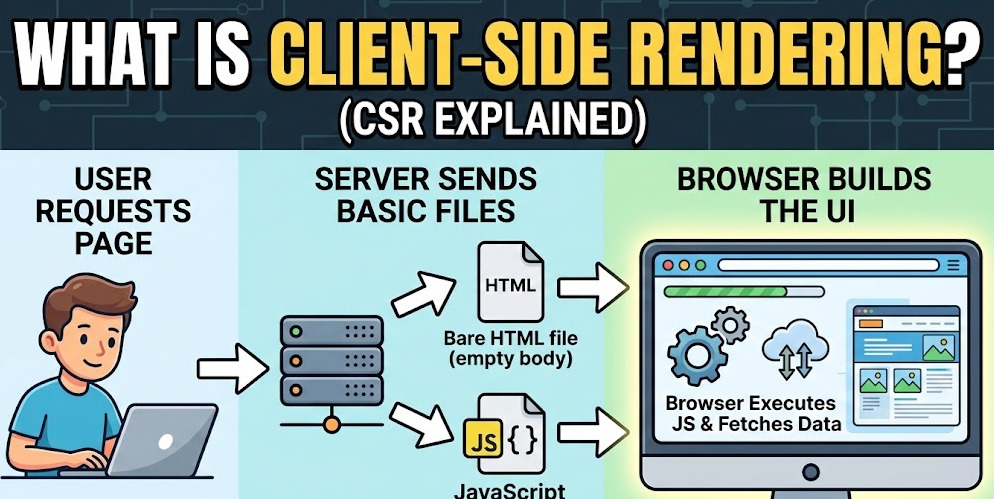
Client-side rendering powers most SPAs by shipping a minimal HTML shell and letting the browser render the UI with JavaScript. This guide breaks down the CSR pipeline, trade-offs, ideal use cases, and concrete ways to improve performance and SEO—using Feature-Sliced Design to keep large CSR apps scalable.
Client-side rendering (CSR) is the default model behind most single-page applications (SPA): the server ships a minimal HTML shell, then the browser downloads a JavaScript bundle to render UI, route between views, and run business logic on the client. That enables rich interactivity and fast in-app navigations, but it can also hurt initial load performance and SEO if your delivery pipeline and architecture are not deliberate. Feature-Sliced Design (FSD) from feature-sliced.design helps large CSR codebases stay modular, cohesive, and maintainable as teams and features grow.
Meta description: Learn how client-side rendering works in SPAs, the real trade-offs vs SSR/SSG, and practical guidelines for when CSR is the right choice—plus performance and SEO techniques, and how Feature-Sliced Design keeps CSR scalable.
Excerpt: CSR powers many modern web apps, especially behind authentication and highly interactive dashboards. This guide explains the CSR rendering pipeline, its benefits and costs, when to choose it, and how to mitigate performance/SEO issues using pragmatic techniques and robust architecture with Feature-Sliced Design.
Table of contents
- How client-side rendering works in a typical SPA
- The trade-offs: what CSR gives you and what it costs
- When CSR is the right choice
- When CSR is the wrong default
- Mitigating CSR downsides: performance, UX, and SEO
- Why architecture matters: CSR scales on modularity
- Feature-Sliced Design for CSR SPAs: a practical structure
- Migration playbook: from spaghetti CSR to a scalable app
- Conclusion
How client-side rendering works in a typical SPA
A CSR app is fundamentally a client-rendered UI runtime delivered over HTTP. The server’s job is to deliver a lightweight entry HTML file (often called an application shell), plus static assets (JS/CSS/fonts), while the browser’s job is to execute JavaScript, build the DOM, and keep the UI in sync with state.
If you have ever started a project with create-react-app (or a comparable SPA starter), you have seen the classic CSR shape:
- The server responds with nearly empty HTML that contains a single root node.
- A
<script>tag loads the main JS bundle (and sometimes additional chunks). - JavaScript bootstraps the framework runtime and renders into the root.
A minimal CSR entry HTML typically looks like this (conceptually):
<!doctype html>
<html>
  <head>
    <meta charset="utf-8" />
    <meta name="viewport" content="width=device-width, initial-scale=1" />
    <title>App</title>
  </head>
  <body>
    <div id="root"></div>
    <script src="/assets/main.[hash].js"></script>
  </body>
</html>
From this point, the “rendering” is an execution pipeline rather than a server template.
The CSR rendering pipeline: from HTML shell to interactive UI
A useful mental model is a timeline with clear phases:
-
Request and TTFB (Time To First Byte)
The browser requests/(or any route), and the server replies quickly with the HTML shell. At this moment, the page may have almost no content. -
Static asset discovery
The browser parses the HTML, discovers<script>and<link>tags, and starts fetching the JS and CSS. With modern bundlers, this may include multiple chunks. -
Download + parse + compile + execute JavaScript
The real work starts when the JS arrives. Framework code, application code, routing logic, state management, and network clients must all be parsed and executed. -
App bootstrap
The entry point typically does four things:- Create a root (React/Vue/Angular)
- Register the router (History API or hash-based routing)
- Configure state (stores, caches, auth tokens)
- Render the initial view
Conceptually:
import { createApp } from "app/bootstrap";
import { router } from "app/router";
import { initAuth } from "features/auth";
import { initTelemetry } from "shared/telemetry";

initTelemetry();
initAuth();
createApp({ router }).mount("#root"); -
Data fetching and first meaningful render
Most SPAs need data. The first “real” UI often depends on API requests, so the initial render is frequently:- A skeleton screen, loader, or minimal layout
- Then a re-render once data arrives
-
Subsequent navigations happen in-memory
Here is the superpower of CSR: after the runtime is loaded, route changes often do not reload the document. The app updates UI and state in memory:- Router updates the URL (History API)
- New route component renders
- Data fetch is triggered (if needed)
- The DOM is updated without a full page refresh
This is why CSR-based SPAs can feel “app-like”: navigation is mostly JS work plus API latency, not a complete server round-trip for HTML.
Why CSR can feel fast after it feels slow
A key principle in software engineering is to separate one-time costs from recurring costs. CSR pays a relatively large one-time cost (download + execute a JS runtime), then enjoys very low recurring costs for navigation and UI updates.
That trade-off becomes visible in metrics:
- First load tends to be constrained by bundle size, CPU, and network.
- In-app navigations tend to be constrained by data fetching and rendering efficiency.
To make this concrete, consider an illustrative (not universal) calculation:
- A 700 KB gzipped JS bundle is roughly 700 × 1024 = 716,800 bytes.
- In bits, that is 716,800 × 8 = 5,734,400 bits (~5.73 Mb).
Approximate download time (ignoring latency and parallelism):
| Connection example | Approx throughput | 700 KB gzipped JS download time |
|---|---|---|
| Decent 4G | 10,000,000 bps (10 Mbps) | 5,734,400 / 10,000,000 ≈ 0.57s |
| Slow 3G | 1,600,000 bps (1.6 Mbps) | 5,734,400 / 1,600,000 ≈ 3.58s |
Now add latency, additional chunks, CSS, fonts, and—often the biggest cost—JavaScript execution time on low-end CPUs. This is why CSR performance work is usually about reducing and deferring JavaScript, not just “using a CDN”.
Rendering, routing, and state: where complexity accumulates
CSR SPAs become complex because they combine multiple responsibilities in the client:
- UI composition (components, layouts, design system)
- Routing and navigation state
- Data orchestration (REST/GraphQL, caching, retries)
- Auth and permissions (SSO/OAuth, token refresh)
- Client-side caches (normalized data, query caches)
- Cross-cutting concerns (telemetry, feature flags, i18n)
This is precisely where architecture determines whether your CSR app stays a pleasant SPA or evolves into “spaghetti code with a router”.
The trade-offs: what CSR gives you and what it costs
CSR is not “good” or “bad”. It is a set of trade-offs—and the right choice depends on product goals, user context, and operational constraints.
Leading architects suggest evaluating rendering strategies with three lenses:
- User experience: How fast does the app feel for real users?
- Discoverability: How well can search engines and link previews consume the content?
- Sustainability: Can the codebase scale with features and teams?
Benefits of client-side rendering
CSR shines when your product behaves more like an application than a document.
-
Rich interactivity by default
Complex stateful UI (drag-and-drop, real-time updates, in-app editors, data grids) is straightforward because the client owns the runtime. -
Fast subsequent navigations
Once the app is loaded, route changes can be near-instant, especially with client caches and smart prefetching. -
Backend decoupling
API-driven development works well: the frontend consumes REST/GraphQL services and can evolve independently from server rendering templates. -
Offline and resilience patterns
Service workers, local-first caches, and optimistic UI patterns are natural fits for CSR. -
Consistent UI composition
A single rendering model across routes makes design systems and shared UI primitives simpler to reuse.
Costs and risks of CSR
The common CSR failure mode is shipping too much JavaScript too early.
-
Slower initial load and delayed content
If the first meaningful content depends on JS and data fetching, users may see a blank or loader-first experience. -
SEO and sharing pitfalls
If server responses do not contain meaningful content per URL, search crawlers and social previews can miss critical information. -
Complexity around performance budgets
Bundle size, code splitting, caching, and client state all require discipline. Performance becomes a product feature. -
Harder guarantees for accessibility and resilience
If the app fails before JS boot completes, the user may get “nothing”. Progressive enhancement is possible, but not automatic. -
Architecture debt grows quickly
Without strong boundaries, UI components, data logic, and routing concerns become tightly coupled.
CSR vs SSR vs SSG/ISR: a pragmatic comparison
There is no one-size-fits-all answer; hybrid approaches are common. The table below focuses on typical strengths and risks, so you can pick intentionally.
| Rendering approach | Strengths | Typical risks / limitations |
|---|---|---|
| CSR (client-side rendering) | Excellent interactivity; fast in-app navigation; easy API-driven development | Weaker first load; SEO complexity; JS execution cost; requires strong architecture to scale |
| SSR (server-side rendering) | Better first paint for content; easier SEO for public pages; predictable HTML per URL | Higher server cost/complexity; caching harder; hydration still ships JS for interactivity |
| SSG/ISR (static generation / incremental static regeneration) | Fast global delivery via CDN; strong SEO; stable performance for content | Not ideal for highly dynamic personalized content; build/invalidation complexity; still needs client JS for interactivity |
A robust strategy in modern products is: use CSR where interactivity and personalization dominate, and use SSG/SSR where content, discovery, and fast first paint dominate.
When CSR is the right choice
CSR is a perfectly valid choice when the product’s value is primarily interactive behavior rather than public content consumption.
Think of CSR as an optimization for stateful experiences:
- The user is signed in.
- The app is used repeatedly.
- Navigation happens frequently inside the product.
- The UI is dynamic, personalized, or collaborative.
High-signal CSR use cases
1) Authenticated dashboards and internal tools
Admin panels, analytics dashboards, billing portals, CRM back offices, monitoring consoles, and workflow automation tools often live behind login. In these cases:
- SEO is irrelevant or secondary.
- Users care more about responsiveness than indexability.
- Client caches and route transitions provide a big UX win.
2) Highly interactive product surfaces
If your UI has complex client interactions (editors, drag-and-drop boards, drawing tools, spreadsheet-like grids, timeline schedulers), CSR usually delivers the best developer experience and user experience.
3) Real-time and collaborative apps
Chat, multiplayer lobbies, live dashboards, collaborative documents, and trading terminals often rely on websockets, streaming updates, and optimistic UI. CSR aligns naturally with these patterns.
4) Personalization-heavy experiences
If the “page” is essentially a composition of user-specific widgets (recommendations, personal feeds, saved views), server rendering may produce little reusable HTML anyway. CSR plus good caching can be the simplest approach.
5) Progressive web apps (PWA) and offline-first flows
CSR is well-suited for service workers, offline caches, background sync, and resilient UX in unstable networks.
A practical decision checklist
CSR is usually a strong default when most of the following are true:
- The app is primarily behind authentication, or content is not meant to be discovered publicly.
- Users spend time in-session, navigating multiple screens per visit.
- Interactivity and client state are core to the experience.
- You can enforce a performance budget, including bundle size and long tasks.
- You have an architectural approach to keep growth manageable (this is where Feature-Sliced Design pays off).
If you answer “yes” to (1)–(3) but “no” to (4)–(5), CSR still works—but the risk of slow UX and architecture debt rises sharply.
When CSR is the wrong default
CSR becomes a costly default when your primary product value is delivered as public, crawlable, content-first pages.
Common anti-patterns for CSR
1) Marketing sites and content-heavy documentation
Landing pages, blogs, documentation hubs, and content libraries usually need:
- fast first content paint
- shareable previews
- reliable indexing per URL
- stable performance on low-end devices
A CSR-only approach can still work with pre-rendering, but at that point you are already moving toward SSG/SSR.
2) SEO-dependent product pages
If revenue depends on search traffic (e-commerce categories, public listings, editorial pages), relying on a client runtime to materialize content increases risk:
- crawlers may not execute JS reliably under all conditions
- timing issues can hide content
- metadata (title/description/OG tags) may be missing at fetch time
3) Ultra-fast “instant” experiences on low-end hardware
If your audience includes low-end devices, slow CPUs, or constrained networks, heavy client bundles can dominate the experience. CSR can still work, but it demands strict performance discipline and careful splitting.
4) Simple sites with limited interactivity
If your site is mostly static content with minimal interactivity, CSR often introduces more complexity than value. A lightweight SSR/SSG approach can be simpler and more resilient.
A balanced approach is often the winning one
Many successful products split their rendering strategy:
- Public surfaces: SSG/SSR for landing pages, docs, pricing, public listings
- Application surfaces: CSR for authenticated dashboards and workflows
This keeps your public experience fast and indexable, while preserving CSR’s strengths where they matter.
Mitigating CSR downsides: performance, UX, and SEO
If you choose CSR, you are choosing to ship a runtime to every user. The good news is that CSR performance and SEO are highly improvable when you treat them as architectural concerns, not last-minute optimizations.
Step 1: Make the first route cheap to execute
The initial route is the bottleneck. Focus on reducing JavaScript work before first render.
-
Route-level code splitting
Make sure each major route is a separate chunk.const SettingsPage = lazy(() => import("pages/settings"));
const BillingPage = lazy(() => import("pages/billing")); -
Defer non-critical features
Do not initialize everything on boot. Delay:- analytics heavy SDKs
- support widgets
- complex editors
- rarely used admin panels
-
Avoid global “mega providers” when possible
Over-nesting providers with expensive initialization can add startup cost. Prefer lazy initialization and local providers for route-specific concerns. -
Reduce render-blocking work
Keep the initial layout lightweight. If the first screen is a dashboard, consider a minimal frame + skeleton that becomes richer after idle.
A key principle in software engineering is cohesion: keep boot code focused on boot. Anything not required for first meaningful paint should not run on the critical path.
Step 2: Control bundle size with a performance budget
CSR wins when the runtime stays lean. Establish budgets and enforce them in CI.
Practical tactics:
-
Tree-shaking friendly imports
Prefer modular packages and avoid importing entire libraries accidentally. -
Audit dependencies
Large bundles often come from a few offenders (charting libraries, date libs, rich editors). Consider lighter alternatives, dynamic imports, or moving heavy tooling behind feature boundaries. -
Ship modern JS when you can
Avoid unnecessary polyfills for audiences that do not need them. Use differential serving when it’s justified. -
Use compression and caching correctly
Gzip/Brotli, immutable hashed assets, long cache TTLs, and CDN delivery are foundational—but they do not replace reducing JS execution time.
Step 3: Optimize client data fetching and caching
CSR UX is often dominated by API latency. The goal is to keep data access predictable and reuse results.
-
Use a query cache (React Query, Apollo, SWR patterns)
This reduces duplicate requests and enables stale-while-revalidate behavior. -
Co-locate data needs with features
If data fetching logic is scattered, you lose control over waterfalls. Consolidate route-level data requirements where possible. -
Prefer parallel fetching
Avoid sequential “fetch A then fetch B then fetch C” patterns unless they are truly dependent. -
Use prefetching intentionally
Prefetch likely next routes after idle or on hover. Do not prefetch everything; respect bandwidth and device constraints.
Step 4: Improve perceived performance (without lying to the user)
Perceived performance is real performance when it reduces user friction and increases confidence.
-
Skeleton screens with meaningful structure
Show the layout the user expects, not a generic spinner. -
Optimistic UI for safe actions
For operations like toggles, reordering, or starring items, optimistic updates can make the app feel instant. -
Avoid layout shift
Allocate space for images, charts, and dynamic blocks to reduce cumulative layout shift.
For user experience evaluation, track:
- LCP (Largest Contentful Paint) as a proxy for first content
- INP (Interaction to Next Paint) as a proxy for responsiveness
- CLS (Cumulative Layout Shift) as a proxy for visual stability
CSR apps can meet these targets, but it requires discipline around bundle size, long tasks, and layout stability.
Step 5: Make CSR SEO-friendly when you actually need SEO
If the app is behind login, you can often stop here. If you do need SEO for public CSR routes, treat SEO as a product surface with clear requirements.
Baseline requirements for crawlable CSR routes:
-
Each URL must be meaningful
Use real routes (not just a single/page) so crawlers and users can link reliably. -
Set title/description per route
Ensure metadata updates correctly when routes change. -
Return correct status codes
If a route is “not found”, the server should return 404—not a 200 HTML shell that later renders “Not Found” in the client. -
Avoid “JS-only content” for critical pages
If a page’s business value depends on organic discovery, consider pre-rendering (SSG) or SSR for that page.
A pragmatic compromise many teams use is:
- Keep the authenticated app as CSR
- Pre-render the public marketing and SEO pages (SSG/SSR)
- Share design system and some features across both, using a consistent architecture
This “split surface” approach is often simpler than forcing a single rendering strategy across all product surfaces.
Why architecture matters: CSR scales on modularity
CSR apps become large because the client is responsible for everything: routing, data orchestration, UI, caching, permissions, and state. Without a strong structure, the codebase tends to collapse into one of these patterns:
- a “components” folder that becomes a junk drawer
- cross-imports everywhere (“just import it from that page…")
- inconsistent data logic (fetch in components, fetch in services, fetch in stores)
- global mutable state that any module can mutate
This is where coupling and cohesion decide the future of your SPA.
- High coupling means features depend on internal details of other features. Refactoring becomes scary.
- Low cohesion means modules do too many unrelated things. Ownership becomes unclear.
A key principle in software engineering is information hiding: modules should expose a public API and keep their internals isolated. That principle is especially important in CSR, where it is easy to import anything from anywhere.
Comparing common organization approaches (and why they break at scale)
Different teams reach for different patterns. Understanding where each pattern shines helps you pick what scales.
| Approach | What it optimizes for | Where it commonly breaks in large CSR SPAs |
|---|---|---|
| MVC / MVP-style layering | Clear separation of view vs logic; familiar mental model | Features cut across layers; hard to represent product slices; cross-layer coupling grows |
| Atomic Design / UI-first organization | Consistent UI building blocks; design system clarity | Business logic and data flow become scattered; “atoms” don’t map to product capabilities |
| Domain-Driven Design (DDD) focus | Strong domain boundaries; ubiquitous language; scalable backend modeling | Frontends need UI composition and interaction boundaries; mapping DDD directly can be heavy |
| Feature-Sliced Design (FSD) | Scalable structure for product features; explicit boundaries; predictable dependency rules | Requires discipline and tooling; teams must learn public APIs and slice ownership |
Notice the theme: CSR apps need a structure that reflects product capabilities (features) and supports reusable UI and domain entities. That is exactly why Feature-Sliced Design is compelling for SPA and CSR-heavy codebases.
Feature-Sliced Design for CSR SPAs: a practical structure
Feature-Sliced Design (FSD) organizes frontend projects by layers and slices, so growth stays controlled.
The core FSD idea in one sentence
Organize the app by what it does (features and entities), not by what it is made of (components vs utils), and enforce boundaries via public APIs.
In practice, an FSD structure often looks like this:
src/
  app/        # app initialization, providers, routing, global config
  pages/      # route-level screens (composition)
  widgets/    # large UI blocks used across pages (composition)
  features/   # user-visible interactions (capabilities)
  entities/   # core domain models (user, order, invoice)
  shared/     # reusable UI kit, libs, config, helpers
How this helps CSR specifically
CSR complexity lives in interactions: auth, filters, editors, search, upload, checkout, notifications. FSD provides:
- Isolation: a feature’s internal components and logic are private.
- Public API: other layers import only what the slice exposes.
- Predictable dependencies: higher layers depend on lower layers, not the other way around.
A helpful dependency rule for CSR:
appcan depend on everything (it composes the world).pagescomposewidgets,features,entities.featurescan depend onentitiesandshared.entitiescan depend onshared.shareddepends on nothing in the app.
Diagram (conceptual):
app → pages → widgets → features → entities → shared
Dependencies flow downward, so refactoring and replacement become safer.
Public APIs: the difference between modularity and “just folders”
The simplest way to enforce isolation is a slice-level entry point, e.g.:
features/auth/
  login/
    ui/
    model/
    api/
    index.ts   # public API
Then the rest of the app imports from the public API only:
import { LoginForm } from "features/auth/login";
Not:
import { LoginForm } from "features/auth/login/ui/LoginForm";
This prevents accidental coupling to internals and keeps refactors low-risk.
CSR state and data in FSD: keep business logic near the feature
A common SPA failure is putting all state in one global store. FSD encourages a more cohesive approach:
- Feature-local state lives inside the feature.
- Entity state represents domain data that multiple features use.
- Shared abstractions provide reusable primitives (HTTP client, caching, i18n).
For example:
shared/api/
  httpClient.ts
  authHeaders.ts

entities/user/
  model/
    types.ts
    selectors.ts
  api/
    fetchCurrentUser.ts
  index.ts

features/auth/login/
  model/
    useLogin.ts
  ui/
    LoginForm.tsx
  index.ts
This structure keeps domain cohesion (user-related concerns together) and reduces cross-feature imports that create tight coupling.
Where MVC, Atomic, and DDD still fit inside FSD
FSD does not forbid other patterns; it gives them a home.
- You can use MVC/MVP inside a slice (e.g., feature model + UI).
- You can build a design system in
shared/uiand apply Atomic Design principles there. - You can reflect DDD aggregates as
entities/(user, order, invoice) without forcing the entire UI into a backend-like domain model.
This “pattern containment” is often the cleanest way to scale: patterns are useful, but they should not dictate the entire project structure.
Migration playbook: from spaghetti CSR to a scalable app
Most teams do not start with FSD on day one. They start with a small SPA and grow. The goal is to evolve safely without stopping delivery.
Step 1: Establish a baseline and choose your target boundaries
Before refactoring, measure what matters:
- initial bundle size
- first route load time (LCP proxy)
- long tasks during startup
- top 10 largest dependencies
- most “hot” directories (where change frequency is high)
Then define boundaries:
- Identify 3–5 core entities (e.g., user, project, order).
- Identify 5–10 top features (auth, search, filtering, export, notifications).
- Identify shared systems (API client, analytics, feature flags).
Step 2: Create the FSD skeleton without moving everything
Add the top-level folders (app/pages/widgets/features/entities/shared) and move only safe “infrastructure” first:
shared/api(HTTP client, interceptors)shared/lib(small utilities)shared/ui(design system base components)app/providers(router, query client, i18n provider)
This creates a stable foundation while keeping risk low.
Step 3: Move one vertical slice end-to-end
Pick a feature with clear boundaries, such as “login”.
- Move UI, model, and API calls into
features/auth/login. - Expose only the public API from
index.ts. - Update imports to use the public API path.
This is where teams often feel the first real benefit: changes become localized, and onboarding becomes easier.
Step 4: Introduce import discipline and tooling
Architecture scales when rules are enforceable:
- Adopt consistent path aliases (
shared/*,entities/*,features/*, …). - Add lint rules to prevent deep imports into slice internals.
- Add code review checks: “Is this importing from the public API?”
A key principle in software engineering is automation of correctness: if architecture rules are manual-only, they will drift under pressure.
Step 5: Use CSR performance work as a forcing function
Every performance optimization is also an architecture opportunity.
- Route-level code splitting becomes easier when routes live in
pages. - Lazy-loading heavy features becomes easier when features are isolated.
- Measuring and reducing bundle size becomes easier when dependencies are not globally imported.
A practical pattern:
- Keep
pagesthin: compose UI blocks and trigger feature flows. - Keep
featuresowning behavior: data fetching orchestration + UI interactions. - Keep
entitiesowning domain: types, selectors, basic domain operations.
Step 6: Split public and private surfaces when needed
If you need SEO for public pages but want CSR for the app:
- Implement public pages with SSR/SSG (or a framework that supports it).
- Keep the authenticated product as CSR.
- Share
shared/uiand domain entities where appropriate.
This is often the best of both worlds: predictable discovery plus excellent in-app UX.
Conclusion
Client-side rendering is a strong choice when your product is an application: authenticated dashboards, interactive workflows, real-time collaboration, and personalization-heavy experiences benefit from CSR’s fast in-app navigation and rich client runtime. The cost is front-loaded—bundle size, JavaScript execution, and SEO complexity—so success depends on intentional performance work and disciplined modularity. Adopting a structured architecture like Feature-Sliced Design is a long-term investment that improves cohesion, reduces coupling, and makes large CSR SPAs easier to evolve, refactor, and onboard into.
Ready to build scalable and maintainable frontend projects? Dive into the official Feature-Sliced Design Documentation to get started.
Have questions or want to share your experience? Visit the Feature-Sliced Design homepage to join the community.