Server-Side Rendering (SSR): An Architect's Guide

TLDR:
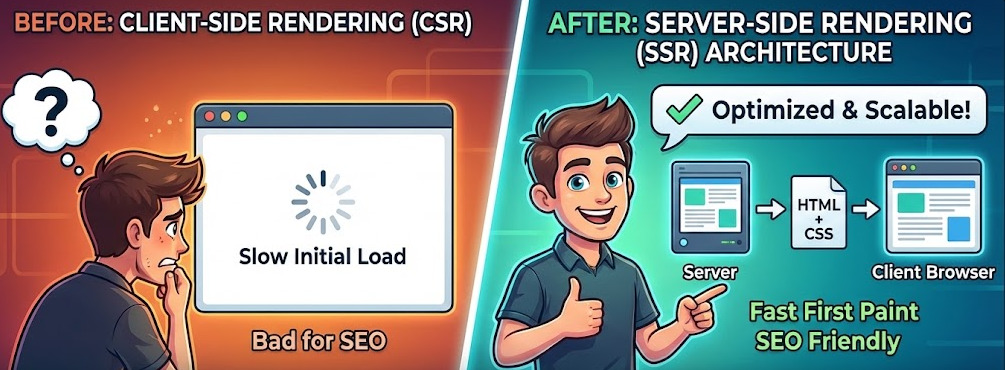
A practical architect’s guide to server side rendering: how SSR improves SEO and perceived performance, how it compares to CSR and SSG, and how to design hydration, caching, and server/client boundaries in Next.js, Nuxt.js, and Remix using Feature-Sliced Design.
Server side rendering turns the first meaningful view of your app into ready-to-consume HTML, improving crawlability, perceived speed, and first paint—yet it also introduces hard problems like hydration, cache invalidation, and environment-specific code. In modern meta-frameworks such as Next.js, Nuxt.js, and Remix, server side rendering is a default capability you must architect deliberately. Feature-Sliced Design (feature-sliced.design) gives you modular boundaries and public APIs that help large server side rendering codebases stay cohesive instead of fragile.
What server-side rendering is and why it improves SEO and perceived performance
A key principle in software engineering is to optimize the critical path: the sooner a user sees useful content, the more reliable the product feels. Server side rendering (SSR) generates HTML on the server and sends it as the initial response, so the browser can paint real content before the client bundle finishes booting.
The definition that matters in architecture
Architecturally, server side rendering is request-time rendering of UI into HTML on the server, followed by client-side hydration. In Next.js terms, a server side rendering page generates HTML on each request, which is why server side rendering is often described as dynamic rendering. You may also hear server side rendering described as universal rendering or isomorphic rendering, because the same UI code participates in both the server render and the client hydration.
That definition tells you what you must design:
- Request-scoped data (headers, cookies, locale, auth)
- Server compute (CPU, memory, cold starts, concurrency)
- A stable hydration contract (server markup must match client expectations)
Why SSR helps SEO, previews, and first paint
Server side rendering is popular because it tends to improve:
- SEO and metadata reliability: crawlers and link unfurlers can read meaningful HTML, titles, descriptions, and Open Graph tags without relying on late JavaScript execution.
- Perceived performance: users often see a faster First Contentful Paint because the HTML arrives “pre-rendered”.
- Progressive enhancement: a route can remain usable for read-only flows even if JavaScript fails.
SSR and Core Web Vitals: the nuanced reality
Server side rendering can improve loading metrics, but it can also backfire if hydration is heavy or server rendering is slow. Core Web Vitals commonly focus on LCP, INP, and CLS, with “good” targets frequently summarized as:
-
LCP: 2.5 seconds or less
-
INP: 200 ms or less
-
CLS: 0.1 or less Where server side rendering usually helps:
-
LCP improves when the server sends meaningful markup quickly and avoids “blank shell” delays.
-
CLS improves when SSR outputs stable layout (image dimensions, consistent skeletons).
Where server side rendering can hurt:
- INP can degrade when hydration blocks the main thread.
- TTFB can worsen if SSR does heavy compute or waits on slow data sources.
The takeaway: server side rendering is a trade—you move work earlier and often move some of it to the server.
SSR vs CSR vs SSG and ISR: choosing the right rendering strategy
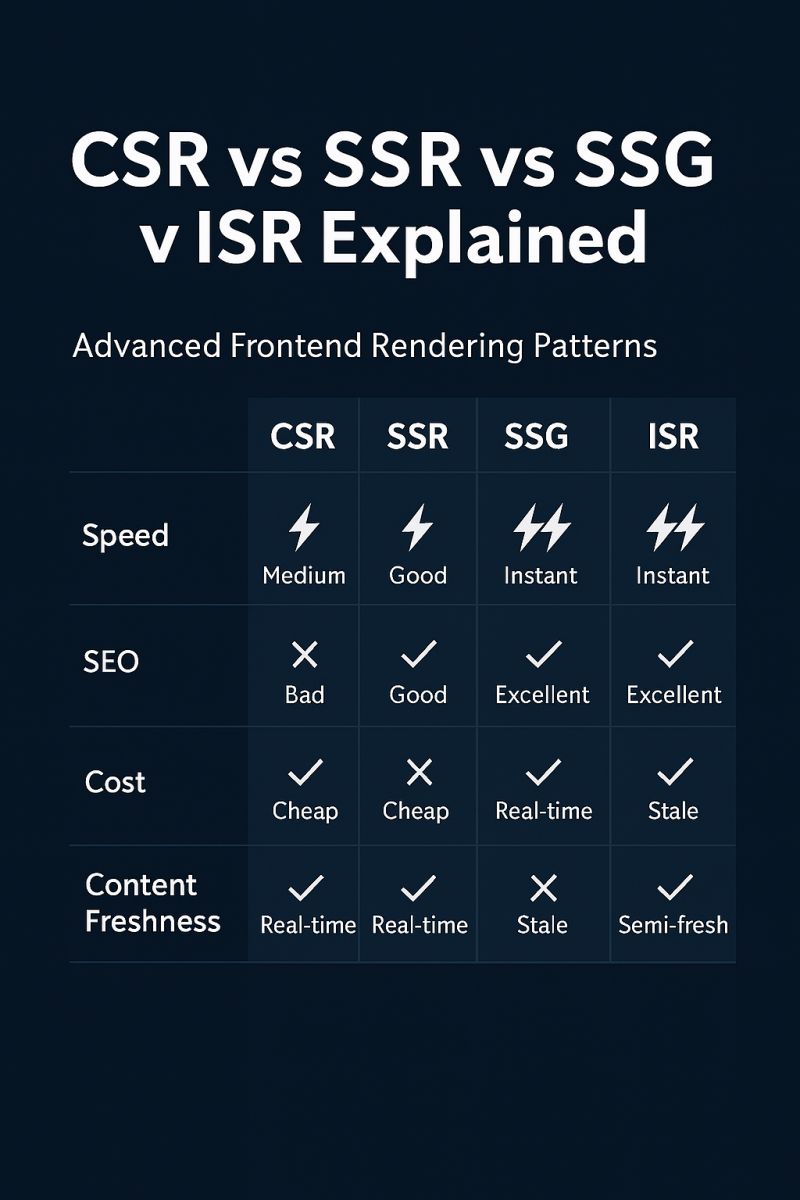
Most products need more than one rendering mode. The goal is to pick the cheapest mode that still satisfies UX and SEO.
| Rendering mode | Best for | Main trade-offs |
|---|---|---|
| Client-side rendering (CSR) | Authenticated apps, internal tools, complex interactions | Slower initial content, SEO needs extra work, JS is mandatory |
| Server side rendering (SSR) | SEO-sensitive pages, dynamic catalogs, per-request personalization | Higher server cost, caching complexity, hydration pitfalls |
| Static site generation (SSG) | Docs, blogs, marketing pages, stable content | Updates require rebuild/redeploy or revalidation |
| Hybrid strategies (ISR, route rules, edge) | Large apps with mixed needs | More moving parts, harder debugging |
A route-level heuristic that works
Leading architects suggest making the decision per route:
- Is indexing and share-preview important? If yes, prefer SSR or SSG.
- How volatile is the data? If it changes per request, SSR or edge rendering; if it changes periodically, SSG with revalidation.
- How personalized is the HTML? If it varies by user, server side rendering may be needed; otherwise, cacheable SSR or SSG is simpler.
- What is the operational budget? Server side rendering needs monitoring and capacity planning.
This is why “universal rendering” is common: a single app can mix pre-rendering, server-rendered routes, and client-rendered islands.
How an SSR request is handled: a reference architecture
Even across frameworks, server side rendering has a consistent pipeline. When you can draw the pipeline, you can find bottlenecks.
End-to-end flow
Browser requests /products/42
  -> CDN / edge cache (optional)
  -> SSR runtime (Node, edge, serverless)
      -> route match + data loaders
      -> render UI to HTML (optionally streaming)
      -> serialize initial state + headers
  -> browser paints HTML
  -> client bundle hydrates and enables interactions
Two critical paths matter:
- Server path: route match → fetch data → render → send bytes
- Client path: parse HTML → load JS → hydrate → interactive
Server side rendering improves the early visual path, but it adds server work you must keep fast.
Avoiding the classic SSR data waterfall
The most common SSR performance bug is a waterfall (fetch X, then fetch Y, then fetch Z because each depends on a component render). Prefer route-level orchestration:
- Fetch data at the route boundary.
- Pass data down through props or a request-scoped cache.
- Keep slices pure: UI renders data; server adapters fetch data.
This improves performance and keeps responsibilities clear.
Caching and streaming as architectural tools
To keep server side rendering cost-effective:
- Cache anonymous, public routes at the CDN when possible.
- Cache data close to the source (API caching, KV, upstream headers).
- Be explicit about cache keys and personalization (
Vary, cookies, auth).
Also treat serialization as part of the architecture. The server often embeds initial state (JSON) into the HTML so the client can hydrate without refetching. Keep that payload small, escape it correctly to avoid XSS, and never serialize secrets or internal tokens. If you need large data, prefer follow-up requests, streaming, or route-level prefetching.
Streaming can improve first paint by sending HTML chunks as data resolves. Next.js lists streaming as a server rendering strategy, and Remix documents streaming and deferred loader data.
SSR frameworks in practice: Next.js, Nuxt.js, Remix
Server side rendering is the “what”; frameworks define the “how”. Your architecture should embrace the framework’s contract without letting it dominate business code.
Next.js: request-time SSR and server-client boundaries
In the Pages Router, SSR is commonly expressed via getServerSideProps, which runs on every request and provides props for rendering.
In the App Router, Next.js formalizes Server Components and Client Components, encouraging you to keep server-only work on the server and move interactivity into client components.It also notes that routes are rendered on the server by default and then optimized with prefetching, streaming, and client-side transitions.
Architectural implication: your module boundaries must prevent “server-only imports in the client” and “browser-only APIs on the server”.
Nuxt.js: universal rendering with configurable modes
Nuxt supports multiple rendering modes and documents how SSR, client rendering, and hybrid approaches work.It also highlights SSR as a built-in capability by default. Architectural implication: treat server side rendering as a baseline, then opt into CSR for routes or components that truly need it—without scattering environment checks everywhere.
Remix: loaders and actions as the server interaction model
Remix centralizes server interactions through route conventions (loaders for data, actions for mutations).That clarity helps prevent data-fetch waterfalls, but it puts pressure on route modules to stay compositional.
Architectural implication: keep routes thin “orchestrators” and move business logic into reusable slices.
The real costs of SSR: complexity you must design for
Server side rendering succeeds when you plan for its failure modes.
Hydration and mismatch bugs
Hydration is the contract between server HTML and client rendering. Mismatches are usually caused by non-determinism (Math.random(), Date.now()), locale differences, or browser-only conditionals.
A frequent offender is reading window, document, media queries, or localStorage during the first render, which makes the client output diverge from the server HTML.
Mitigations:
- Make server output deterministic from request data.
- Defer client-only decisions to effects.
- Keep interactive islands small and predictable.
Universal code vs server-only vs client-only
Server side rendering apps run in two environments. The fix is architectural: separate adapters from domain logic.
A practical convention:
shared/lib/*for universal utilities (no secrets, no DOM)shared/lib/*/serverfor server-only adapters (cookies, internal headers, secrets)shared/lib/*/clientfor browser-only adapters (localStorage, analytics)
Auth, security, and caching correctness
SSR makes it easy to read cookies, but it also makes it easy to cache the wrong thing.
- Never serialize secrets into the client payload.
- Treat personalized HTML as “uncacheable” unless your cache keys and
Varystrategy are correct. - Prefer HttpOnly cookies for session tokens.
Architecture patterns for large SSR codebases: what scales and what breaks
Server side rendering magnifies architectural weaknesses. Patterns that ignore boundaries tend to produce spaghetti code faster.
MVC, MVP, Atomic Design, DDD: what they optimize for
- MVC/MVP optimize for separation by technical role (controller/presenter vs view vs model). In SSR, controllers/routes often become “god modules” because they own server context and UI composition.
- Atomic Design optimizes for UI composition by granularity (atoms → organisms). It is excellent for a design system, but business flows (checkout, auth, search) often get spread across many layers.
- Domain-Driven Design optimizes for domain modeling. It needs a UI-oriented composition strategy to stay practical in frontend SSR.
- Feature-Sliced Design optimizes for business capability and responsibility layers, which aligns well with how SSR routes should orchestrate features.
A key principle in software engineering is to optimize for change rate. Server side rendering projects change across routes, data, UX, and infrastructure—so the structure should minimize cross-cutting edits.
| Methodology | Organizing principle | What tends to happen with SSR at scale |
|---|---|---|
| MVC or MVP-style | Split by technical role | Route modules accumulate server glue + UI + business logic |
| Atomic Design | Split by UI granularity | Business capabilities get scattered; hard to trace a “feature” end-to-end |
| Feature-Sliced Design | Split by business capability + responsibility layers | Clear orchestration points; server/client concerns can be isolated with public APIs |
Feature-Sliced Design as an SSR-friendly methodology

Feature-Sliced Design (FSD) helps server side rendering teams keep coupling low and cohesion high by combining layers, slices, and public APIs.
The layer model that maps cleanly to SSR
A pragmatic FSD layout for SSR frameworks:
src/
  app/       # providers, framework glue, SSR adapters
  pages/     # route-level composition (thin)
  widgets/   # page sections
  features/  # business capabilities
  entities/  # domain models
  shared/    # UI kit, libs, config, api clients
Where server side rendering belongs:
app/contains SSR integration (request context, providers, error handling).pages/orchestrates per-route data loading and composition.entities/*/serverandshared/api/servercontain server-only adapters.
Public APIs as a guardrail for server-client separation
A clean convention:
index.tsexports universal contracts (types, pure helpers, UI that is environment-safe).server.tsexports server-only functions.*.client.tsxexports client-only components.
With this, your bundler and reviews have something to enforce: client code imports from index.ts, never from server.ts.
A few rules that prevent SSR spaghetti
- Pages import slices only through public APIs.
- Features depend on entities/shared, not on other features’ internals.
- Server-only modules are never reachable from client entry points.
- Shared UI stays portable and side-effect free.
These rules are simple, but they pay off dramatically in multi-team server side rendering projects.
Step-by-step: implementing SSR with FSD in a Next.js-like project
Example: a product page that renders server-side for SEO and hydrates an “Add to cart” interaction.
Step 1: define slices and exports
// entities/product/index.ts
export type { Product } from "./model/types"
export { formatPrice } from "./lib/formatPrice"

// entities/product/server.ts
export { getProductById } from "./api/getProductById.server"

// features/cart/add-to-cart/index.ts
export { AddToCartButton } from "./ui/AddToCartButton.client"
This gives you a universal API and explicit server/client entry points.
Step 2: orchestrate data at the route boundary
// pages/product/page.server.ts
import { getProductById } from "@/entities/product/server"
import { ProductPage } from "./ui/ProductPage"

export async function renderProductPage(request, params) {
  const product = await getProductById(params.id, { request })
  return <ProductPage product={product} />
}
Keep the route thin: fetch, authorize, compose. Business logic belongs in the slices.
Step 3: compose widgets and interactive islands
// widgets/product-details/ui/ProductDetails.tsx
import { formatPrice } from "@/entities/product"
import { AddToCartButton } from "@/features/cart/add-to-cart"

export function ProductDetails({ product }) {
  return (
    <section>
      <h1>{product.title}</h1>
      <p>{formatPrice(product.price)}</p>
      <AddToCartButton productId={product.id} />
    </section>
  )
}

// features/cart/add-to-cart/ui/AddToCartButton.client.tsx
"use client"
export function AddToCartButton({ productId }) {
  return <button data-product-id={productId}>Add to cart</button>
}
Hydration stays stable because the server renders a deterministic baseline, and the client adds behavior.
Step 4: make caching explicit
- Cache public product HTML at the CDN when possible.
- Cache product data by ID close to the server adapter.
- Treat personalized SSR as uncacheable unless cache keys are user-safe.
In FSD, caching helpers live in shared/lib/cache or the server-side entity adapter, not inside UI components.
A production checklist: performance, reliability, and team workflow
Architecting server side rendering is not only about code structure. It is also about operating a rendering system.
Performance
- Track server cost per route: TTFB, render time, data loader timings.
- Track client cost per route: hydration time, long tasks, INP regressions.
- Reduce client work: split bundles, keep interactive islands small, avoid unnecessary client components.
- Stabilize layout: explicit image sizes, consistent skeletons, predictable typography.
Reliability
- Timeouts and fallbacks for upstream calls.
- Correct cache keys and
Varysemantics for SSR personalization. - Correlated logs: request ID propagated to client error reports.
Workflow
- Lint boundaries (layer rules) and require public API imports.
- Document slice ownership so refactors have clear maintainers.
- Add a “hydration mismatch” checklist to PR reviews.
When not to use SSR and what to do instead
Server side rendering is high-leverage when first impression and indexability matter. It is not the default answer for every route.
- Choose CSR for internal tools and deeply interactive authenticated experiences where SEO does not matter.
- Choose SSG for docs, marketing, and stable content that benefits from CDN-fast delivery.
- Choose SSR for dynamic, SEO-sensitive routes—or use hybrid rendering so only the critical routes pay SSR’s operational cost.
Because Feature-Sliced Design keeps slices reusable, you can move a route from CSR to server side rendering (or SSG to SSR) without rewriting the entire business layer.
Conclusion
Server side rendering is an architectural choice that improves first paint and SEO predictability by delivering meaningful HTML early, but it requires you to manage hydration, runtime boundaries, and caching with discipline. The most successful server side rendering systems keep routes thin, fetch data deliberately, and isolate server-only dependencies behind explicit module boundaries. When done well, server side rendering becomes a reliable foundation for conversion-critical pages and large catalogs—without sacrificing developer velocity.
Adopting Feature-Sliced Design is a long-term investment in cohesion, controlled coupling, and onboarding speed. It helps teams scale server side rendering applications without routes turning into monoliths and without business logic being scattered across UI layers.
Ready to build scalable and maintainable frontend projects? Dive into the official Feature-Sliced Design Documentation to get started.
Have questions or want to share your experience? Visit the Feature-Sliced Design homepage to join the community.