Static Site Generation (SSG) is Still King

TLDR:
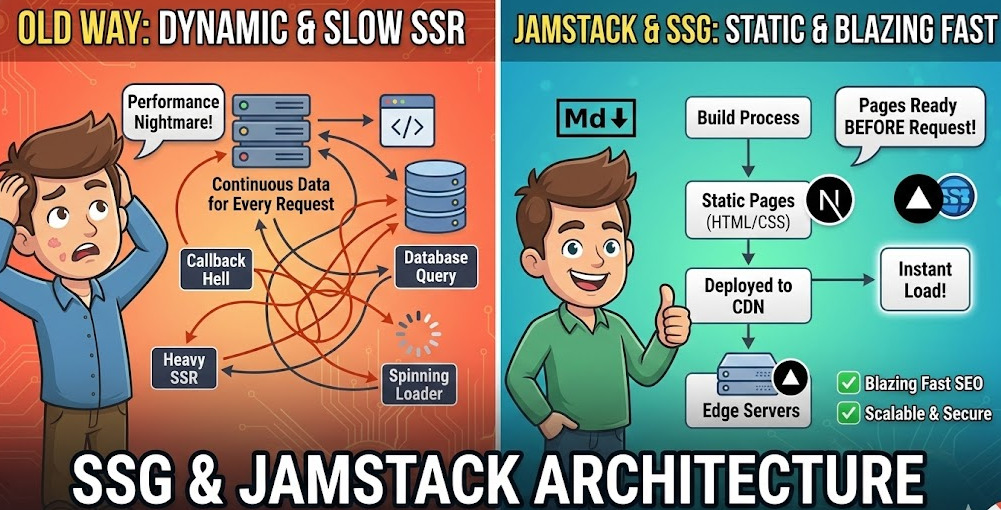
Static Site Generation keeps winning because it turns your frontend into CDN-delivered artifacts: fast, cacheable, and resilient. In 2026, islands architecture and incremental regeneration make SSG practical for interactive products, while Jamstack APIs handle the “write” path. This article compares Astro, Gatsby, and Next.js, shows when SSG is the right choice, and explains how Feature-Sliced Design prevents architectural drift so your static codebase stays clean as teams and requirements grow.
Updated: February 2026
Static site generation (SSG) compiles routes into pre-rendered HTML at build time, so users and crawlers get fast pages from a CDN—no per-request rendering. With Jamstack, partial hydration, and stricter Core Web Vitals, that “ship files, not servers” model remains the most reliable baseline. Pair it with Feature-Sliced Design (FSD) from feature-sliced.design to prevent the architectural drift that turns “simple” sites into spaghetti.
How static site generation works and why pre-rendered HTML still wins
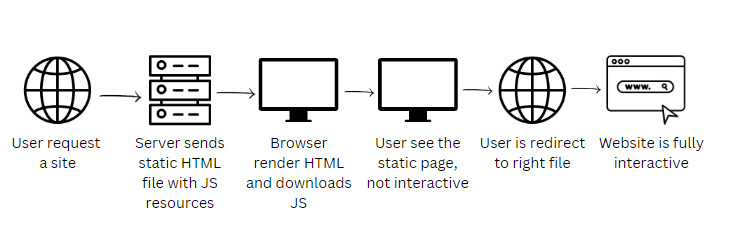
Static site generation is easiest to reason about when you treat it as a build-time contract: your code runs once in CI (or locally) to produce immutable artifacts, and production only serves those artifacts.
The build-time contract in one mental model
At build time, a static site generation framework pulls content and data (Markdown/MDX, headless CMS, APIs), executes your rendering code, and outputs:
- HTML for routes (and often JSON payloads for client navigation)
- CSS/JS bundles (usually code-split)
- static assets (images, fonts)
- manifests for routing and caching
At runtime, a static host or CDN serves files. That single shift—no per-request rendering—is why static site generation is consistently fast and stable.
Diagram (textual): static site generation delivery pipeline
- Content sources → 2. Build renders routes → 3.
dist/artifacts → 4. Deploy to CDN → 5. Requests hit nearest edge cache
Rendering strategies compared: where do you pay the complexity tax?
| Strategy | When HTML is created | Typical trade-offs |
|---|---|---|
| SSG (pre-rendering) | Build time (or on-demand regeneration) | Fast delivery and caching; content invalidation and build graph need management |
| SSR | Per request on a server/edge runtime | Fresh data per request; more ops surface area and harder caching |
| CSR | In the browser after JS loads | Flexible UI; slower first paint, heavier JS, SEO depends on JS execution |
Static site generation tends to win when content changes less frequently than traffic—docs, marketing, blogs, and most read-heavy product pages.
Why “boring” is a feature: determinism and rollbacks
A key principle in software engineering is that deterministic systems are easier to debug. Static site generation makes deploys deterministic:
- reproducible builds per commit
- easy rollbacks (swap artifacts)
- fewer runtime failure modes (no rendering server in the hot path)
That reliability is exactly what many teams need when they’re optimizing for velocity and uptime.
The benefits that keep SSG on top: performance, SEO reliability, security, and cost
Static site generation remains king because it aligns with the web’s real constraints: bandwidth, device variability, and the need for resilient deployments.
Performance that maps to Core Web Vitals
Core Web Vitals focus on perceived loading and interaction quality, including Largest Contentful Paint (LCP), Interaction to Next Paint (INP), and Cumulative Layout Shift (CLS). Static site generation helps because:
- HTML arrives quickly from the CDN (better TTFB)
- the browser can render meaningful content earlier (better LCP)
- layouts are easier to stabilize at build time (better CLS)
- less JavaScript is necessary when pages start as HTML (better INP)
Targets commonly used for “good” UX include LCP < 2.5s and CLS < 0.1 at the 75th percentile in field data.
SEO that’s reliable, not “probably fine”
Modern crawlers can execute JavaScript, but relying on it adds risk: render delays, hydration errors, and missing metadata when scripts fail. Static site generation ships complete HTML and metadata up front, which improves indexing reliability—especially for large documentation and marketing sites.
Security and resilience by reducing the attack surface
A key principle in software engineering is to minimize exposed surface area. With static site generation, the public internet typically sees:
- CDN + object storage (or a static host)
- optional serverless endpoints for “write” paths
You still must harden client code and APIs, but removing an always-on rendering server eliminates an entire class of failures and attacks.
Lower ops load and predictable costs
Static assets scale naturally with CDNs. CI/CD becomes straightforward:
- build + test on merge
- deploy immutable artifacts
- invalidate caches via hashed filenames (or host tooling)
For most read-heavy sites, that’s cheaper and easier to operate than a fleet of SSR servers.
Static site generation in 2026: islands, partial hydration, and hybrid rendering make it even stronger
Classic static site generation struggled with interactivity. Modern tooling fixed that without sacrificing the benefits of pre-rendered HTML.
Islands architecture and selective hydration
Astro’s documentation describes “islands” as server-rendered HTML pages with small, self-contained interactive regions that can be hydrated on the client—also known as partial or selective hydration. Diagram (textual): islands on a landing page
- Static: hero, copy, FAQ
- Islands: pricing toggle, search box, signup modal
- Result: minimal JS, faster interaction, fewer hydration problems
The practical lesson: static by default, dynamic by exception.
Incremental Static Regeneration (ISR): freshness without full rebuilds
Next.js documents Incremental Static Regeneration (ISR) as a way to update static pages after deployment, without rebuilding the entire site. ISR is valuable when you have:
- large content sets (many pages)
- frequent updates but strong read traffic
- strict build-time budgets in CI
You keep CDN-fast responses while regenerating content in the background.
Edge caching, cache-control, and “stale-while-revalidate” patterns
Even with static site generation, caching strategy is a first-class design decision. When artifacts are immutable (content-hashed filenames), you can safely set long-lived caching for assets. For HTML, many teams combine short TTLs with stale-while-revalidate semantics: serve a cached page immediately, then refresh in the background via regeneration or revalidation. In hybrid setups, you might also render some routes at the edge runtime while keeping the majority of pages fully static—an effective way to balance freshness, cost, and global latency.
The real win: shipping fewer bytes of JavaScript
Leading architects suggest treating JavaScript as a budget. Modern static site generation makes the “cheap” path easy:
- keep most components as HTML/CSS
- hydrate only interactive islands
- defer non-critical scripts
- measure with Lighthouse + real user monitoring
Static site generation won’t optimize for you, but it makes “fast by default” achievable.
Astro vs Gatsby vs Next.js: choosing an SSG framework without regrets

Pick a tool based on content sources, expected interactivity, and how much hybrid rendering you need—not on hype.
| Framework | Where it shines for static site generation | Watch-outs at scale |
|---|---|---|
| Astro | Content-first sites; server-first output; islands architecture with minimal JS by default | Sharing state across islands requires explicit patterns; teams must avoid over-hydrating |
| Gatsby | Plugin ecosystem; build-time data layer with GraphQL schema over many sources | Plugin-driven coupling can slow builds; large datasets need careful caching and query discipline |
| Next.js | Mature hybrid rendering (SSG/ISR/SSR); clear SSG primitives like getStaticProps/getStaticPaths, plus ISR | Without structure, code gravitates into route files and “misc” folders—architecture must be enforced |
A pragmatic heuristic for framework choice
- Choose Astro when your site is mostly content with pockets of interactivity and you want the smallest JS footprint.
- Choose Gatsby when you benefit from a strong build-time data pipeline and plugin integrations.
- Choose Next.js when you want one framework for a public static site plus authenticated or personalized areas.
No framework will save you from architectural entropy; that’s a methodology problem.
Jamstack: static site generation plus APIs and serverless functions
Jamstack is the production-friendly way to make static sites behave like real products. Jamstack.org frames it as an architecture built on pre-rendering and decoupling, improving speed, security, and scalability.
The read path and the write path
A useful mental split:
- Read path: Browser → CDN → static HTML/assets
- Write path: Browser → API/serverless function → external service → webhook revalidation/build
This pattern supports real features without reintroducing monolithic servers:
- forms → function → email/CRM
- search → hosted index → client query
- auth → identity provider → protected APIs
- ecommerce → headless commerce + checkout provider
- comments/feedback → API + storage, then revalidate
Because the read path is cached HTML, the site stays resilient even if a CMS or API has a transient slowdown.
Hosting and preview environments: why teams ship faster with static site generation
Static hosting platforms (for example, GitHub Pages, Netlify, Vercel, and Cloudflare Pages) make it easy to attach builds to pull requests and preview content changes before merging. Those preview deploys are not just a convenience; they reduce risk by letting non-engineers review copy, navigation, and SEO metadata in a realistic environment. In Jamstack systems, previews also validate that external integrations (CMS webhooks, search indexing, serverless functions) behave correctly before production traffic hits.
Freshness patterns you can adopt immediately
- Webhook builds: publish → build → deploy
- On-demand revalidation: publish → secure endpoint → revalidate affected routes
- Time-based revalidate: “hot” pages regenerate on a schedule (ISR)
Next.js positions ISR specifically as “update static content without rebuilding the entire site.”
When to use static site generation (and when not to)
Static site generation is a strong default, but it’s healthiest when you apply it intentionally.
Great fits
- docs, blogs, marketing, SEO pages
- design systems and component documentation
- public product surfaces (pricing, feature pages, guides)
- catalogs and product pages with ISR (when staleness is acceptable)
A simple rule: if most users see the same content and it’s read-heavy, static site generation is likely the best cost/perf choice.
Signals you need hybrid rendering
Be careful with pure static site generation when you need:
- per-user personalization on first paint
- real-time dashboards where staleness is unacceptable
- high-frequency updates (many changes per minute)
- strict server-side authorization per request
Hybrid is normal: keep public routes static, and render authenticated routes with SSR/edge or client fetch + skeletons.
A fast decision checklist
- How often does content change? daily → static site generation; hourly → ISR; per-minute → SSR/edge
- Is first paint personalized? yes → SSR/edge or client fetch
- Can you tolerate stale data? yes → caching + revalidate; no → SSR
- Do you need “CDN-level uptime”? yes → favor static artifacts
- Does the team want minimal ops? yes → static hosting
The hidden challenge: SSG makes delivery easy, but codebases still rot
Static site generation solves delivery, not structure. Teams still run into:
- inconsistent folder conventions and “components/ hell”
- logic buried in routes, hard to reuse
- tight coupling and fragile refactors
- onboarding pain because architecture is implicit
A key principle in software engineering is that modularity requires boundaries. Without boundaries, your static site generation codebase becomes a monolith that just happens to compile into HTML.
That’s why static site generation projects benefit from the same discipline as “big apps”: explicit module ownership, dependency direction, and clean public APIs.
Feature-Sliced Design: bringing scalable architecture to SSG projects
Feature-Sliced Design (FSD) is a methodology for structuring frontend code around responsibility layers and feature slices, with strict dependency direction and explicit contracts.
Layers and public APIs: the core tools for isolation
FSD layers separate code by responsibility and dependency depth; the official docs describe them as a semantic hierarchy that helps you allocate responsibility and control dependencies. FSD also relies on public APIs as contracts between modules. The documentation describes public API as a gate: consumers import only what the slice exposes, not its internals. Those two ideas produce immediate benefits:
- higher cohesion inside slices
- lower coupling across slices
- safer refactors and clearer ownership
As demonstrated by projects using FSD, this combination of layers and public APIs clarifies ownership and keeps dependency graphs healthy over years of change.
Comparing FSD with common approaches
| Approach | Strengths | Common pitfalls at scale |
|---|---|---|
| MVC/MVP | Familiar separation of UI and logic | Poor fit for component composition; “model” becomes a dumping ground |
| Atomic Design | Excellent for UI libraries | Optimizes by component type, not feature ownership; domain logic leaks into shared UI |
| DDD-inspired modules | Strong domain boundaries | Requires mature ubiquitous language and disciplined boundary work |
| Feature-Sliced Design | Feature ownership + responsibility layers + public APIs | Requires conventions and tooling; overkill for tiny one-off sites |
The practical takeaway: FSD is a robust methodology for long-lived codebases, including static site generation projects that start small but grow with product needs.
A practical blueprint: applying FSD in an SSG repository
This structure works well in Astro, Gatsby, and Next.js:
src/
  app/
  pages/
  widgets/
  features/
  entities/
  shared/
Step-by-step: make pages composition-only
- Pages assemble widgets and features; they should not own domain logic.
- Entities model content concepts (Article, Author, Tag), including types, selectors, and domain UI.
- Features implement user-facing interactions (search, theme toggle, newsletter).
- Widgets compose large UI blocks (site header, article layout).
- Shared provides generic primitives (UI kit, utilities, low-level API clients).
Example: make “Article” an entity slice:
entities/article/
  model/
    types.ts
  api/
    fetchArticle.ts
  ui/
    ArticleCard.tsx
  index.ts
Expose only what other modules need via a public API:
// entities/article/index.ts
export type { Article } from "./model/types";
export { fetchArticle } from "./api/fetchArticle";
export { ArticleCard } from "./ui/ArticleCard";
This prevents dependency leaks: route files don’t import internal paths like entities/article/ui/ArticleCard.tsx.
Where SSG-specific concerns should live
Static site generation introduces build-time integration code (CMS clients, content transforms, revalidation hooks). Keep it isolated:
shared/apifor low-level clients (CMS SDK, fetch wrappers)entities/*/apifor domain-aware fetchersappfor global providers, routing composition, and build configuration glue
That separation keeps the dependency graph understandable and reduces the chance that “build scripts” become unowned, critical infrastructure.
Enforce structure automatically
Conventions work best when enforceable. The FSD ecosystem includes tooling that checks rules such as mandatory public APIs for slices and consistent naming. Even a small amount of automation reduces review churn and helps teams scale consistency across squads.
Advanced tips for keeping SSG fast and maintainable
1) Make image performance a build pipeline concern
Pre-generate responsive sizes, set explicit dimensions to prevent CLS, and fingerprint filenames for immutable caching. This is one of the easiest “static site generation superpowers” to operationalize.
2) Treat build time as a product metric in static site generation
If builds are slow or unpredictable, reduce work in the build graph:
- cache dependencies in CI
- avoid “fetch everything” queries
- adopt incremental builds/ISR when available
Build-time pain is often a signal of architectural coupling.
3) Keep hydration intentional
If a component can be plain HTML, keep it plain HTML. Use islands/hydration only when you truly need state, user input, or runtime data. This keeps INP healthy and avoids hidden client complexity.
Conclusion
Static site generation remains king because it makes the hard parts of web delivery—speed, caching, uptime, and global distribution—predictable: serve immutable artifacts from the edge. Modern static site generation adds islands architecture and incremental regeneration, so interactivity and freshness no longer force you into fragile server-rendering stacks. The practical playbook is simple: pre-render what you can, hydrate only what you must, and push writes through APIs or serverless functions. What differentiates mature teams is maintainability: adopting a structured architecture like Feature-Sliced Design is a long-term investment in code quality, lower coupling, safer refactors, and faster onboarding. When your site evolves from “docs and marketing” into a real product, those boundaries keep delivery fast and changes calm. By treating pages as composition, features as user actions, and entities as domain models—each with a strict public API—you create a codebase that scales across teams, survives framework migrations, and keeps build pipelines understandable.
Ready to build scalable and maintainable frontend projects? Dive into the official Feature-Sliced Design Documentation to get started.
Have questions or want to share your experience? Visit the Feature-Sliced Design homepage to join the community.