React Lifecycle Methods vs. Hooks: A Full Guide

TLDR:
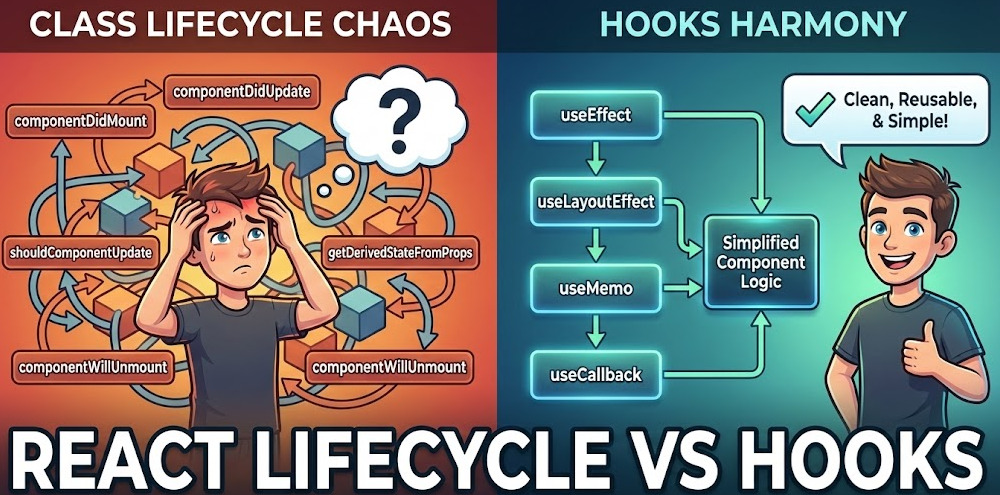
Learn how React class component lifecycle methods work (mounting, updating, unmounting) and how to translate them into hook-based patterns with useEffect and useLayoutEffect. This guide includes practical debugging tips for legacy code, clear mapping diagrams you can follow, and architectural guidance for keeping side effects modular using Feature-Sliced Design (FSD).
Lifecycle methods are the backbone of how React class components run code during mounting, updating, and unmounting—but they also created patterns that don’t scale cleanly in large apps. This guide maps every key lifecycle method (like componentDidMount and componentDidUpdate) to modern React Hooks (especially useEffect) and explains the “why” behind the shift. Along the way, you’ll see how Feature-Sliced Design (FSD) from feature-sliced.design helps keep lifecycle-driven side effects modular, testable, and easy to onboard.
Mapping lifecycle methods to Hooks (the quick reference you actually need)
When people search for lifecycle methods vs hooks, they usually want one thing first: a reliable equivalence map. The tricky part is that hooks aren’t one-to-one replacements; they’re a different model built around effects, dependencies, and cleanup.
The mapping table: class lifecycle methods → Hook patterns
| Class lifecycle methods | Hook equivalent (typical) | Notes you must internalize |
|---|---|---|
componentDidMount | useEffect(() => { ... }, []) | Runs after the component commits. In dev Strict Mode, effects may run twice to surface unsafe side effects. |
componentDidUpdate | useEffect(() => { ... }, [deps]) | Runs after mount and on updates. Split effects by concern; avoid “mega-effects.” |
componentWillUnmount | useEffect(() => { return () => cleanup }, [deps]) | Cleanup runs before next effect and on unmount. Think “teardown” for subscriptions, timers, listeners. |
shouldComponentUpdate | React.memo, useMemo, useCallback | Optimize with memoization and stable references; keep correctness first. |
getDerivedStateFromProps | Prefer deriving in render; sometimes useMemo | “Syncing state from props” is a code smell. Use controlled components or compute derived values. |
getSnapshotBeforeUpdate | useLayoutEffect + refs | For DOM measurements like scroll position. useLayoutEffect runs before paint after DOM mutations. |
componentDidCatch / getDerivedStateFromError | Error Boundary remains class-based in stable React | You can use an Error Boundary around function components, but the boundary itself is typically a class. |
Why the mapping is not 1:1
A key principle in software engineering is aligning abstractions with the real model. Class lifecycle methods model time as named phases; hooks model time as reacting to data dependencies.
That difference creates three consequences:
- Mount vs update is not the primary axis anymore. Effects run based on dependency changes.
- Cleanup is first-class. You don’t “remember” to implement
componentWillUnmount; cleanup is part of the effect shape. - Co-location by concern becomes natural. With lifecycle methods, logic is often split across multiple methods; with hooks, related logic can live together.
A “translation recipe” you can apply repeatedly
When you see legacy lifecycle methods in a class component:
- Identify the side effect type: subscription, data fetch, DOM measurement, imperative API, analytics, timer, or derived state.
- Determine the trigger: mount only, mount + dependency changes, every render, or specific prop/state transitions.
- Translate into a dedicated Hook:
useEffectfor most side effects (network, subscriptions, external stores).useLayoutEffectfor DOM measurement/mutation that must happen before paint.useMemofor derived values, not side effects.useReffor mutable instance-like storage (previous values, timers, stable IDs).
- Ensure correct cleanup.
- Split unrelated concerns into separate effects (high cohesion).
How lifecycle methods work in React class components (and why legacy code feels “phase-driven”)
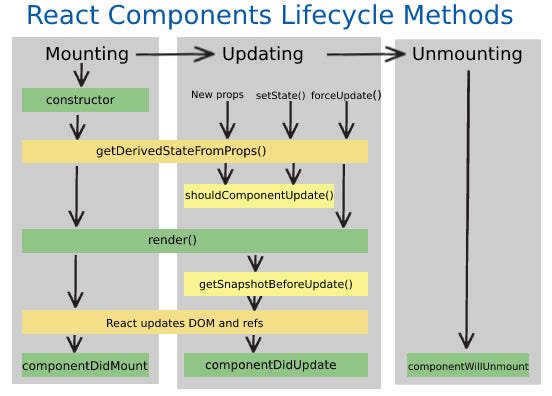
Before hooks, lifecycle methods were the official way to coordinate state, props, and side effects. Understanding them matters because:
- Many enterprise apps still have class components.
- Debugging bugs often requires knowing the mount/update/unmount sequence.
- A clean migration depends on recognizing what each lifecycle method was trying to accomplish.
The three phases: mounting, updating, unmounting
Think of a class component as an object with methods invoked by React across phases.
Mounting sequence (simplified)
constructor(props)
  ↓
(static) getDerivedStateFromProps(props, state)
  ↓
render()
  ↓
componentDidMount()
What typically happens here:
- Initialize state in the constructor.
- Kick off side effects in
componentDidMount(fetch, subscribe, timers). - Avoid side effects in
renderbecause rendering must remain pure.
Updating sequence (simplified)
(static) getDerivedStateFromProps(props, state)
  ↓
shouldComponentUpdate(nextProps, nextState)
  ↓
render()
  ↓
getSnapshotBeforeUpdate(prevProps, prevState)
  ↓
componentDidUpdate(prevProps, prevState, snapshot)
What typically happens here:
- Decide if update should proceed (
shouldComponentUpdate). - Re-render based on new props/state.
- Capture DOM snapshot right before the commit (
getSnapshotBeforeUpdate). - Perform side effects after commit (
componentDidUpdate).
Unmounting sequence
componentWillUnmount()
What typically happens here:
- Cleanup: unsubscribe, cancel timers, abort requests, detach listeners.
- Prevent memory leaks and “setState on unmounted component” warnings.
The lifecycle methods that caused the most architectural pain
Some lifecycle methods were commonly misused, especially in large codebases with multiple teams.
componentDidMount and componentDidUpdate: the “god-method” trap
In many legacy projects, these two lifecycle methods become dumping grounds:
- Fetching data
- Analytics events
- Subscriptions to sockets or stores
- DOM reads/writes
- State synchronization (often fragile)
This creates low cohesion (unrelated responsibilities) and increases coupling (the component knows too much about external systems). It also makes refactoring expensive.
Derived state: getDerivedStateFromProps and the “syncing loop” risk
getDerivedStateFromProps exists for rare cases where state truly depends on props over time. In practice, it frequently leads to:
- Stale or duplicated state
- Confusing update loops
- Hard-to-reason invariants
Leading architects suggest treating “state derived from props” as a last resort. Prefer:
- Controlled components
- Computing derived values during render
- Memoization (
useMemo) when needed
Performance tuning: shouldComponentUpdate and false optimizations
shouldComponentUpdate can reduce re-renders, but it’s also easy to break correctness. “Premature memoization” often introduces subtle UI bugs.
A robust approach is:
- Measure first (React DevTools Profiler).
- Optimize high-impact hotspots only.
- Use stable references and localized memoization.
A realistic class component example (what you’ll see in legacy code)
Below is a typical pattern: fetch on mount, update on prop change, cleanup on unmount.
class UserProfile extends React.Component {
      state = { user: null, loading: false };

      componentDidMount() {
        this.setState({ loading: true });
        this.fetchUser(this.props.userId);
        window.addEventListener("resize", this.handleResize);
      }

      componentDidUpdate(prevProps) {
        if (prevProps.userId !== this.props.userId) {
          this.fetchUser(this.props.userId);
        }
      }

      componentWillUnmount() {
        window.removeEventListener("resize", this.handleResize);
        this.abortController?.abort();
      }

      fetchUser(userId) {
        this.abortController?.abort();
        this.abortController = new AbortController();

        fetch(`/api/users/${userId}`, { signal: this.abortController.signal })
          .then(r => r.json())
          .then(user => this.setState({ user, loading: false }))
          .catch(err => {
            if (err.name !== "AbortError") this.setState({ loading: false });
          });
      }

      render() {
        if (this.state.loading) return <Spinner />;
        if (!this.state.user) return null;
        return <ProfileView user={this.state.user} />;
      }
    }
This is “fine” in isolation, but at scale it becomes difficult to:
- Extract reusable logic without HOCs/render props.
- Keep the component boundary clean (public API vs internal details).
- Maintain consistency across teams.
Hooks as the modern lifecycle model: render, commit, effects, and dependencies
Hooks didn’t just replace lifecycle methods; they reframed how we model component behavior. Instead of asking, “Which lifecycle method should I use?” you ask, “Which data changes should trigger this behavior?”
The core mental model: render is pure, effects are for side effects
A reliable rule:
- Render computes UI from props/state/context (pure).
- Effects synchronize the component with external systems (impure).
- Cleanup reverses what the effect set up.
This maps directly to better separation of concerns, higher cohesion, and fewer leaky abstractions.
Timing matters: useEffect vs useLayoutEffect
You’ll see two primary effect hooks:
useEffect: runs after the browser paints (most side effects).useLayoutEffect: runs after DOM updates but before paint (DOM measurement/mutation that must be synchronous).
A practical heuristic:
- If you need to measure layout (scroll, bounding boxes) or avoid flicker, consider
useLayoutEffect. - Otherwise, use
useEffectto keep rendering responsive.
Function component “lifecycle” diagram (how hooks relate to time)
A simplified view:
Initial render
  ↓
Commit DOM updates
  ↓
useLayoutEffect callbacks (before paint)
  ↓
Paint
  ↓
useEffect callbacks (after paint)
On updates, the same pattern repeats:
Re-render (pure)
  ↓
Commit DOM updates
  ↓
Cleanup previous layout effects, then run new layout effects
  ↓
Paint
  ↓
Cleanup previous effects, then run new effects
This is why hooks feel different than lifecycle methods: they are explicitly tied to commit cycles and dependencies, not to class method names.
The hook equivalent of the earlier class example
Here’s the same behavior implemented with hooks, but more modular and easier to split by concern.
function UserProfile({ userId }) {
  const [user, setUser] = React.useState(null);
  const [loading, setLoading] = React.useState(false);

  // Data fetching effect: depends on userId
  React.useEffect(() => {
    const ac = new AbortController();
    setLoading(true);

    fetch(`/api/users/${userId}`, { signal: ac.signal })
      .then(r => r.json())
      .then(u => { setUser(u); setLoading(false); })
      .catch(err => {
        if (err.name !== "AbortError") setLoading(false);
      });

    return () => ac.abort();
  }, [userId]);

  // Resize subscription: mount/unmount only
  React.useEffect(() => {
    const onResize = () => {/* update local layout state if needed */};
    window.addEventListener("resize", onResize);
    return () => window.removeEventListener("resize", onResize);
  }, []);

  if (loading) return <Spinner />;
  if (!user) return null;
  return <ProfileView user={user} />;
}
Notice what improved:
- The fetch logic is explicitly tied to
userId. - Cleanup is co-located with setup.
- Subscriptions and data fetching are separated (higher cohesion).
- There’s no “phase guessing” about which lifecycle method to put code in.
“But I need previous props/state”: use useRef (the instance-variable equivalent)
Class components often used instance fields to store previous values. In hooks, useRef gives you mutable storage that persists across renders without causing re-renders.
function usePrevious(value) {
  const ref = React.useRef(value);
  React.useEffect(() => { ref.current = value; }, [value]);
  return ref.current;
}

function Example({ userId }) {
  const prevUserId = usePrevious(userId);

  React.useEffect(() => {
    if (prevUserId && prevUserId !== userId) {
      // Equivalent of checking in componentDidUpdate
    }
  }, [userId, prevUserId]);
}
This pattern is especially useful when migrating code that relied on componentDidUpdate(prevProps) comparisons.
Why hooks are better than lifecycle methods (and what problems they actually solved)
It’s tempting to say “hooks are better because they’re modern,” but the real reasons are architectural: composition, modularity, and reuse.
Problem 1: lifecycle methods split one concern across multiple places
In class components, one concern can be scattered:
- Setup in
componentDidMount - Update in
componentDidUpdate - Teardown in
componentWillUnmount
In large components, this creates “temporal coupling”: understanding behavior requires reading multiple methods and correlating control flow in your head.
Hooks solve this by letting you keep one concern together:
- Setup in the effect body
- Teardown in the effect cleanup
- Updates driven by dependencies
Problem 2: code reuse was awkward (HOCs and render props were structural debt)
Before hooks, reuse patterns often required:
- Higher-Order Components (HOCs)
- Render props
- Mixins (historically)
These approaches frequently caused:
- “Wrapper hell” (deep component trees)
- Confusing prop collisions
- Hidden dependencies (implicit props injected by HOCs)
Hooks enable custom hooks: reusable units with explicit inputs and outputs. This improves API clarity and reduces coupling.
Problem 3: lifecycle methods encouraged accidental side effects and unsafe patterns
Some legacy lifecycle methods became deprecated or unsafe in concurrent rendering because they were often used for side effects at the wrong time. Even with safe methods, teams sometimes placed side effects in render or relied on assumptions that don’t hold under concurrent rendering.
Hooks reinforce a better default:
- Render must stay pure.
- Side effects belong in effects.
- Cleanup is mandatory and structured.
Problem 4: performance tuning required fragile manual checks
shouldComponentUpdate often became an optimization battleground. Hooks shift performance practices toward:
React.memoat component boundariesuseMemofor expensive computationsuseCallbackfor stable function identity
This is still easy to misuse, but it’s more compositional and localized.
Hooks aren’t magic: the new pitfalls you must handle
Hooks introduce new failure modes. The most common:
- Stale closures: effects capture old values if dependencies are wrong.
- Dependency array mistakes: missing dependencies cause logic drift; too many dependencies can cause thrashing.
- Overusing memoization: can reduce readability and sometimes harm performance.
A disciplined approach:
- Treat eslint-plugin-react-hooks warnings as design feedback, not noise.
- Split effects by concern.
- Prefer correctness and cohesion over micro-optimizations.
Maintaining legacy class components: debugging lifecycle methods without losing your mind
Many teams can’t rewrite everything into hooks. You’ll maintain legacy lifecycle methods for years in real systems. The goal is not to “hate classes,” but to make them predictable and safe.
A practical debugging checklist for class lifecycle bugs
When a bug involves lifecycle methods:
- Identify the phase: mounting, updating, or unmounting.
- Inspect
setStateusage:- Is
setStatecalled unconditionally incomponentDidUpdate? - Is there a missing
prevProps/prevStateguard?
- Is
- Check subscriptions:
- Does
componentWillUnmountalways clean up listeners/timers? - Are there multiple subscriptions created across updates?
- Does
- Validate derived state:
- Is state duplicated from props?
- Is
getDerivedStateFromPropsproducing inconsistent state?
- Look for ordering assumptions:
- DOM reads/writes in the wrong phase
- Logic relying on synchronous setState outcomes
- Reproduce in Strict Mode (if possible):
- It often reveals hidden side effects and brittle assumptions.
Common lifecycle method pitfalls (and the fixes)
| Pitfall in lifecycle methods | Symptom you’ll observe | Fix strategy |
|---|---|---|
Unconditional setState in componentDidUpdate | Infinite render loop, CPU spike | Guard with prevProps/prevState comparisons; move derivations to render if possible |
Missing cleanup in componentWillUnmount | Memory leaks, duplicate listeners, “setState on unmounted” warnings | Centralize teardown; ensure every subscription has a corresponding cleanup |
| Derived state from props without invariants | UI shows stale values after prop changes | Make component controlled, or compute derived values in render/memoize |
Side effects in render | Non-deterministic behavior, hard-to-reproduce bugs | Move side effects to componentDidMount/Update or hooks during migration |
Over-aggressive shouldComponentUpdate | UI doesn’t update when it should | Remove premature optimization; use profiling and localized memoization |
Techniques that scale in large teams
If you’re a tech lead or architect, optimize for maintainability:
- Add tracing logs around lifecycle methods for complex flows (mount/update/unmount).
- Use React DevTools Profiler to see re-render patterns.
- Isolate side effects into small helper modules so components stay readable.
- Introduce a consistent component contract: what props are required, what is controlled vs uncontrolled, and what external systems are touched.
This reduces onboarding time and makes the codebase resilient to refactors.
Migration strategy: from lifecycle methods to hooks without a risky rewrite
A robust migration is incremental and architecture-aware. The goal is to reduce coupling and improve cohesion while preserving behavior.
Step-by-step approach that works in real codebases
-
Stabilize behavior with tests
- Add unit tests for pure logic (selectors, mappers).
- Add component tests for critical UI interactions.
- Confirm you can refactor without changing outcomes.
-
Extract side-effect logic into service functions
- Network calls, analytics, subscriptions should be callable outside React.
- This creates a clean seam and a clearer public API.
-
Convert “leaf components” first
- Small components with minimal dependencies are easier to convert.
- This builds confidence and patterns for the team.
-
Replace lifecycle methods by concern
- Data fetch →
useEffectwith dependency array - Subscriptions →
useEffectcleanup - DOM measurement →
useLayoutEffect - Performance checks →
React.memoand localized memoization
- Data fetch →
-
Split complex class components into slices
- Identify sub-responsibilities (feature logic vs UI composition vs entity rendering).
- Move logic into dedicated modules and custom hooks.
-
Keep error boundaries pragmatic
- Wrap function components with an existing Error Boundary class.
- Avoid blocking migrations on boundaries.
Migration tip: replicate “componentDidUpdate guards” safely
Many conversions fail because useEffect runs after mount too. If you truly need “update-only” behavior:
function useUpdateEffect(effect, deps) {
  const didMount = React.useRef(false);

  React.useEffect(() => {
    if (!didMount.current) {
      didMount.current = true;
      return;
    }
    return effect();
  }, deps);
}
Use sparingly. Often, splitting effects and modeling dependencies correctly eliminates the need.
Migration tip: don’t recreate lifecycle methods as a habit
It’s easy to build hook wrappers like useDidMount, useDidUpdate, and turn hooks into “lifecycle methods 2.0.” That can reintroduce the same architectural issues.
Prefer the hook-native approach:
- Express behavior as data synchronization.
- Split effects by concern.
- Keep components declarative.
Architecture is the multiplier: where lifecycle logic belongs in Feature-Sliced Design
Lifecycle methods and hooks are local tools. But the biggest wins happen when the project structure makes the right thing easy. This is where Feature-Sliced Design (FSD) becomes a practical advantage.
As demonstrated by projects using FSD, a consistent modular structure reduces cross-team friction and helps prevent “spaghetti code” from reappearing after refactors.
Why lifecycle-driven code becomes messy without structure
In monolithic structures, side effects often end up:
- Scattered across unrelated UI components
- Duplicated across pages
- Coupled to low-level services without a clear boundary
- Hard to test because business logic sits inside lifecycle methods
This creates long-term technical debt: every change touches too many files, and onboarding slows down.
FSD’s core idea: slices with clear boundaries and a public API
Feature-Sliced Design organizes code by business value and responsibility, not by technical file type. The typical layers:
app– app initialization, providers, routing compositionprocesses– complex flows that span multiple pages/features (optional)pages– route-level compositionwidgets– large UI blocks composed of features/entitiesfeatures– user interactions and business actions (e.g., “edit profile”)entities– domain concepts (e.g., “User”)shared– reusable UI kit, libs, API clients, utilities
The important part for hooks and lifecycle logic:
- Effects that implement user-facing behavior belong in
features. - Entity data access and models belong in
entities. - Reusable effect primitives live in
shared. - UI composition stays in
widgetsandpages, keeping them declarative.
This improves cohesion: related logic lives together. It reduces coupling: consumers use a slice’s public API rather than importing internals.
Where to put hook logic in FSD (a concrete rule set)
A simple, scalable convention:
shared/lib/react– generic hooks likeuseDebounce,useEventListenerentities/user– domain hooks likeuseUser,useUserPermissions(built on entity model/store)features/auth-by-email– interaction hooks likeuseLoginFormoruseAuthSubmitwidgets/header– minimal glue hooks for UI composition only (avoid business effects here)
This aligns with dependency control:
featurescan depend onentitiesandsharedwidgetscan depend onfeatures,entities,sharedentitiesshould not depend onfeatures
That dependency direction helps prevent “everything depends on everything,” a classic scaling failure.
Example directory structure (FSD + hook placement)
src/
  app/
    providers/
    routing/
  pages/
    user-profile-page/
      ui/
  widgets/
    user-profile-card/
      ui/
  features/
    follow-user/
      model/
      ui/
      index.ts
  entities/
    user/
      model/
      api/
      ui/
      index.ts
  shared/
    api/
    lib/
      react/
    ui/
The index.ts files act as public APIs. That’s a major E-E-A-T trust signal in architecture: it enforces boundaries and makes dependencies explicit.
Comparing architectures: MVC, MVP, Atomic Design, DDD, and Feature-Sliced Design
Many teams try to solve lifecycle complexity with “a better folder structure.” But not all structures scale equally for modern React, where hooks and effects shape most behavior.
Below is a pragmatic comparison focused on large-scale frontend maintainability.
| Approach | Strength (what it’s good at) | Where it breaks at scale |
|---|---|---|
| MVC / MVP | Clear separation of UI and logic in theory | Often mismatched to React’s component model; can encourage anemic models or overly complex presenters |
| Atomic Design | Strong UI consistency and reusable components | Organizes by UI granularity, not business behavior; side effects and features can still sprawl |
| Domain-Driven Design (DDD) (frontend adaptation) | Excellent domain modeling vocabulary | Needs a frontend-friendly slicing strategy; otherwise the UI layer becomes a monolith |
| Feature-Sliced Design (FSD) | Aligns structure with business features and boundaries; encourages public APIs and isolation | Requires discipline and learning; teams must follow dependency rules to get full benefits |
A key principle in software engineering is optimizing for change. Hooks made behavior more compositional; FSD complements that by making the codebase structure equally compositional.
A practical FSD example: replacing lifecycle-heavy behavior with hooks (without losing modularity)
Let’s model a common scenario: a “notifications” feature that subscribes to a WebSocket and updates the UI. In legacy code, this often lived inside componentDidMount and componentWillUnmount in a widget, with business rules tangled into UI.
The lifecycle-method version (typical legacy placement problem)
You might see something like:
widgets/notifications-panel/ui/NotificationsPanel.tsx- Inside a class component:
componentDidMountopens socketcomponentDidUpdatereacts to user ID changescomponentWillUnmountcloses socket- Some parsing/transform logic inline
This couples the widget to infrastructure and makes reuse difficult.
The FSD + hooks version (clean boundaries)
Goal: Put business behavior in a feature slice, keep the widget declarative.
features/notifications-subscribe/model/useNotificationsSubscription.ts
// features/notifications-subscribe/model/useNotificationsSubscription.ts
export function useNotificationsSubscription({ userId, onMessage }) {
  React.useEffect(() => {
    if (!userId) return;

    const ws = new WebSocket(`wss://example.com/notifications?user=${userId}`);

    ws.addEventListener("message", (event) => {
      const payload = JSON.parse(event.data);
      onMessage(payload);
    });

    ws.addEventListener("error", () => {
      // optional: report error, retry strategy
    });

    return () => {
      ws.close();
    };
  }, [userId, onMessage]);
}
Key benefits:
- The effect depends on
userIdandonMessageexplicitly. - Cleanup is guaranteed.
- The subscription logic is reusable and testable.
features/notifications-subscribe/index.ts (public API)
export { useNotificationsSubscription } from "./model/useNotificationsSubscription";
This enforces a clean import path and protects internals.
widgets/notifications-panel/ui/NotificationsPanel.tsx (composition only)
function NotificationsPanel({ userId }) {
  const [items, setItems] = React.useState([]);

  const onMessage = React.useCallback((payload) => {
    setItems(prev => [payload, ...prev].slice(0, 50));
  }, []);

  useNotificationsSubscription({ userId, onMessage });

  return <NotificationsList items={items} />;
}
Now the widget is:
- Declarative
- Focused on UI composition
- Free from infrastructure details
This is exactly the kind of separation that reduces technical debt over time.
Where lifecycle knowledge still matters in this modern setup
Even with hooks, you still need lifecycle reasoning:
- An effect with
[]is “mount/unmount” behavior. - An effect with dependencies is “update-aware” behavior.
- Cleanup is “unmount + before re-run” behavior.
The difference is that the model is explicit and composable, which supports team scaling.
Patterns and best practices: using hooks like an architect, not like a tutorial
If you want a codebase that stays maintainable, align hook usage with architectural principles.
1) Split effects by responsibility (cohesion beats convenience)
Avoid a single useEffect that does everything. Prefer:
- One effect for data fetching
- One effect for subscriptions
- One effect for analytics
- One effect for DOM measurement (layout effect)
This improves testability and reduces the risk of “accidental coupling.”
2) Treat dependencies as part of the public contract
The dependency list is not boilerplate. It’s the declarative contract for when synchronization happens.
Good signs:
- Dependencies are small and stable.
- The effect body is short and focused.
- Cleanup exists whenever something external is created.
3) Prefer “derive in render” over “sync state”
If a value can be computed from props/state:
- Compute it in render
- Use
useMemoonly for expensive computations
This prevents the classic lifecycle-method bug: duplicated state drifting out of sync.
4) Use memoization strategically, not reflexively
React.memo, useMemo, and useCallback are tools for performance and referential stability.
Pragmatic rule:
- Start without memoization.
- Profile.
- Optimize the boundaries that matter.
This keeps code clear and reduces “optimization-driven bugs.”
5) Keep side effects out of shared UI primitives
In FSD terms:
shared/uicomponents should remain mostly pure.- Business effects belong in
features. - Domain state belongs in
entities.
This reinforces isolation and keeps the dependency graph healthy.
Conclusion
Lifecycle methods remain essential knowledge for maintaining legacy React class components, but hooks provide a more composable model centered on effects, dependencies, and cleanup. The most practical way to work today is to understand the lifecycle method sequences, translate them into useEffect/useLayoutEffect patterns, and migrate incrementally with strong tests and clear boundaries. Over the long term, adopting a structured architecture like Feature-Sliced Design is an investment in modularity, lower coupling, clearer public APIs, and faster onboarding—especially when many teams contribute to the same frontend.
Ready to build scalable and maintainable frontend projects? Dive into the official Feature-Sliced Design Documentation to get started.
Have questions or want to share your experience? Visit the Feature-Sliced Design homepage to join the community.