The Ultimate Next.js App Router Architecture

TLDR:

This in-depth guide explores how to build a scalable and maintainable Next.js App Router architecture using React Server Components, modern data fetching, caching strategies, and Feature-Sliced Design, helping teams avoid technical debt and scale confidently in production.
Nextjs projects often start clean and end up as a tangled mix of Server Components, client-only islands, ad-hoc folders, and unpredictable caching. Feature-Sliced Design (FSD) on feature-sliced.design offers a modern, battle-tested way to keep the App Router, React Server Components, and data fetching cohesive as your codebase scales—without sacrificing performance, cohesion, or team autonomy.
Why App Router Architecture Is the First Problem You Must Solve
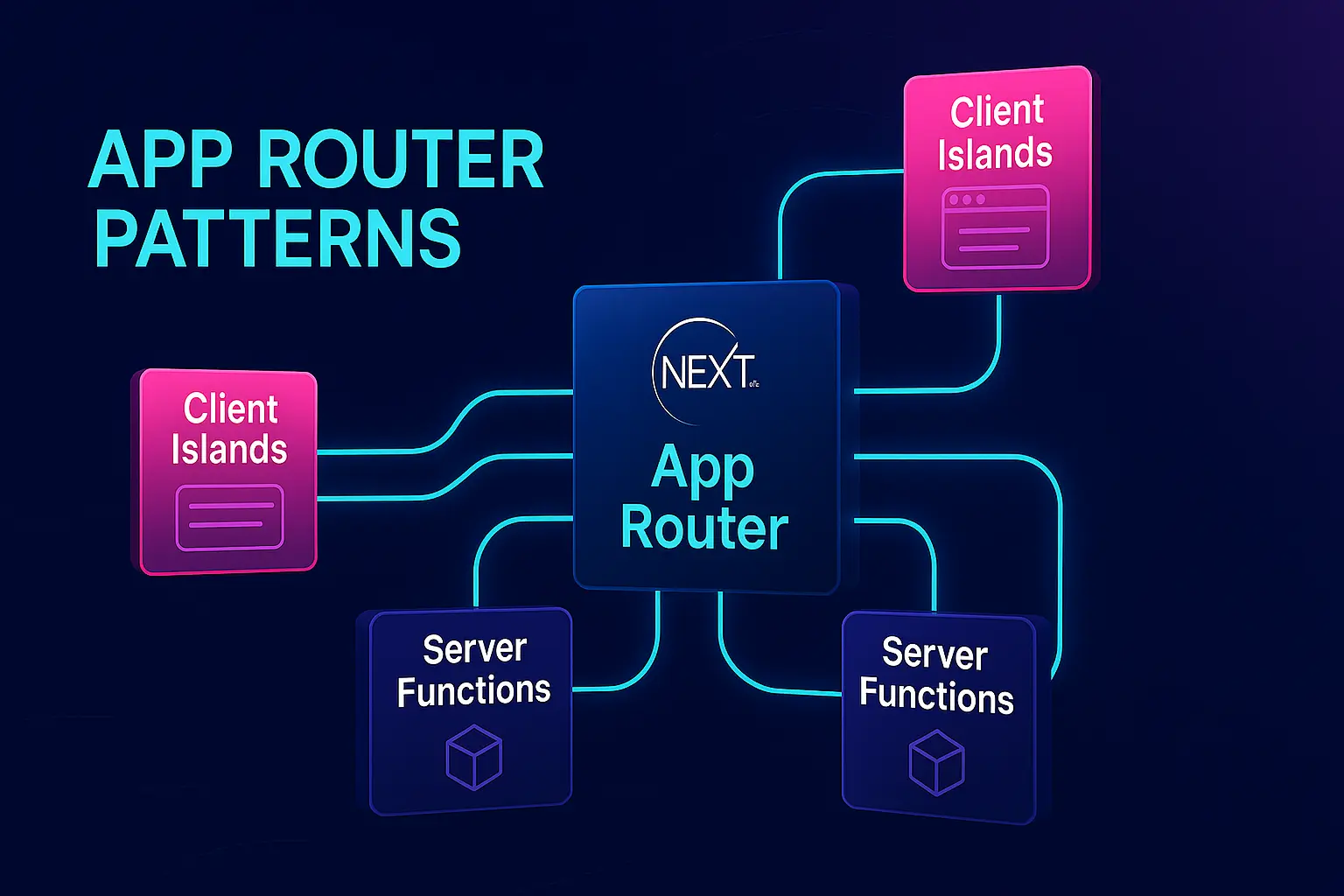
A key principle in software engineering is that structure is a performance feature—not just for runtime, but for teams. Next.js App Router makes it easy to ship fast, but it also introduces new architectural pressure points:
- Two execution worlds: Server Components and Client Components coexist, and the boundary matters for security, bundle size, and coupling.
- New routing primitives: layouts, nested routes, loading/error boundaries, and route groups create powerful composition—and new ways to accidentally leak dependencies.
- Caching is now “part of the code”: the default caching, revalidation, and invalidation APIs influence correctness as much as they influence speed. oaicite:0
- Deployment realities: Vercel’s platform features and Next.js cache behavior shape how you design ISR, previews, and mutation flows in production. oaicite:1
If you do not plan for these constraints, you get the usual symptoms: spaghetti code, fat “utils”, global providers that quietly couple everything, slow onboarding, and refactors that break unrelated routes.
The goal of “The Ultimate Next.js App Router Architecture” is not to invent new patterns. It’s to combine proven architectural principles—cohesion, low coupling, explicit public APIs, isolation, and unidirectional dependency flow—with what App Router actually is: a server-first, streaming-by-default React architecture.
The App Router Mental Model: Routing Is Composition, Not “Pages”
App Router is best understood as a composition tree:
- Segments build a route hierarchy.
- Layouts compose shared UI and shared server logic for a subtree.
- Pages finalize a segment’s UI.
- loading.tsx / error.tsx define boundaries.
- Route Handlers define HTTP endpoints within the same routing model. oaicite:2
The architecture you want should align with that shape:
- Keep route composition thin. Routes should assemble features and widgets, not implement domain logic.
- Keep business logic close to business concepts. Put complexity where it belongs: in features and entities, not in layouts or route files.
- Treat boundaries as contracts. Server/Client boundaries, module boundaries, and public APIs should be explicit and stable.
This is exactly where Feature-Sliced Design fits: it gives you a hierarchy of responsibility (layers) and a scale-friendly decomposition (slices) that map cleanly onto App Router’s composition style.
App Router vs Pages Router: What Actually Changes for Architecture
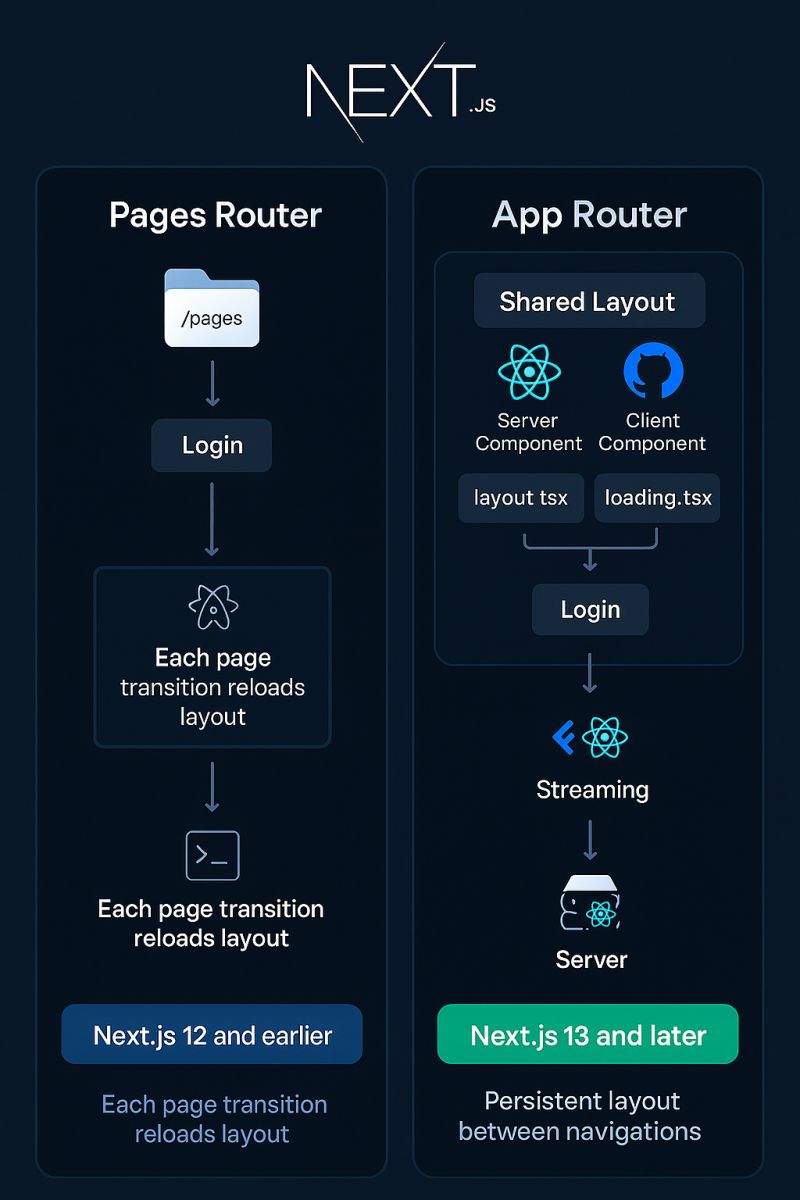
Many teams treat “App Router vs Pages Router” as a routing upgrade. Architecturally, it’s a platform shift.
Execution model and data fetching
Pages Router encourages a request/response mindset with explicit data functions (like server-side props patterns) and client-driven interactivity. App Router shifts you toward:
- React Server Components for server-first UI and data reads. oaicite:3
- Streaming and partial rendering by default (especially with loading boundaries).
- Granular caching controls across renders and fetches. oaicite:4
API design
With Pages Router, many teams centralize server logic behind API routes and call them from the client. With App Router, you now have more options:
- Route Handlers (HTTP endpoints) in
app/**/route.ts.oaicite:5 - Server Actions (server functions invoked from components/forms) for many mutation paths. oaicite:6
This is not merely convenience. It changes coupling:
- Overusing Route Handlers can create a “mini-backend inside the frontend” with leaky DTOs.
- Overusing Server Actions can lead to hidden side effects and accidental cross-feature dependencies if you don’t design boundaries.
Caching and invalidation become architecture
In Pages Router, caching is often “HTTP headers + CDN + ISR”. In App Router, caching is deeper:
- What you fetch, how you tag it, how you revalidate it, and where you cache it will shape correctness. oaicite:7
- Next.js now offers “getting started” and “deep dive” guidance emphasizing caching layers and invalidation APIs as first-class tools. oaicite:8
If you want an architecture that scales, you must plan for cache boundaries the same way you plan for module boundaries.
The Core Architectural Challenge: Keep Server-First Power Without Global Coupling
A robust methodology for App Router must answer five questions:
- Where does domain logic live?
- How do routes compose features without importing internals?
- Where do Server Components stop and Client Components start?
- How do we fetch data predictably and revalidate safely?
- How do we deploy and operate this on Vercel without surprises?
Let’s compare common approaches and why they often fail in Next.js at scale.
Common Frontend Architecture Approaches and Their Limits in Next.js
Layered architecture (MVC, MVP, MVVM)
Layered patterns separate concerns by technical type. They are valuable, but in modern Next.js they often degrade into:
components/,hooks/,services/,utils/as global buckets.- UI concerns leaking into data code and vice versa.
- “Shared service layer” becoming a dependency magnet (high fan-in, low cohesion).
This structure can be readable early, but it tends to create implicit coupling because nothing stops unrelated features from importing each other’s internals.
Component-based architecture and Atomic Design
Atomic Design is excellent for design systems and consistent UI composition. But it does not answer:
- Where do “user scenarios” live (e.g., add-to-cart, login, follow user)?
- Where does domain model code live?
- How do you prevent cross-feature imports?
- How do you structure server vs client boundaries?
In App Router, you can build a beautiful component tree and still end up with fragile data flows and untestable business logic.
Domain-Driven Design (DDD) on the frontend
DDD aligns structure to business concepts and bounded contexts. That’s a strong direction, but many frontend DDD attempts lack:
- A clear dependency rule (what can depend on what).
- A consistent layer system for shared UI, domain entities, and feature scenarios.
- A pragmatic implementation style for UI-heavy codebases.
Feature-Sliced Design (FSD) as the missing scaling layer
Feature-Sliced Design is a modern blueprint for modularity:
- Organize by business relevance (features and entities), not only by technical type.
- Enforce unidirectional dependency flow via layers.
- Make module boundaries explicit using a public API.
This fits Next.js App Router because routes are composition nodes and FSD specializes in composition by responsibility.
Comparative Table: MVC vs Atomic Design vs FSD (Why FSD Fits App Router)
| Methodology | What it optimizes | What breaks first in App Router |
|---|---|---|
| MVC / MVVM | Separation by technical role | Global “service” gravity, coupling through shared layers |
| Atomic Design | UI consistency and design systems | No guidance for domain logic, data fetching, or feature boundaries |
| Feature-Sliced Design | Modularity by business scope + strict dependency direction | Requires discipline: public APIs, layer rules, and slice ownership |
The takeaway is pragmatic: keep what works (component decomposition, clear UI primitives), but add what you need to scale (feature boundaries and dependency rules).
The Ultimate Next.js App Router Architecture with Feature-Sliced Design
This section gives you a concrete structure you can apply today.
The layers (FSD) mapped to Next.js App Router
FSD layers (from highest to lowest):
- app: application initialization and global providers (composition root)
- pages: route-level composition (per segment/page)
- widgets: large UI blocks composed from features/entities
- features: user interaction scenarios (business actions)
- entities: domain models and domain UI (core business concepts)
- shared: reusable, business-agnostic code (UI kit, utilities, config)
In App Router terms:
app/directory becomes the routing runtime, but your business code should live insrc/FSD layers.- Your route files should import from pages and below, never from deep internals.
A common and effective setup is:
- Use Next.js
app/for routing only. - Use
src/for the product architecture (FSD layers).
A concrete directory structure
Below is a practical structure that keeps the App Router clean while allowing FSD to scale: app/ (public)/ layout.tsx page.tsx (auth)/ login/ page.tsx register/ page.tsx api/ webhooks/ route.ts _providers/ Providers.tsx layout.tsx error.tsx not-found.tsx loading.tsx
src/ app/ providers/ index.ts ui/ AppShell.tsx routing/ link.ts pages/ home/ ui/ HomePage.tsx index.ts login/ ui/ LoginPage.tsx index.ts widgets/ header/ ui/ Header.tsx index.ts product-grid/ ui/ ProductGrid.tsx index.ts features/ auth/ login/ ui/ LoginForm.tsx model/ login.schema.ts useLogin.ts api/ login.action.ts index.ts cart/ add-to-cart/ ui/ AddToCartButton.tsx model/ useAddToCart.ts api/ addToCart.action.ts index.ts entities/ user/ model/ types.ts session.ts ui/ UserAvatar.tsx index.ts product/ model/ types.ts api/ product.queries.ts ui/ ProductCard.tsx index.ts shared/ ui/ button/ Button.tsx input/ Input.tsx lib/ fetch/ fetcher.ts cache/ tags.ts config/ env.ts
This arrangement delivers three important benefits:
- Routes stay thin and are easy to reason about.
- Features are cohesive: UI + model + API live together.
- Refactors get safer because you can move slices without chasing imports across the whole repo.
Public API is non-negotiable
To prevent spaghetti code, each slice exposes a stable surface:
features/cart/add-to-cart/index.tsentities/product/index.tswidgets/header/index.ts
Inside index.ts, export only what consumers should use. Everything else remains internal.
Example pattern (pseudo-code):
features/cart/add-to-cart/index.ts- exports:
AddToCartButton,addToCartAction, maybeuseAddToCart - does not export internal selectors, helper functions, or private types unless needed
- exports:
This enforces encapsulation, reduces accidental coupling, and improves maintainability.
Server Components vs Client Components: The Boundary Strategy That Prevents Chaos
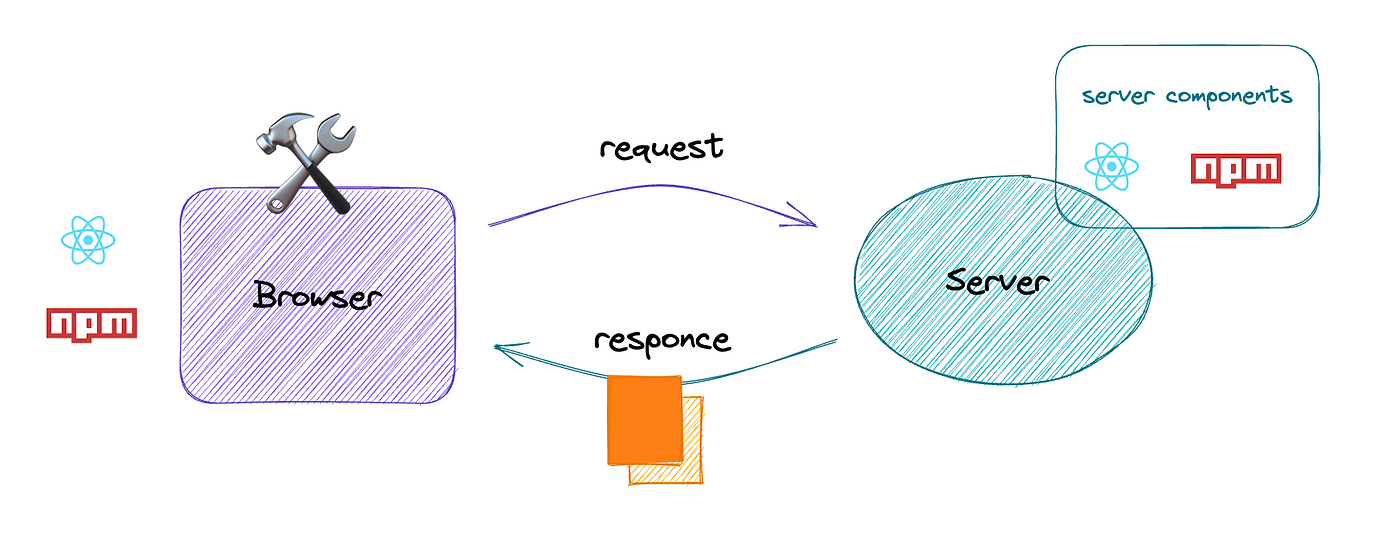
React Server Components (RSC) are a superpower, but they must be organized. A clean rule:
- Server Components own data reads and composition.
- Client Components own interactivity and local UI state.
- Keep client components “leaf-like”. They should not become composition roots.
Practical rules
- Default everything to Server Components (no
"use client"unless needed). - Put
"use client"components inside features and widgets when interactivity is required. - Avoid passing server-only objects to client components (e.g., database handles).
- Keep client boundaries narrow: pass minimal props, not service objects.
This produces high cohesion: server composition remains stable while interactive islands remain isolated.
Example: A route composes a server-first page
app/(public)/page.tsx:
- imports
HomePagefromsrc/pages/home - does not implement domain logic directly
Pseudo-code:
app/(public)/page.tsxreturn <HomePage />
src/pages/home/ui/HomePage.tsx (Server Component):
- fetches products
- composes
HeaderandProductGrid
ProductGrid might be server (render list) while AddToCartButton is client and lives in a feature slice.
Data Fetching Patterns in App Router That Scale
Search intent #1 and #3 demand a clear, comprehensive guide to data fetching across Server and Client Components.
Server-side fetching: your default
Next.js explicitly supports fetching in Server Components via fetch, ORMs, and filesystem I/O.
A scalable approach is to keep data access in entities/ (domain-specific reads) and expose them via a public API.
Example pattern:
entities/product/api/product.queries.tsgetProductById(id)listProducts(filters)
The page imports these queries (or a feature-level “use case” function) and renders.
This avoids a “global services” bucket and keeps queries close to the domain model.
Client-side fetching: when you truly need it
Client fetching is appropriate when:
- You need live updates independent of navigation.
- You need user-driven polling or websockets.
- You need client-only auth context to call an external API.
App Router guidance includes client fetching via Route Handlers as one of the standard paths.
In an FSD architecture:
- Route Handlers live near routing (
app/api/**/route.ts) or under a dedicated server boundary. - Client hooks live in features/ (because they represent user scenarios).
Avoid building generic “api client” hooks that every slice imports without ownership. Prefer slice-owned hooks that wrap shared primitives.
Streaming and loading states: turn latency into UX
One of the most practical benefits of App Router is streaming with loading.tsx. Use it intentionally:
- Put fast, cacheable data in the server page.
- Put slow, non-critical data in nested components wrapped by a loading boundary.
Architecturally, streaming works best when your UI is already decomposed into widgets and features—another reason FSD pairs well with App Router.
Caching and Revalidation: Design It Like a System, Not a Trick
Search intent #4 is where many “Next.js architectures” get vague. We will not.
Next.js provides multiple caching and revalidation APIs and emphasizes how they interact.
The caching goals that matter
- Correctness: users should see accurate data within acceptable freshness bounds.
- Performance: reduce repeated work and backend load.
- Operability: you must be able to invalidate safely on mutations.
- Cost control: caching reduces compute and database usage.
A simple, robust strategy: tag everything you intend to invalidate
Next.js supports invalidation via functions like revalidatePath and revalidateTag.
Use this mental model:
- If data changes because of a mutation, it must have a tag or a clear path invalidation strategy.
- Prefer tags for domain entities (e.g.,
product:123,cart:user:42,catalog). - Use
revalidateTagafter successful mutations to refresh dependent pages.
A good “tag taxonomy” lives in shared/lib/cache/tags.ts and is imported by feature slices that mutate.
Example tag helpers (conceptual):
tagProduct(id) => "product:" + idtagCatalog() => "catalog"tagUser(id) => "user:" + id
This is an architectural win: tags become a stable contract between domain changes and UI freshness.
Server Actions + revalidation: the mutation pipeline
Many teams now use Server Actions for mutations, especially forms. Next.js documentation positions Server Actions as server-executed async functions usable from Server and Client Components.
A scalable pattern:
- Feature slice owns the mutation (e.g.,
features/cart/add-to-cart/api/addToCart.action.ts) - Action performs mutation and then revalidates tags/paths relevant to that domain
This aligns responsibility: the slice that changes the data also owns freshness.
Route Handlers vs Server Actions: when to use which
Use Server Actions when:
- The mutation is tied to UI workflows (forms, buttons).
- You want a direct, typed “call” from UI.
- You want to keep the API surface internal to the app.
Use Route Handlers when:
- You need a stable HTTP interface (webhooks, third-party callbacks, public API).
- You need custom request/response handling with Web APIs. oaicite:14
A pragmatic rule: internal UI mutations → Server Actions; integration boundaries → Route Handlers.
Cache Components: mixing static, cached, and dynamic content
Next.js also introduced an opt-in “Cache Components” capability (enabled via a config flag) to mix static, cached, and dynamic content in one route.
Architecturally, treat this as a powerful tool—but still keep boundaries:
- Use it to optimize rendering composition.
- Keep business rules in features/entities so you don’t create route-level complexity.
Concrete Example: Product Catalog + Cart in App Router with FSD
Let’s make the architecture tangible with a common scenario: product list, product detail, add-to-cart, and cart badge in header.
The slices
entities/product: types, product queries, product UIentities/cart: types, cart queriesfeatures/cart/add-to-cart: button, server action, optimistic client state if neededwidgets/header: renders logo, nav, and cart badgepages/home: composes product grid and headerpages/product-details: composes product view and add-to-cart
The data flow
pages/home(Server Component) callsentities/product/api/listProducts()- It renders
widgets/product-gridwhich rendersentities/product/ui/ProductCard ProductCardincludesfeatures/cart/add-to-cart/ui/AddToCartButton(Client Component)- On click,
AddToCartButtoncallsaddToCartAction()(Server Action) - The action mutates and then triggers
revalidateTag("cart:user:...")and possiblyrevalidateTag("catalog")depending on business requirements.oaicite:16 widgets/header(Server Component) reads cart summary and renders the badge
This yields a clean separation:
- Server reads are colocated with domain entities.
- Mutations are owned by feature slices.
- UI composition is done by pages/widgets.
- Cache invalidation is a first-class, slice-owned concern.
Architecture Principles for Next.js That Prevent Technical Debt
These principles are stable and apply across Next.js versions.
1) High cohesion: keep things that change together together
If a feature changes, you should update one slice, not hunt across components/, hooks/, and services/.
FSD naturally encourages cohesion because each feature slice contains UI, model, and API related to that scenario.
2) Low coupling: prefer dependency direction over “shared helpers”
“Shared” code should be truly generic. If you place domain helpers in shared/, you create hidden coupling.
A healthier approach:
- Domain logic lives in
entities/andfeatures/ shared/is for primitives (UI kit, small utilities, env config)
3) Explicit public API: stop accidental imports
Public APIs turn “anything can import anything” into “imports are contracts”.
This matters more in App Router because server/client boundaries and cache behavior amplify the cost of tangled dependencies.
4) Isolation: keep route-level files boring
Your app/**/page.tsx should read like orchestration:
- import a page component
- pass params
- return UI
If routes contain business logic, they become brittle and hard to refactor.
5) Observability-friendly design: make cache and data boundaries visible
Caching problems are often invisible until production. Your architecture should make it easy to answer:
- Which tags are invalidated by this mutation?
- Which route segments depend on this entity?
- Which components are client-only and why?
When tags, actions, and queries are owned by slices, these answers become obvious.
Deployment to Vercel: App Router Best Practices That Survive Production

Search intent #5 asks for best practices on Vercel. The strong approach is to treat deployment as part of architecture.
Understand shared caching and ISR behavior
Next.js documentation explains that caching and revalidating pages (ISR and newer App Router functions) use a shared cache, and default storage differs by hosting model.
On Vercel, ISR and edge/CDN behavior also matter, and platform docs highlight how certain preview/draft flows interact with caching.
Practical advice:
- Use ISR and tag invalidation for content that tolerates slight delay.
- Keep mutation-driven freshness explicit (revalidate tags/paths from the feature that mutates).
- Treat previews/draft modes as a separate concern with a clear security model.
Use Route Handlers for integrations, not as your default backend
Vercel makes it easy to ship endpoints, but a frontend repo that becomes a sprawling “API project” creates operational risk.
Guidance:
- Webhooks, OAuth callbacks, and third-party integrations → Route Handlers.
- UI-driven mutations → Server Actions, owned by feature slices.
This keeps your system understandable and reduces accidental public surface area.
Production ergonomics: reduce cold-start and over-fetching via structure
Even if you optimize caching, poor architecture causes repeated work:
- multiple components fetching the same data with different keys
- duplicate requests within one render path
- inconsistent cache tags
A slice-based design helps because queries live in one domain place and are reused intentionally, not accidentally.
Step-by-Step: Migrating from Pages Router or “Flat Folders” to This Architecture
This migration plan is designed to be safe and incremental.
- Create
src/and introduce FSD layers without moving everything at once. - Add public APIs (
index.ts) for a few key slices. - Move one domain entity (e.g.,
entities/user) and update imports. - Move one user scenario into a feature slice (e.g.,
features/auth/login). - Refactor one route: make
app/**/page.tsxthin and delegate tosrc/pages/**. - Introduce cache tag taxonomy in
shared/lib/cache/tags.ts. - Move mutations to Server Actions where appropriate, and attach revalidation.
- Enforce rules: add lint rules or tooling to prevent cross-layer imports.
Leading architects suggest that migrations succeed when the target structure is simple, repeatable, and enforced by conventions. FSD gives you that repeatability.
Final Checklist: What “Ultimate App Router Architecture” Looks Like in Practice
You know you’re on track when:
- Routes are mostly composition and wiring.
- Features own mutations, revalidation, and client interactivity.
- Entities own domain reads and domain UI primitives.
- Shared is small and boring.
- Public APIs exist for every slice that others import.
- Server/Client boundaries are narrow and intentional.
- Cache tags are stable, named, and owned by the domain.
This approach helps to mitigate common challenges: it reduces coupling, increases cohesion, improves onboarding, and makes performance optimization less risky because structure mirrors responsibility.
Conclusion
A scalable Next.js App Router codebase is built on explicit boundaries: Server Components for composition and data reads, Client Components for focused interactivity, and predictable caching with clear invalidation rules. App Router gives you powerful primitives—layouts, streaming, Route Handlers, Server Actions, and revalidation APIs—but without structure, those same primitives can accelerate technical debt. Adopting Feature-Sliced Design is a long-term investment in maintainability and team productivity: it enforces unidirectional dependencies, promotes cohesive feature modules, and makes refactoring safer through public APIs. Ready to build scalable and maintainable frontend projects? Dive into the official Feature-Sliced Design Documentation to get started. Have questions or want to share your experience? Join our active developer community on Website!
Disclaimer: The architectural patterns discussed in this article are based on the Feature-Sliced Design methodology. For detailed implementation guides and the latest updates, please refer to the official documentation.