The Best Way to Manage Async State in Frontend

TLDR:
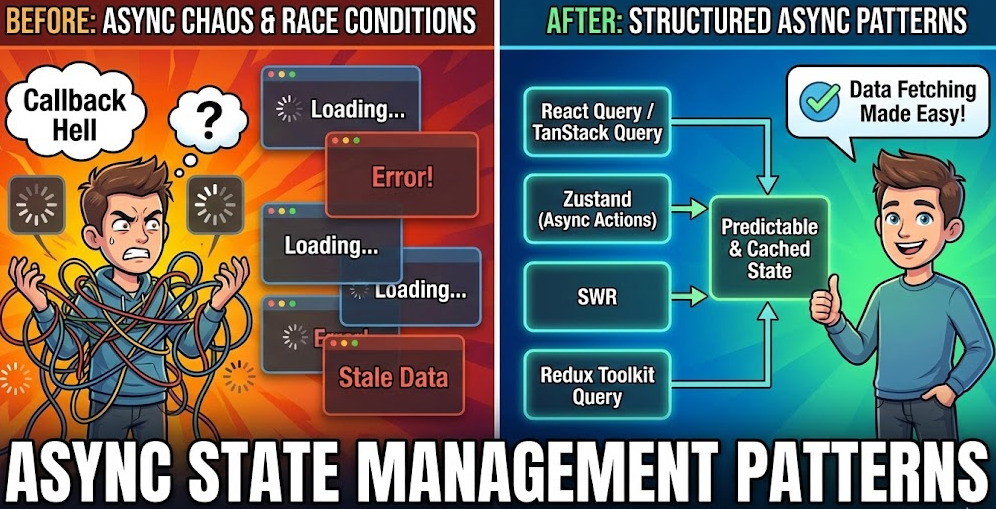
Async state is where frontends often become fragile: loading, success, and error states spread across components, race conditions appear, and refactors get risky. This guide shows practical patterns—from state machines with useReducer and a reusable useAsync hook to server-state libraries like React Query and SWR—and explains how Feature-Sliced Design helps you place async logic cleanly for scalable teams.
Async state is where good frontends quietly become fragile: loading state and error state multiply, race conditions surface, and “just fetch in the component” turns into untestable, tightly coupled glue. Feature-Sliced Design (feature-sliced.design) gives you a reliable structure for isolating async state management, while modern server-state tools like React Query and SWR reduce boilerplate and prevent the most common async bugs by design.
Table of contents
- Why async state breaks apps (even with “simple” requests)
- A solid mental model: UI state vs client state vs server state
- Common approaches to async state management (and their limits)
- Use a state machine: reliable transitions with
useReducer - Abstract it: a
useAsynchook tutorial that doesn’t leak complexity - Why server-state libraries win: React Query and SWR as the default
- Race conditions and concurrency: practical fixes that scale
- How Feature-Sliced Design makes async state scalable in real teams
- Architecture comparison: MVC, MVP, Atomic Design, DDD, and FSD
- A pragmatic playbook: choose the right async state tool per case
- Conclusion
Why async state breaks apps (even with “simple” requests)
A key principle in software engineering is make invalid states unrepresentable. Async flows tend to do the opposite.
Even a single request is not just “data or no data”. In practice, each async operation has a lifecycle:
- Idle (nothing started yet)
- Loading (in-flight)
- Success (data available)
- Error (failure details available)
That’s already a finite set of request states. But real products quickly add nuance:
- Refetching (background refresh while showing cached data)
- Retrying (transient failures)
- Partial failures (some data loads, some doesn’t)
- Pagination / infinite scrolling (multiple pages, multiple in-flight requests)
- Optimistic updates (temporary local changes that may be rolled back)
- Offline / stale data (eventual consistency)
- Cancellation (user navigates away, input changes, takeLatest semantics)
If you track async state with a few booleans—isLoading, isError, hasData—you often create more combinations than real states. With 3 flags you get 2^3 = 8 combinations, but only ~4 are meaningful. The rest are contradictions like “loading + error + hasData” that produce UI glitches, inconsistent spinners, or swallowed errors.
The core pain: async state spreads faster than you expect
Async state rarely stays local because:
- Multiple screens need the same data (shared cache problem).
- UI needs consistent patterns (spinners, skeletons, toasts, empty states).
- Errors need centralized handling (auth failures, 429/500, network timeouts).
- Teams need predictable structure (onboarding and refactoring speed).
When async state is scattered across components, effects, and ad-hoc stores, you get:
- High coupling: UI components know too much about data fetching and transport.
- Low cohesion: fetching logic lives far from the domain it belongs to.
- No public API boundaries: internal details leak through imports.
- Hard refactors: changing a request touches many unrelated places.
Leading architects suggest treating async state as a first-class model, not incidental glue.
A solid mental model: UI state vs client state vs server state
“The best way” to manage async state starts with a correct classification of what kind of state you’re managing. The biggest improvement you can make is separating server state from client/UI state.
1) UI state (ephemeral, local, not share-worthy)
Examples:
- Modal open/close
- Hover, focus, selected tab
- Local form input values (before submit)
- Inline validation messages
- Accordion expanded sections
Best tools: component state (useState), local stores, lightweight state machines, UI libraries.
2) Client state (app-owned, derived, and domain-specific)
Examples:
- Auth token presence (often persisted)
- Feature flags pulled once at bootstrap
- Complex multi-step wizard progress
- Draft entities not yet saved
- Cross-page filters that are not server-backed
Best tools: a client store (Redux Toolkit, Zustand, MobX), or domain-specific reducers. Keep it explicit and testable.
3) Server state (remote source of truth + cache)
Examples:
- Query results from REST/GraphQL
- Search results and pagination pages
- User profile, product lists, permissions
- Derived server metadata (ETags, cursors)
- Real-time streams (WebSocket) treated as remote updates
Server state is special because it must handle:
- Caching and invalidation
- Staleness (fresh vs stale data)
- Background revalidation
- Request deduplication
- Retries and backoff
- Synchronization between multiple subscribers
Best tools: server-state libraries like React Query (TanStack Query) or SWR, plus an architecture that isolates where this logic lives.
If you keep server state in a generic global store as if it’s client state, you often rebuild a worse version of these libraries—without structural sharing, garbage-collected cache, devtools, or battle-tested edge cases.
Common approaches to async state management (and their limits)
There’s no single pattern that fits every app. But you can evaluate approaches by how they handle:
- Correctness (no invalid states)
- Concurrency (race conditions, takeLatest)
- Reuse (shared caching, dedupe)
- Maintainability (cohesion, isolation, public API)
- Team scalability (consistent conventions)
Local component state: useEffect + useState
This is the default for many teams:
- Trigger fetch in an effect
- Store
data,error,isLoadingin component state - Add cleanup for cancellation
It’s decent for:
- One-off screens
- Prototypes and isolated widgets
It breaks down when:
- Multiple components fetch the same data
- You need refetching, pagination, or caching
- You need consistent error handling
- You start sprinkling
isMountedhacks
A typical “quick” implementation grows into spaghetti effects.
Global store requests: thunks/sagas/epics
Another common strategy:
- Put request state into Redux or another store
- Use thunk/saga/observable to run effects
- Keep a normalized entity store + request statuses
This can be strong when:
- You truly have complex client workflows
- You need orchestration across many domains
- You want strict action logs and time-travel debugging
But for server state specifically, it often causes:
- Massive boilerplate (actions, reducers, selectors)
- Subtle cache invalidation bugs
- Non-local reasoning (who owns refetch rules?)
- Tight coupling between UI and transport conventions
Ad-hoc custom hooks: useUser(), useProducts(), etc.
This is closer to a maintainable direction:
- Extract fetching and async state to hooks
- Return
{ data, isLoading, error, refetch } - Reuse hooks across screens
This improves cohesion, but you still need to solve:
- Cache sharing across hook instances
- Deduping identical in-flight requests
- Stale data + revalidation policies
- Out-of-order responses and cancellation
Comparison table: what to pick first
| Approach | Best for | Common pitfalls |
|---|---|---|
| Local component state | Simple pages, small widgets, learning | No shared cache, duplicated requests, race conditions, inconsistent UX |
| Global store (thunks/sagas) | Complex client workflows, orchestration, auditing | Boilerplate, cache invalidation complexity, tight coupling |
| Custom hooks | Reuse and encapsulation | You reinvent caching, dedupe, retries, pagination |
| Server-state library (React Query/SWR) | Most server data fetching | Requires query key discipline and architectural placement |
A pragmatic conclusion used in many mature teams: use a server-state library by default for remote data, and reserve reducers/stores for true client workflows.
Use a state machine: reliable transitions with useReducer
When async state becomes complex—multi-step submission, uploads with progress, dependent requests, or a “wizard” that loads different resources—modeling it as a finite state machine is the most reliable approach.
Why state machines help
- They enforce valid transitions (no “loading + error” contradictions).
- They are easy to test: input actions → expected state.
- They avoid incidental booleans and “flag soup”.
- They document the lifecycle explicitly (great for onboarding).
A simple async state machine
Think in events and states:
- Events:
START,RESOLVE,REJECT,CANCEL,RESET - States:
idle,loading,success,error
A TypeScript-like reducer (pseudo-code):
type AsyncState<T> =
  | { status: 'idle' }
  | { status: 'loading'; requestId: number }
  | { status: 'success'; data: T; receivedAt: number }
  | { status: 'error'; error: Error };

type Action<T> =
  | { type: 'START'; requestId: number }
  | { type: 'RESOLVE'; requestId: number; data: T }
  | { type: 'REJECT'; requestId: number; error: Error }
  | { type: 'RESET' };

function reducer<T>(state: AsyncState<T>, action: Action<T>): AsyncState<T> {
  switch (action.type) {
    case 'START':
      return { status: 'loading', requestId: action.requestId };

    case 'RESOLVE':
      if (state.status !== 'loading' || state.requestId !== action.requestId) return state;
      return { status: 'success', data: action.data, receivedAt: Date.now() };

    case 'REJECT':
      if (state.status !== 'loading' || state.requestId !== action.requestId) return state;
      return { status: 'error', error: action.error };

    case 'RESET':
      return { status: 'idle' };
  }
}
Two important details:
- Discriminated unions prevent invalid combinations at compile time.
requestIdenforces latest-only semantics, preventing stale responses from overwriting newer results.
Diagram (describe it for your docs and reviews)
A helpful schema you can include in team docs:
idle→ (START) →loadingloading→ (RESOLVE) →successloading→ (REJECT) →errorsuccess→ (START) →loading(refetch)error→ (START) →loading(retry)- any → (
RESET) →idle
This clarity is exactly what “spaghetti async logic” lacks.
When to prefer useReducer over a server-state library
Use useReducer (or a proper state machine library) when:
- The async flow is not just “fetch data”.
- You have step-dependent transitions (e.g., submit → poll status → finalize).
- You need progress (uploads, streaming parsing).
- You need explicit local orchestration (takeLatest, debounce + cancel, branching).
For plain “load server data and cache it”, a dedicated server-state library is typically stronger.
Abstract it: a useAsync hook tutorial that doesn’t leak complexity
A custom useAsync hook is a good bridge between “local effects everywhere” and “a proper server-state cache”. It also complements React Query/SWR for non-cacheable flows like:
- Fire-and-forget commands
- Upload with progress (often mutation-like but custom)
- One-off background tasks
- Integrations that require manual cancellation
Step 1: Define a compact async state shape
Avoid flag soup; prefer a single status.
type UseAsyncState<T> =
  | { status: 'idle' }
  | { status: 'pending' }
  | { status: 'success'; data: T }
  | { status: 'error'; error: unknown };
Step 2: Provide a stable run() API
run() executes a promise factory and ensures the latest call wins.
function useAsync<T>() {
  const [state, dispatch] = useReducer(reducer, { status: 'idle' });
  const requestIdRef = useRef(0);

  const run = useCallback(async (promiseFactory: () => Promise<T>) => {
    const requestId = ++requestIdRef.current;
    dispatch({ type: 'START', requestId });

    try {
      const data = await promiseFactory();
      dispatch({ type: 'RESOLVE', requestId, data });
      return data;
    } catch (error) {
      dispatch({ type: 'REJECT', requestId, error });
      throw error;
    }
  }, []);

  const reset = useCallback(() => dispatch({ type: 'RESET' }), []);

  return { state, run, reset };
}
This pattern:
- Encapsulates async workflow state
- Ensures out-of-order responses don’t clobber the UI
- Gives a clean API that works well in Features in FSD
Step 3: Add cancellation (when you control the transport)
If you’re using fetch, you can thread an AbortSignal:
const abortRef = useRef<AbortController | null>(null);

const run = useCallback(async (factory) => {
  abortRef.current?.abort();
  const controller = new AbortController();
  abortRef.current = controller;

  // pass controller.signal into fetch/transport
  return factory(controller.signal);
}, []);
A useful rule: cancellation is for correctness, not just performance. It prevents stale state updates and “setState on unmounted component” warnings.
Step 4: Keep UI rendering simple and predictable
Render via status:
idle: show placeholder or nothingpending: show spinner/skeletonsuccess: show dataerror: show message + retry
This uniformity improves UX and makes your UI components more reusable.
Why server-state libraries win: React Query and SWR as the default
If most of your async state is “remote data + caching”, the best way to manage it is to stop modeling it manually and use a server-state cache.
React Query (TanStack Query) and SWR exist because server state has unique behaviors that are expensive to reinvent:
- Caching with TTL (cache time) and freshness (stale time)
- Request deduplication and in-flight sharing
- Background refetching and revalidation
- Retries with backoff and focus/online refetch
- Pagination / infinite queries
- Mutations with optimistic UI and rollback
- Query invalidation and targeted refetch
- Better developer experience (devtools, logging, predictable APIs)
The key insight: treat server state as a cache, not a store
When you put API responses into a generic global store, you take on:
- Designing query keys and normalization
- Handling race conditions and out-of-order updates
- Managing staleness and refetch triggers
- Tracking request status per resource
- Garbage collecting unused data
A server-state library already provides these as core features.
React Query / SWR comparison (practical, not ideological)
| Topic | React Query (TanStack Query) | SWR |
|---|---|---|
| Core philosophy | Full-featured server-state management | Lightweight stale-while-revalidate |
| Strong points | Mutations, invalidation, infinite queries, devtools, granular options | Minimal API, simple fetcher model, great for straightforward data |
| When it shines | Complex apps with many endpoints and workflows | Content-heavy apps, simple REST reads, fast adoption |
Both support patterns like:
isLoading,isFetching,isErrordata,errorrefetch/mutate- Cache sharing and dedupe
- SSR/hydration (framework-dependent)
A clean async state contract for your UI
Your UI components should ideally depend on a small, stable interface:
datastatus(orisLoading/isError)erroraction(refetch,retry,mutate)
This is high cohesion: UI cares about rendering and user intent, not transport.
Common server-state patterns you get “for free”
1) Background refresh without jarring UI
Instead of toggling a global loading spinner, you can:
- Keep old data visible
- Show a subtle “refreshing” indicator
- Update when the new data arrives
This avoids the “flicker” that users hate and developers keep patching manually.
2) Request deduplication and cache reuse
Multiple components can subscribe to the same query key and share:
- Cached data
- A single in-flight request
- Consistent error handling
That reduces duplicate network calls and keeps state consistent across the UI.
3) Controlled invalidation
After a mutation (create/update/delete), you can:
- Update cache optimistically
- Or invalidate specific query keys
- Or refetch affected resources
That’s a scalable model for “data consistency” without manual wiring.
Race conditions and concurrency: practical fixes that scale
Race conditions are the silent killer of async state management. They happen whenever:
- The user triggers multiple requests (typing search, changing filters)
- You have dependent requests (load A, then load B)
- You render based on stale closures
- You navigate while requests are in flight
- Multiple tabs/windows update shared resources
The most common race: out-of-order responses
Scenario:
- User types “re”
- Request A fires for “re”
- User types “react”
- Request B fires for “react”
- A returns after B, and overwrites the UI with older results
Solutions (choose based on your stack):
- Abort previous request with
AbortController(best if supported end-to-end). - TakeLatest with request IDs (works everywhere; shown in the reducer/hook).
- Debounce input to reduce request volume (UX-friendly, not a correctness substitute).
- Use server-state libraries that dedupe and isolate by query key (e.g., key includes the search term).
Concurrency checklist for robust async state
- Always define “latest wins” semantics for user-driven queries.
- Never rely on
isMountedflags as a primary strategy; it hides deeper issues. - Avoid global
isLoadingfor independent requests; it becomes incorrect as soon as concurrency exists. - Prefer resource-scoped state: loading/error tracked per query key or per entity ID.
- Guard state updates (request ID or abort signal) in local async flows.
Dependent requests: avoid “waterfall chaos”
If you need:
- Load
user - Then load
permissionsfor that user - Then load
dashboard widgets
Prefer:
- Parallelize where possible (reduce latency).
- Make dependencies explicit via query keys (server-state libs) or via state machine transitions (reducers).
- Fail gracefully: partial data + scoped errors often beats a blank screen.
A practical pattern is to model this as:
userQuerypermissionsQueryenabled only whenuserQueryhas datawidgetsQueryenabled only when prerequisites are ready
This makes orchestration declarative and testable.
Optimistic updates: correctness with confidence
Optimistic UI is a “rare attribute” that becomes a competitive advantage when done well:
- UI updates instantly
- Server confirms or rejects
- Cache rolls back on error
To keep it safe:
- Ensure mutations are idempotent where possible
- Store rollback snapshots
- Keep optimistic logic inside a cohesive module (Feature slice), not sprinkled in components
Server-state libraries offer dedicated mutation lifecycles for this because it’s a common, high-value pattern.
How Feature-Sliced Design makes async state scalable in real teams

Async state is not just a technical problem. It’s an organizational problem: who owns the data fetching logic, and where does it live?
Feature-Sliced Design (FSD) gives you:
- Clear boundaries (layers, slices)
- Consistent public APIs
- High cohesion (domain logic stays near domain code)
- Lower coupling (no cross-feature reach-through)
- Predictable refactoring paths
As demonstrated by projects using FSD, the biggest win is not a single trick—it’s a repeatable structure that prevents entropy.
The architectural idea: co-locate async logic with the slice that owns it
In FSD, slices represent meaningful parts of the product:
- Entities: core business concepts (User, Product, Order)
- Features: user actions/value (Add to cart, Login, Search)
- Widgets: composed UI blocks (Header, Sidebar)
- Pages: route-level composition
- Shared: reusable primitives (UI kit, libs, API client)
- App: app-wide providers and configuration
Async state management becomes maintainable when:
- Entity queries live near the entity.
- Feature mutations live near the feature.
- Shared transport is centralized and stable.
- UI components consume a narrow public API, not internal files.
A concrete FSD-friendly directory example (server-state library)
Assume a “Products search” with pagination:
- Entity:
product - Feature:
search-products - Shared: API client + query client provider
A typical FSD structure (described, not mandated):
shared/api/— fetch client, interceptors, base URL, auth headersshared/lib/react-query/— query client setup, query key helpersshared/ui/— Loader, ErrorMessage, EmptyState, Skeletonsentities/product/model/— types, query keys, selectorsapi/— endpoint functions (REST/GraphQL)ui/— ProductCard, ProductList (pure UI)index.ts— public API exports
features/search-products/model/— search params state, debounced term, orchestrationui/— SearchBar, SearchPanelindex.ts— public API exports
pages/products/— route compositionapp/providers/— QueryClientProvider, error boundaries, router
Why this matters:
- The
entities/productslice is highly cohesive: types + endpoints + query logic stay together. - The feature owns user intent (search term, filters), not the transport layer.
- Pages assemble features/entities; they don’t implement async logic.
Public API as the guardrail against import chaos
A key mechanism in FSD is the public API of a slice.
- UI imports from
entities/product(index) rather than deep file paths. - Internal query keys and transport details stay private.
- Refactors are local: you change internals without breaking the app.
This is how you keep async state patterns consistent across teams.
A clean split of responsibilities (high cohesion, low coupling)
Entities should expose:
- Data types (DTOs, domain view models)
- Query hooks for entity reads (e.g., “product by id”, “product list”)
- Small UI components that render entities
Features should expose:
- Mutation hooks or command handlers (“add to cart”, “rate product”)
- UI that represents user interactions
- Orchestration of multiple queries when it’s a user action
Shared should provide:
- HTTP client + interceptors
- Error normalization (convert transport errors to a stable shape)
- Query client config, retry policies, logging
- UI primitives for loading/error/empty states
This separation makes async state predictable and safe to evolve.
Architecture comparison: MVC, MVP, Atomic Design, DDD, and FSD
Async state becomes painful when the architecture doesn’t give you a place to put it.
Here’s a practical comparison through the lens of where async logic tends to end up and how it affects maintainability:
| Methodology | Where async state usually lives | Risk at scale |
|---|---|---|
| MVC / MVP | Controllers/Presenters or scattered service calls | Often mixes UI + transport; “god” controllers; brittle refactors |
| Atomic Design | Component hierarchy (atoms/molecules/organisms) | Great for UI reuse, but domain async logic lacks clear ownership |
| DDD (frontend adaptation) | Domain modules, application services | Strong modeling, but needs extra conventions for UI composition |
| Feature-Sliced Design (FSD) | Entities/Features with explicit public APIs | Clear ownership, consistent boundaries, scalable modularity |
What’s different about FSD:
- It’s frontend-native: it expects UI composition and product slices.
- It optimizes for teams: conventions reduce decision fatigue.
- It pairs naturally with server-state libraries: queries/mutations live with the owning slice.
DDD concepts still fit well inside FSD:
- Entities can represent domain aggregates.
- Features map to use-cases (application services).
- Slices can approximate bounded contexts when needed.
FSD doesn’t replace good modeling; it makes it consistently placeable in a real frontend codebase.
A pragmatic playbook: choose the right async state tool per case
The most effective teams standardize decisions. Here’s a practical selection guide that prevents overengineering while keeping correctness high.
1) If it’s server data: start with a server-state library
Use React Query or SWR when you need:
- Caching, staleness, background refetch
- Multiple subscribers to the same resource
- Pagination/infinite scroll
- Query invalidation after mutations
- SSR/hydration friendliness (framework-dependent)
Place it in FSD like this:
- Query functions/hooks close to Entities
- Mutations close to Features
- Query client and policies in Shared/App providers
This yields consistent “async state contracts” across the app.
2) If it’s a local async workflow: use a reducer/state machine
Use useReducer (or a state machine library) when you have:
- Multi-step flows with branching
- Progress tracking
- Tight control of “latest wins”
- Complex error recovery and retry steps
Keep it cohesive:
- Feature slice owns the workflow model
- UI consumes the model state and emits events
3) If it’s reusable but not cacheable: build a useAsync hook
Use a custom hook when:
- You need an ergonomic wrapper around async operations
- You want consistent loading/error semantics
- Caching isn’t desired (commands, background tasks)
Make it robust:
- One
statusfield - Request ID or cancellation
- Clear public API (
run,reset)
4) Avoid these common anti-patterns
-
One global loading spinner for everything
This fails with concurrency. Prefer per-resource loading indicators. -
Dumping server responses into a generic store by default
You recreate cache logic poorly and increase coupling. -
Deep imports across slices
You leak internal details and slow down refactors. Use public APIs. -
Mixing transport errors with UI concerns
Normalize errors insharedand render them inshared/ui.
5) A step-by-step migration strategy (works in real codebases)
If you already have scattered async logic:
- Standardize UI primitives: Loader, ErrorMessage, EmptyState in
shared/ui. - Introduce server-state library for one vertical slice (one page + one entity).
- Move query logic into Entities, expose via public API.
- Move mutations into Features, invalidate/update relevant queries.
- Refactor pages to compose, not fetch.
- Add conventions: query key format, error normalization, retry rules.
- Enforce boundaries: lint rules or code review checks for slice imports.
This approach improves reliability without a risky big-bang rewrite.
Conclusion
Managing async state well is less about a single trick and more about choosing the right abstraction for the right kind of state. For most applications, server state is best handled with a dedicated cache like React Query or SWR, while complex local workflows benefit from explicit state machines with useReducer or a carefully designed useAsync hook. Feature-Sliced Design reinforces these choices by giving async logic a clear home—Entities and Features with stable public APIs—reducing coupling and improving cohesion as the codebase and team grow.
Ready to build scalable and maintainable frontend projects? Dive into the official Feature-Sliced Design Documentation to get started.
Have questions or want to share your experience? Visit the Feature-Sliced Design homepage to join the community.